
@Voice Aloud Reader (TTS)
Screenshots



Description
About @Voice Aloud Reader (TTS) Feature - Your Portable Text-to-Speech Companion
@Voice Aloud Reader (TTS) is a highly practical and versatile text-to-speech application designed to convert written text from various sources into clear, natural-sounding spoken audio. It serves as an accessible tool for listening to digital content hands-free, transforming articles, documents, ebooks, and web pages into an auditory format. The app stands out for its simplicity, broad file format support, and deep customization of the speech engine, catering to users who prefer auditory learning, have visual impairments, or seek multitasking capabilities. By leveraging Android's built-in Text-to-Speech (TTS) engines or high-quality third-party ones, it provides a seamless bridge between textual information and spoken word, making information consumption more flexible and convenient.
Chapter 1: Function
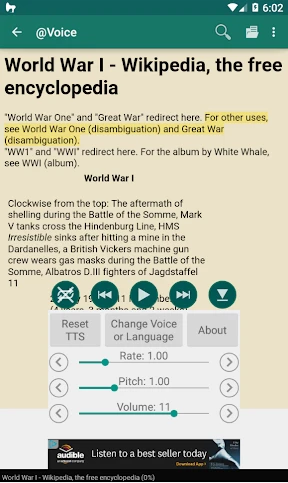
@Voice Aloud Reader's core functionality revolves around capturing text and reading it aloud. Users can import text from a wide array of sources including web pages via share functions, local files such as PDFs, EPUBs, Word documents, and plain text files, or directly from the clipboard. The app features a built-in web browser for navigating to and extracting article text from websites, stripping away ads and clutter for a clean listening experience. Once text is loaded, users have precise control over the reading process: play, pause, skip, and adjust reading speed and pitch with fine granularity. It supports creating bookmarks for long documents and allows users to save articles as audio files in WAV or MP3 format for offline listening. The interface is designed to be straightforward, focusing on the text view and a customizable playback control panel.
Chapter 2: Value
The primary value proposition of @Voice Aloud Reader lies in its ability to make textual content accessible and consumable in situations where reading is inconvenient, impossible, or inefficient. Its key advantage is exceptional versatility in source material, handling everything from news articles and long-form reports to personal documents and eBooks, which eliminates the need for multiple specialized apps. The app adds significant value through deep TTS engine integration, allowing users to select from and customize various voices for different languages, ensuring a personalized and often more natural listening experience. For professionals and students, it transforms commute time or chores into productive learning sessions. For individuals with dyslexia, visual fatigue, or visual impairments, it acts as a crucial accessibility tool, granting independence in accessing written information. Furthermore, the audio export feature provides enduring value, enabling users to build a library of spoken content for playback on any device. Compared to many subscription-based services, @Voice Aloud Reader often operates as a one-time purchase or with a generous free version, offering robust functionality without ongoing costs. Its offline capability ensures reliability regardless of internet connectivity, solidifying its role as a dependable, always-available personal reader.
Chapter 3: Scenarios
@Voice Aloud Reader is ideally suited for several key user groups and daily situations. Students and lifelong learners can use it to listen to textbook chapters, research papers, or online articles while exercising, traveling, or doing household tasks, effectively doubling their productive time. Commuters and drivers can convert their daily travel into informative sessions by listening to news, blogs, or work documents hands-free and eyes-free. Professionals may utilize it to proofread reports by hearing them read aloud, catching errors that are often missed during silent reading. It is an indispensable tool for the visually impaired community, providing an easy method to access a vast range of digital text content not always available in dedicated audiobook formats. Older adults experiencing eye strain or preferring auditory input will find the app simplifies staying informed and entertained. Everyday use cases include listening to a recipe from a website while cooking, enjoying long articles saved for later, converting a PDF manual into an audio guide for a task, or letting the app read aloud social media posts or emails. In essence, any scenario where visual attention is occupied or limited presents a perfect opportunity for @Voice Aloud Reader to deliver content audibly.
Uninstall Instructions
For step-by-step guidance on how to safely remove this application from your device, please refer to our 《Uninstall Instructions》 document.
Pros
- supports listening to text from any app via share menu
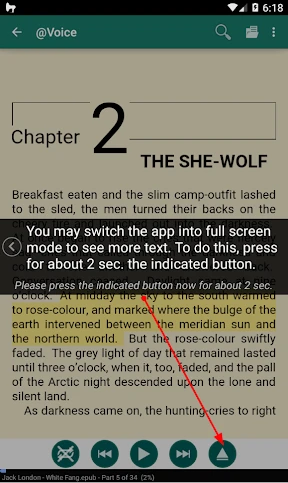
- reads aloud epub files with precise chapter navigation
- creates audio files from text for offline playback
- customizable reading speed and voice per document
- minimal battery drain during long background playback
Cons
- premium voices require separate tts engine downloads
- epub formatting can be lost in complex layouts
- no built-in text editor for quick corrections
- file management lacks cloud sync across devices
- older android versions may have voice compatibility issues
Frequently Asked Questions
What is @Voice Aloud Reader and what does it do?
@Voice Aloud Reader is a Text-to-Speech (TTS) app designed to read text content aloud from various sources. Its core function is to convert digital text into spoken audio, allowing for hands-free listening. It can read web articles, PDFs, eBooks, and documents from your device. The app positions itself as a tool for accessibility, multitasking, and learning, enabling users to listen to content while commuting, working, or relaxing.
Is @Voice Aloud Reader free to use?
The app operates on a freemium model. You can download and use the basic version for free, which includes core TTS functionality. However, advanced features such as saving audio to MP3 files, cloud storage integration, or removing ads typically require a one-time purchase or a premium upgrade within the app. The specific pricing for in-app purchases is detailed on the app's store page.
What file formats and sources can this app read from?
@Voice Aloud Reader supports a wide range of text sources and formats. It can directly read text from web browsers, clipboard, and share menus. For files, it commonly supports EPUB, PDF, HTML, TXT, and DOC formats. The app also integrates with cloud services like Google Drive and Dropbox for accessing stored documents. This makes it adaptable for reading news, books, research papers, and personal documents.
How does the text-to-speech voice and customization work?
The app utilizes the built-in TTS engines installed on your Android device, such as Google Text-to-speech. It does not provide its own voices. You can select from available system voices, languages, and adjust the speech rate and pitch within the app's settings. For more voice options or higher quality, you need to install or configure additional speech engines and data packs through your device's system settings, not within the app itself.
Can I listen to articles without an internet connection?
Yes, once content is loaded or a file is opened, @Voice Aloud Reader can read it aloud without an active internet connection. The speech synthesis is performed locally by your device's TTS engine. However, an initial internet connection might be required to download language data for new TTS voices if they are not pre-installed. For downloading web articles for offline reading, you need to save or open them while online first.
App Info
Technical Info
Recommended For You

Wahy (Holy Quran)
Books & Reference

Fresha for business
Beauty

Manobook - Los Besos de Jacob
Books & Reference

OBDeleven VAG car diagnostics
Auto & Vehicles

Selfie Camera - Photo Effects
Beauty

Joyread
Books & Reference
CL Theme Card
Auto & Vehicles

Car Launcher
Auto & Vehicles

AI Image Generator - Dali
Art & Design

Fashion Design Sketches Book
Art & Design

ThinkDiag+
Auto & Vehicles

ATOM Store, Myanmar
Communication

Whistle Express Car Wash
Auto & Vehicles

Our Daily Bread
Books & Reference

Phone Call App & WiFi Call Any
Communication

JobStack for Work | Job Search
Business

Dictionary.com: English Words
Books & Reference

Cartoon Comic Strip Maker
Comics

Protection 360™
Business

Krita
Art & Design