
Flyers, Poster Maker, Design
Screenshots




Description
About Flyers, Poster Maker, Design App Feature
Flyers, Poster Maker, Design is a comprehensive mobile graphic design application tailored for creating professional-quality marketing materials and visual content with ease. It empowers users, regardless of their design expertise, to produce stunning flyers, posters, social media graphics, invitations, and business cards directly from their smartphones or tablets. The app integrates a vast library of customizable templates, advanced editing tools, and a user-friendly interface, bridging the gap between complex desktop design software and the need for quick, on-the-go creativity. It serves as a versatile digital toolkit for personal projects, small business promotion, and community event organization, making sophisticated design accessible to everyone.
Chapter 1: Function
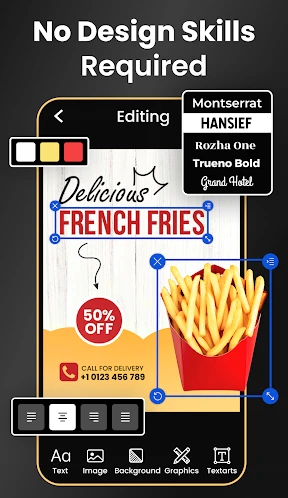
The core functionality of Flyers, Poster Maker, Design centers on providing a streamlined, template-driven design process. Users begin by selecting from thousands of professionally designed templates categorized by occasion, industry, and platform. The app features a robust editor that allows for deep customization: users can modify text with diverse fonts, colors, and styles; upload and edit personal photos using cropping, filtering, and adjustment tools; and manipulate graphical elements like shapes, icons, and stickers. Key functions include a background remover for images, a layout grid for alignment, and the ability to manage multiple design layers. Completed projects can be exported in high-resolution formats suitable for both digital sharing and professional printing, all within a single, cohesive workflow.
Chapter 2: Value
The primary value proposition of Flyers, Poster Maker, Design lies in its democratization of professional graphic design. It eliminates the traditional barriers of cost, complexity, and time associated with software like Adobe Photoshop, offering a powerful yet intuitive alternative. Its key advantages are multifaceted. First, the sheer volume and quality of constantly updated templates provide immense creative inspiration and save significant design time. Second, the depth of its in-app editing tools rivals basic desktop applications, granting users substantial creative control without a steep learning curve. Third, its mobility is a game-changer; ideas can be conceptualized and executed anywhere, enabling real-time content creation for social media or urgent promotional needs. Furthermore, it is cost-effective, often operating on a freemium model that provides substantial functionality for free, with optional subscriptions for premium assets. This combination empowers small business owners, entrepreneurs, educators, and event planners to maintain a consistent and polished visual identity independently, fostering brand growth and effective communication without relying on external designers.
Chapter 3: Scenarios
The app primarily targets individuals and small to medium-sized entities requiring effective visual communication without dedicated design resources. Key user groups include small business owners and freelancers who need to create promotional flyers, social media ads, and business logos to market their services. Event organizers, such as those planning parties, weddings, or community fundraisers, utilize it for designing invitations, posters, and event schedules. Educators and students find it valuable for making engaging presentation materials, project reports, and classroom posters. Content creators and social media managers leverage the app to produce a steady stream of platform-specific graphics for Instagram stories, Facebook covers, and YouTube thumbnails. In everyday use, a local cafe manager might quickly design a daily specials flyer; a musician could craft a gig poster for an upcoming show; or a community club secretary might develop an announcement for a charity drive. The app fits seamlessly into scenarios demanding quick turnaround, professional aesthetics, and on-demand design capability.
Uninstall Instructions
For step-by-step guidance on how to safely remove this application from your device, please refer to our 《Uninstall Instructions》 document.
Pros
- one-tap AI generates posters from product photos
- industry-specific templates for real estate and cafes
- brand kit auto-applies logos and fonts
- exports print-ready files with bleed marks
- offline mode allows editing without internet
Cons
- premium templates locked behind subscription
- large print files slow on older devices
- limited vector editing for custom graphics
- team collaboration requires business plan
- AI background removal struggles with hair detail
Frequently Asked Questions
What is Flyers, Poster Maker, Design app for?
Flyers, Poster Maker, Design is a graphic design application focused on creating marketing and promotional materials. Its core function is to provide users with templates and tools to easily design flyers, social media posts, posters, and invitations. It positions itself as an all-in-one design tool for small businesses, event organizers, and individuals without professional design skills.
Is this app free to use or does it have in-app purchases?
The app is free to download and use with access to basic templates and design tools. However, it operates on a freemium model, offering in-app purchases. These typically include subscriptions or one-time payments to unlock premium templates, advanced design assets, higher resolution exports, and the removal of watermarks from your final designs.
What devices and systems is this design app compatible with?
Flyers, Poster Maker, Design is primarily a mobile application. It is adapted for both iOS and Android operating systems, available on smartphones and tablets. There is no information provided regarding a dedicated desktop or web version. The app is designed for general audiences, with no specific adaptation mentioned for specialized user groups.
How does the template and customization process work?
The app offers a library of categorized templates for various occasions and industries. Users select a template and can then fully customize it. This includes editing text (font, color, size), replacing or adding images from your gallery or the app's stock library, changing background colors, and repositioning elements. The process uses a drag-and-drop editor for intuitive design.
Can I use my own images and what are the export options?
Yes, you can import and use your own photos and images from your device's gallery within your designs. For exporting, the free version typically allows saving your design to your device, often with a watermark or in standard resolution. Premium subscriptions or purchases generally enable exporting in high-resolution formats (like HD or print-ready PDF) without any branding.
App Info
Technical Info
Recommended For You

Stickman: draw animation maker
Art & Design

Beauty Calculator Pretty Scale
Beauty

AR Drawing Paint Sketch Trace
Art & Design

Duo Call - Dual Global Calling
Communication

Tarteel ترتيل - Memorize Quran
Books & Reference

The General® Auto Insurance
Business

Ascension | Bible & Catechism
Books & Reference

Kobo | eBooks & Audiobooks
Books & Reference

ReadEra Premium – ebook reader
Books & Reference

Google Pixel Watch
Communication

hoopla Digital
Books & Reference

PayPal POS (ex Zettle)
Business

AI Hairstyle Try On・Wigs・Bangs
Beauty

Snapchat
Communication

Bazaart AI Photo Editor Design
Art & Design

Holy Bible King James + Audio
Books & Reference

Guide For Stardew
Books & Reference

Google Messages
Communication

Realtime Charts for Torque Pro
Auto & Vehicles

Solo: Your Gig Business App
Business