Circuit Color
Screenshots

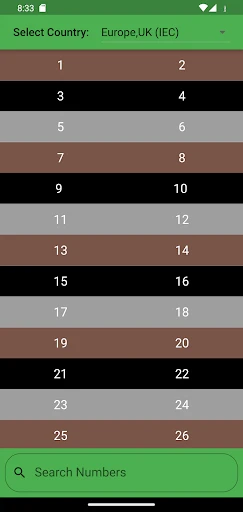
Description
About Circuit Color Feature – A Smart Code Identifier for Electricians
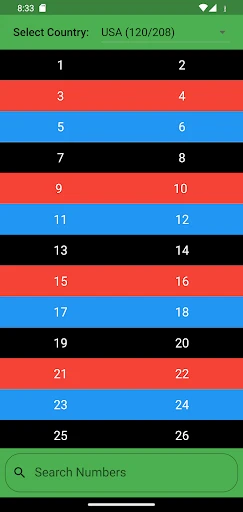
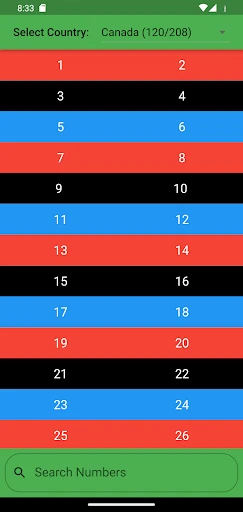
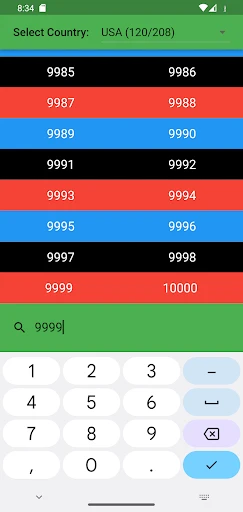
Circuit Color is a specialized mobile application designed for electrical professionals and enthusiasts. It serves as an intelligent tool for identifying and managing electrical wire color codes according to various international and national standards, such as NEC, IEC, and BS. The app simplifies complex wiring tasks by providing instant access to code references, enabling users to ensure accuracy, enhance safety, and improve efficiency in electrical installations and troubleshooting. With its user-friendly interface and offline functionality, Circuit Color has become an essential digital companion in the toolkit of modern electricians.
Chapter 1: Function
Circuit Color's core functionality revolves around being a comprehensive and portable reference guide for electrical wiring color codes. The app allows users to quickly look up the standard color designations for different types of circuits—including phase, neutral, ground, and control wires—across multiple regions and applications. Key features include a searchable database of standards, a color-picker tool for identifying unknown wires by matching their hue, and the ability to save and organize custom color code schemes for specific projects. It also provides explanatory notes on the proper use and exceptions within each standard. Essentially, it digitizes complex codebooks, putting critical information at the user's fingertips to prevent wiring errors during installation, maintenance, or repair work.
Chapter 2: Value
The primary value proposition of Circuit Color lies in its ability to mitigate risk and save time for electrical professionals. Misidentifying a wire can lead to equipment damage, system failure, or serious safety hazards like electrical shocks and fires. This app acts as a preventive tool, promoting adherence to codes and best practices. Its key advantages are multifaceted. First, it offers unparalleled convenience; instead of carrying bulky physical codebooks or relying on potentially unreliable memory, an electrician can access precise information instantly on a smartphone or tablet. Second, it enhances accuracy through visual aids like the color-matching tool, which reduces subjective judgment calls. Third, the app supports offline use, ensuring functionality is available on job sites without internet connectivity. Fourth, by allowing custom schemes, it adapts to unique project requirements or legacy systems not covered by standard codes. Finally, it serves as an educational resource for apprentices and students learning the trade, helping them build a solid foundation in electrical standards. Overall, Circuit Color translates into tangible benefits: reduced error rates, increased job site efficiency, strengthened compliance, and ultimately, a higher standard of workmanship and safety.
Chapter 3: Scenarios
Circuit Color is primarily targeted at electrical professionals, including licensed electricians, electrical engineers, technicians, and maintenance personnel working in residential, commercial, and industrial settings. It is equally valuable for advanced DIY homeowners undertaking complex wiring projects and for vocational students in electrical training programs. Typical use cases are diverse. An electrician installing a new three-phase panel can use the app to verify the correct color sequence for phases L1, L2, and L3 according to local regulations. A service technician troubleshooting a malfunctioning machine can identify control wire colors from an unfamiliar European manufacturer by switching the app's standard to IEC. An apprentice on a renovation job can use the color-picker to confirm the function of existing, faded wires before making new connections. For a project manager, custom color schemes can be created and shared with the team to ensure consistency in a large-scale installation. In every scenario, the app is used at the point of work to make immediate, confident decisions, thereby streamlining tasks and upholding safety protocols.
Uninstall Instructions
For step-by-step guidance on how to safely remove this application from your device, please refer to our 《Uninstall Instructions》 document.
Pros
- color codes instantly recognized via phone camera
- offline database includes obscure component brands
- pinout diagrams adjust for different package types
- history log tracks previously scanned components
- no ads or subscriptions for core identification features
Cons
- requires steady hand for accurate camera focusing
- database updates require manual app reinstalls
- struggles with faded or damaged component markings
- no community forum for user-shared schematics
- pinout zoom lacks multi-touch gesture control
Frequently Asked Questions
What is Circuit Color and what does it do?
Circuit Color is a specialized mobile application designed for electronics engineers, technicians, and hobbyists. Its core function is to assist in identifying and deciphering electronic component values, primarily through resistor color codes and SMD markings. The app provides a quick reference tool to input color bands or read codes, delivering immediate component specifications like resistance, tolerance, and temperature coefficient. It positions itself as a practical, on-the-go utility for prototyping, repair, and educational purposes.
Is Circuit Color free to use or does it have in-app purchases?
Circuit Color is typically offered as a free application with core functionality accessible at no cost. However, it may include optional in-app purchases. These purchases could involve removing advertisements, unlocking advanced features like a wider database of components (e.g., capacitors, inductors), or accessing premium tools such as circuit calculation utilities. The basic resistor decoding and SMD lookup features are generally free. No information is provided regarding subscription models.
On which devices and operating systems is Circuit Color available?
Circuit Color is primarily available for Android devices through the Google Play Store. There is no official information regarding its availability on iOS (Apple's App Store), Windows, or web-based platforms. The app is optimized for smartphones and may function on tablets, but it is not specifically designed for wearables or desktop operating systems. Users should check the app store listing for the most current system version requirements (e.g., Android 8.0 and up).
How accurate is the component data provided by Circuit Color?
Circuit Color's database is based on standard industrial color codes and marking schemes. While it strives for accuracy, the app functions as a reference tool and should not be solely relied upon for critical circuit design where absolute precision is mandatory. Factors like component manufacturing variations, ambient lighting affecting color perception, and user input error can influence results. For definitive validation, especially in safety-critical or high-precision applications, using a calibrated multimeter to measure the actual component value is essential.
Can I use Circuit Color to identify components other than resistors?
The primary and most robust feature of Circuit Color is resistor identification via color bands and SMD codes. Some versions of the app may expand its database to include basic information for other passive components like capacitors and inductors, but this is often a premium feature. It does not function as a general-purpose component identifier for active components (transistors, ICs) via photos or part numbers. Its core technical characteristic is focused on decoding standardized color and alphanumeric markings on specific passive components.
App Info
Technical Info
Recommended For You

Meeting - Video Conference
Business

Mary Kay® MirrorMe™
Beauty

Google Voice
Communication

Sketchbook
Art & Design

Wear OS by Google Smartwatch
Communication

Toonsutra: Webtoon & Comics
Comics

YouMail: Block Spam on Android
Communication

Eyecon Caller ID & Spam Block
Communication

RingCentral
Business

Google Chat
Business

Message Plus - SMS Messager
Communication

IAA Buyer Salvage Auctions
Business

2ndLine - Second Phone Number
Communication

Magnificat Lenten 2025
Books & Reference

Spark Driver
Business

Stitch Photos: Long Screenshot
Art & Design

Magic Doodle: Glow Art Drawing
Art & Design

Figma: view. comment. mirror.
Art & Design

NovelBar-Your Reading Haven
Books & Reference

The Cepher
Books & Reference