
Hangouts
Screenshots



Description
About Hangouts Feature - Seamless Communication Across Platforms
Hangouts is a versatile communication application developed by Google, designed to facilitate instant messaging, voice calls, and video conferencing. It integrates seamlessly with Google's ecosystem, including Gmail and Google Workspace, while also functioning as a standalone app. Initially positioned as a unifying platform for personal and professional conversations, Hangouts bridges the gap between simple texting and more formal meeting tools. Its core premise is to offer a straightforward, reliable way for users to connect with individuals or groups across various devices, from smartphones to desktop computers, without significant barriers to entry.
Chapter 1: Function
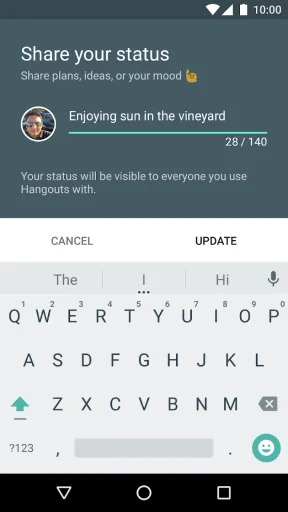
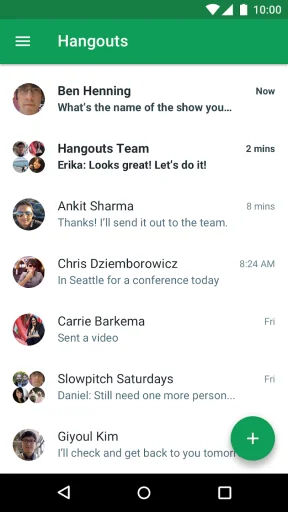
Hangouts provides a suite of core communication functions centered on real-time interaction. The app supports one-on-one and group instant messaging, allowing users to exchange text, photos, emojis, and stickers. A primary feature is its high-quality video calling capability, enabling conversations with up to 10 participants in a single call, which is ideal for small team meetings or family gatherings. Integrated voice calling lets users make free calls to other Hangouts users over the internet. Furthermore, it synchronizes conversations across devices, so users can start a chat on their phone and continue it on their laptop via the web client or Chrome extension. For users with Google Voice integration, it also manages SMS messaging and voicemail. The interface is clean and focuses on the contact list and ongoing conversations, prioritizing ease of use over complex features.
Chapter 2: Value
The value proposition of Hangouts lies in its deep integration, simplicity, and cross-platform accessibility. As a product within the Google ecosystem, its greatest advantage is its seamless connection with Gmail and Google Contacts. Users can instantly launch video calls or chats directly from their Gmail interface, making it exceptionally convenient for those already embedded in Google's services. For personal use, it offers a reliable, no-cost alternative to traditional SMS and phone calls, especially for international communication. Its cross-platform consistency ensures a uniform experience whether on Android, iOS, or the web, which is a significant benefit for users who switch between devices frequently. While not as feature-rich as some dedicated enterprise solutions, Hangouts served as an accessible entry point for small businesses and teams using Google Workspace, providing essential meeting functions without a steep learning curve. Its value was in being a lightweight, dependable tool that prioritized getting people connected quickly over offering an overwhelming array of bells and whistles. This focus on core, stable communication made it a trusted choice for many within the Google-centric user base.
Chapter 3: Scenarios
Hangouts primarily targeted two overlapping user groups: individuals within personal social circles and small teams or professionals using Google services. For personal scenarios, it was commonly used for daily check-ins with family and friends, sharing quick updates, photos, or organizing impromptu group video calls for virtual gatherings. It was particularly valuable for maintaining long-distance relationships where internet-based calls replaced costly international dialing. In educational or informal professional settings, students collaborating on projects or remote colleagues needing a quick huddle could easily start a group chat or a video meeting without scheduling formal software. Freelancers and small business owners often utilized Hangouts for client consultations or internal team communication, leveraging its integration with their Gmail workflow. The app excelled in situations that required spontaneous, lightweight communication rather than pre-planned, large-scale webinars or complex collaborative sessions, serving as a digital equivalent of a quick phone call or a casual meeting room.
Uninstall Instructions
For step-by-step guidance on how to safely remove this application from your device, please refer to our 《Uninstall Instructions》 document.
Pros
- seamless integration with google contacts and calendar
- group video calls for up to 10 participants free
- persistent chat history across all android devices
- low bandwidth usage for voice calls in poor connectivity
- instant photo sharing within ongoing conversations
Cons
- no standalone desktop app requiring chrome browser
- sms integration limited to specific carriers and regions
- lacks message reactions and advanced group admin tools
- video call quality inconsistent compared to dedicated apps
- no message retraction or scheduled send features
Frequently Asked Questions
What is Google Hangouts and what does it do?
Google Hangouts is a communication platform developed by Google, functioning primarily as an instant messaging and video chat service. It allows users to send text messages, share photos, and conduct voice or video calls with individuals or groups. Its core positioning was as a unified messaging app integrated with Google's ecosystem, including Gmail and Google+ (now discontinued).
Is Google Hangouts free to use for messaging and calls?
Yes, the core messaging and calling features of Google Hangouts are free to use. It does not have in-app purchases for basic functionality. However, for standard phone calls to landlines or mobile numbers (not over data), credit is required. The app may request permissions for microphone, camera, and contacts to enable its full communication features.
What devices and systems can I use Hangouts on?
Hangouts is accessible on a wide range of devices. It supports Android and iOS mobile operating systems, and can be used on computers via web browsers like Chrome, or through dedicated Chrome extensions. It is also integrated into Gmail's web interface. Note that Google has ended support for Hangouts on smart displays and certain legacy systems.
Does Hangouts support group video calls and what are the limits?
Yes, Hangouts supports group video calls. The service allows for video meetings with multiple participants. The specific participant limit has varied over time but was typically around 25 people for standard Google accounts. It's important to note that Google has been migrating users to Google Chat and Meet, which are its successor services for these functions.
How can I access my old Hangouts messages and contacts?
Your message history and contacts within Hangouts are tied to your Google account. You can access them through the Hangouts app or web interface while the service is still active for your account. For long-term preservation and as Google phases out Hangouts, users are advised to use Google Takeout to download their data or transition to Google Chat, where some history may be migrated.
App Info
Technical Info
Recommended For You

Yaelokre OC Maker
Art & Design

Remove Background From Video
Beauty
Housecall Pro
Business

AR Drawing: Art, Trace, Sketch
Art & Design

Mahjong Dots Elimination
Comics

Hexa AI: Logo & Design Creator
Art & Design

Watchgram for Telegram
Communication

Edmunds - Shop Cars For Sale
Auto & Vehicles

ReadEra – book reader pdf epub
Books & Reference

Ulta Beauty: Makeup & Skincare
Beauty

Girls Hairstyle Step By Step
Beauty

5 Calls: Contact Your Congress
Books & Reference

UC Browser-Safe, Fast, Private
Communication

Yahoo Mail
Communication

Visible mobile
Communication

All Email Connect
Communication

MyFrontier
Communication

TMOLector: Manga and Stories
Comics

Talk & Translate - Translator
Books & Reference

NIV Bible
Books & Reference