
Beauty Makeup Editor & Camera
Screenshots

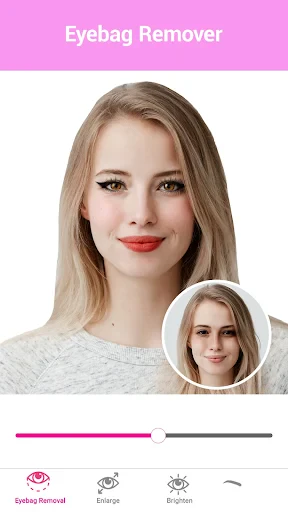
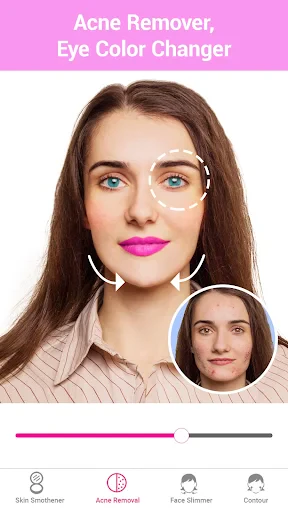


Description
About Beauty Makeup Editor & Camera Features
Beauty Makeup Editor & Camera is a comprehensive mobile application designed for photo enhancement and virtual makeup. It integrates advanced AI-powered beautification tools with a real-time camera and a powerful post-editing suite. The app allows users to capture or upload photos and instantly apply a wide array of beauty adjustments, from subtle skin smoothing to dramatic makeup looks. It serves as an all-in-one digital beauty salon, eliminating the need for multiple specialized apps. Targeted primarily at photography enthusiasts, social media users, and anyone interested in personal image enhancement, it simplifies the process of achieving professional-looking, polished photos directly from a smartphone.
Chapter 1: Function
The core functionality of Beauty Makeup Editor & Camera revolves around real-time capture and detailed post-editing. Its built-in camera employs live filters and beautification effects, smoothing skin, enlarging eyes, and slimming the face during video or photo capture. In editor mode, users can upload existing photos for transformation. Key tools include precise acne removal, blemish eraser, and skin tone evening. The makeup suite offers virtual application of foundations, lipsticks, eyeshadows, blushes, and eyeliners with adjustable intensity. Additional features encompass hair color change, body reshaping tools for subtle contouring, background editing, and a vast library of filters, frames, and stickers. The app also provides collage making, allowing for the creation of multi-photo layouts with consistent beautification applied across all images.
Chapter 2: Value
The primary value proposition of Beauty Makeup Editor & Camera lies in its democratization of professional-grade photo beautification, making it accessible, instant, and cost-free. Its key advantage is the seamless integration of a robust real-time camera with a depth-filled editor, offering a complete workflow in one platform. The AI technology intelligently detects facial features for accurate and natural-looking enhancements, avoiding the 'over-edited' look common in simpler apps. The extensive customization allows for everything from quick one-touch perfection to meticulous, layer-by-layer creative design, catering to both casual users and beauty enthusiasts. It saves significant time and potential expense compared to using complex desktop software. Furthermore, by providing a safe space for experimentation with bold makeup styles or aesthetic changes without real-world commitment, it adds an element of fun and creative exploration. The constant updates with new trends, makeup items, and filters ensure the content remains fresh and aligned with current beauty and social media trends, delivering sustained value to its user base.
Chapter 3: Scenarios
The primary target users are individuals active on social media platforms like Instagram, TikTok, and WeChat, who regularly share personal photos and seek to maintain an appealing online presence. It is immensely popular among young adults and teenagers, particularly those interested in beauty, fashion, and digital self-expression. Everyday use cases include preparing profile pictures for social networks, dating apps, or professional LinkedIn profiles where a polished image is desired. Users often employ the app to enhance group photos or selfies before sharing them with friends and family. It is also a practical tool for visualizing new makeup styles or haircolors before a salon visit. Content creators and micro-influencers use it to maintain a consistent, aesthetically pleasing visual theme across their posts. Additionally, it serves users in scenarios with less-than-ideal lighting or skin conditions, allowing them to confidently capture and share moments without concern for temporary imperfections, thus boosting digital self-confidence.
Uninstall Instructions
For step-by-step guidance on how to safely remove this application from your device, please refer to our 《Uninstall Instructions》 document.
Pros
- one-tap makeup transfer from photos to your face
- real-time AR try-on for diverse cosmetic styles
- high-fidelity skin texture preservation during edits
- offline functionality for core makeup features
- precise color matching from any uploaded image
Cons
- heavy makeup styles may appear overly synthetic
- advanced editing requires in-app purchases
- AR lighting struggles in low-light environments
- limited customization for unconventional makeup looks
- high-resolution processing drains battery quickly
Frequently Asked Questions
What is Beauty Makeup Editor & Camera?
Beauty Makeup Editor & Camera is a photo editing application focused on virtual makeup and enhancement. Its core function is to apply digital makeup, such as lipstick, eyeshadow, and foundation, to photos or in real-time through the camera. It also includes standard photo editing tools like filters, skin smoothing, and face reshaping for beautifying portraits.
Is the app free to use, or are there in-app purchases?
null
How does the virtual makeup application work technically?
The app uses facial recognition technology to detect key features like eyes, lips, and face contours. It then allows users to digitally overlay makeup products onto these areas. Users can adjust the intensity, color, and placement. The technology is designed for static photos and may offer a real-time preview mode using the camera.
What devices and systems is this app compatible with?
The app is primarily designed for smartphones. It is available on both iOS (via the App Store) and Android (via Google Play) platforms. Compatibility depends on the specific version; it generally requires a moderately recent OS version and performs best on devices with a good front-facing camera for real-time preview.
Can edited photos be saved in high resolution?
Yes, the app allows saving edited photos to your device's gallery. The output resolution depends on the original photo's quality and the app's settings. Some advanced features or removal of watermarks might require a premium purchase. For specific maximum resolution or format details, please check the app's description on its official store page.
App Info
Technical Info
Recommended For You

Invitation Maker & Card Design
Art & Design

Passport Photo: ID Photo Print
Art & Design

AI Dress up-Try Clothes Design
Beauty

Alight Mobile
Business

Heart Camera
Beauty

My Mitsubishi Connect
Auto & Vehicles

Vaporwave PRO Wallpapers
Art & Design

Anime Avatar Maker & Creator
Beauty

CDisplayEx Comic Reader Lite
Comics

GlobalComix: Comic Book Reader
Comics

Scentbird Monthly Perfume Box
Beauty

Fonts - Logo Maker
Art & Design

Ai Vista
Art & Design

PixShift: BackGround Changer
Art & Design

Freed Audiobooks
Books & Reference

Opera Mini: Fast Web Browser
Communication

Meta Ads Manager
Business

Dashtoon: Comics & Manga
Comics

AppBarber: Cliente
Beauty

AutoScout24: Buy & sell cars
Auto & Vehicles