
Microsoft Edge: AI browser
Screenshots


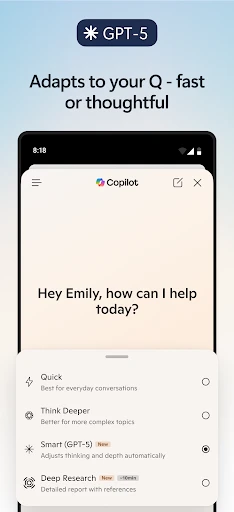

Description
About Microsoft Edge AI Browser Features
Microsoft Edge, rebuilt on the Chromium engine, has evolved into a modern AI-powered browser that seamlessly integrates with the Windows ecosystem while offering cross-platform availability. It distinguishes itself by deeply incorporating Microsoft's AI technologies, such as Copilot, to provide an intelligent, efficient, and secure web browsing experience. Beyond fast performance and robust compatibility, Edge focuses on enhancing user productivity and information management through built-in tools and AI-driven features, positioning itself as more than just a gateway to the internet but as a smart productivity hub.
Chapter 1: Function
Microsoft Edge's core functionality centers on delivering a fast and compatible browsing experience powered by the Chromium engine, ensuring smooth rendering of websites and support for Chrome extensions. Its integrated AI, Copilot, assists users directly within the browser sidebar for tasks like summarizing web pages, drafting content, and answering complex queries. The browser includes vertical tabs for better tab management, Collections for organizing web content and notes, and Immersive Reader for distraction-free reading. Enterprise-grade security features like Microsoft Defender SmartScreen and tracking prevention are built-in. Furthermore, Edge offers seamless synchronization across devices using a Microsoft account and integrates productivity tools like PDF editing and direct Office web app access.
Chapter 2: Value
The primary value proposition of Microsoft Edge lies in its deep integration of AI to augment human capabilities, directly embedding Copilot as a free, readily accessible assistant within the browsing workflow. This transforms passive information consumption into active creation and synthesis, saving users significant time and effort. Its key advantages are multifaceted. First, the AI-powered features like page summarization, conversational search, and content generation provide immediate practical utility without switching contexts. Second, as part of the Microsoft ecosystem, it offers superior integration with Windows, Office 365, and OneDrive, creating a fluid productivity environment. Third, its performance and resource efficiency are often superior to other Chromium-based browsers, leading to longer battery life on laptops. Fourth, its strong privacy controls and security features, backed by Microsoft's enterprise security expertise, offer robust protection. Finally, features like Collections, vertical tabs, and immersive reading address specific user pain points in organization and focus, delivering a thoughtful and comprehensive browsing experience that prioritizes both efficiency and user well-being.
Chapter 3: Scenarios
Microsoft Edge with AI is ideally suited for several key user groups and daily scenarios. Students and researchers benefit immensely from using Collections to gather online materials and Copilot to quickly summarize lengthy articles or generate draft outlines for papers. Professionals and office workers leverage its integration with Office apps for quick document edits, use the sidebar Copilot to prepare meeting notes from web research, and rely on its efficiency for managing multiple work-related tabs and web applications. Developers appreciate the Chromium compatibility for testing, along with built-in tools like the developer console. Everyday users seeking a secure and organized browsing experience find value in its tracking prevention, password monitor, and clutter-free reading mode. In essence, any user looking to enhance their online productivity, streamline information management, and interact with the web through an intelligent assistant will find Microsoft Edge's AI capabilities directly applicable to their daily digital routines.
Uninstall Instructions
For step-by-step guidance on how to safely remove this application from your device, please refer to our 《Uninstall Instructions》 document.
Pros
- vertical sidebar integrates copilot for side-by-side ai assistance
- sleeping tabs feature significantly reduces memory consumption
- pdf reader with native annotation and ai explainer tools
- workspaces allow shared tab groups for collaborative projects
- edge copilot drafts content using current page context
Cons
- frequent ai prompts may disrupt focused reading flow
- workspaces require microsoft account for cross-device sync
- sidebar copilot occupies screen space on compact laptops
- some web apps exhibit compatibility issues with sleeping tabs
- privacy-focused users cannot fully disable data collection for ai
Frequently Asked Questions
What is Microsoft Edge: AI browser?
Microsoft Edge: AI browser is a web browser developed by Microsoft, positioned as an AI-enhanced browsing tool. Its core functions include standard web browsing, tab management, and collections, uniquely integrated with AI features like the Copilot assistant for summarizing content, answering questions, and generating text. It is designed to offer a more productive and intelligent web experience by leveraging built-in AI capabilities directly within the browsing interface.
Is Microsoft Edge free to use with any hidden costs?
Yes, Microsoft Edge supports extensions from its own Microsoft Edge Add-ons store. Importantly, it is also compatible with a vast majority of extensions available on the Chrome Web Store. Users can typically install Chrome extensions directly or with a simple toggle in the browser's settings, allowing for significant customization and functionality addition, similar to other Chromium-based browsers.
Can I use extensions from other browsers in Microsoft Edge?
Microsoft Edge is completely free to download and use as a web browser. It does not require any subscription or upfront payment for its core browsing and AI features like Copilot. The browser may display advertisements or promote Microsoft services, but there are no mandatory in-app purchases. Optional paid services, such as Microsoft 365 subscriptions, are separate and not required for the browser's primary functionality.
What devices and systems is Microsoft Edge compatible with?
Microsoft Edge is widely compatible across multiple platforms. It is available for Windows 10 and 11, macOS, Linux, iOS, and Android operating systems. The AI features, such as Copilot, are generally supported on these platforms, though some advanced functionalities might have specific system requirements or gradual rollout schedules. It adapts to various user groups, from casual consumers to enterprise environments.
How does the built-in AI Copilot feature work?
The built-in AI Copilot in Microsoft Edge appears as a sidebar icon. Users can click it to interact with an AI assistant without leaving their webpage. Core functions include summarizing long articles or PDFs, answering questions about the current page content, drafting emails or social posts, and explaining complex concepts. It operates by processing the text on the active tab or user prompts, leveraging cloud-based AI models.
App Info
Technical Info
Recommended For You

StyleSeat: Book Hair & Beauty
Beauty

ヘア&ビューティーサロン検索/ホットペッパービューティー
Beauty

HHAeXchange
Business

네이버 - NAVER
Books & Reference

PayPal Business
Business

Audiobooks.com: Books & More
Books & Reference

Smarty Men Jacket Photo Editor
Beauty

Tattoo Design & Tattoo Maker
Beauty

Watch Duty (Wildfire)
Communication

Show My Colors: Color Palettes
Beauty

Whoosh
Auto & Vehicles

The Language of Letting Go
Books & Reference

AI Hairstyle Try On・Wigs・Bangs
Beauty

AnyDesk Remote Desktop
Business

Samsung Accessory Service
Communication

MyWalmart
Business

Dual App - Web Scanner App
Communication

ReadEra Premium – ebook reader
Books & Reference

NavRadio+
Auto & Vehicles

CLZ Comics comic book database
Comics