
Inky - Run Inkscape on Android
Screenshots
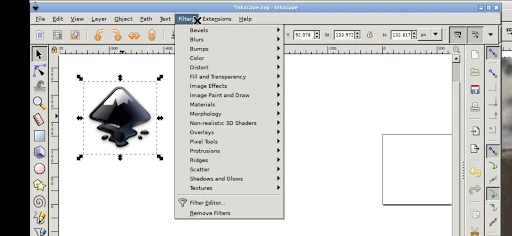
Description
About Inky - Run Inkscape on Android Feature
Inky is a groundbreaking mobile application that brings the full power of Inkscape, the renowned open-source vector graphics editor, to Android devices. It is not a simplified companion tool but a robust port that allows users to create, edit, and manage complex vector graphics directly on their smartphones and tablets. By translating a desktop-grade creative suite to a touchscreen interface, Inky dismantles the traditional barrier of needing a computer for professional vector design work. It represents a significant leap in mobile productivity, offering a genuine alternative for designers, students, and hobbyists who require precision and flexibility on the go. The app maintains fidelity to Inkscape's core principles while innovating for mobile usability.
Chapter 1: Function
Inky delivers the comprehensive functionality of Inkscape to the Android platform. Its core functions revolve around the creation and manipulation of vector graphics using paths, shapes, and text. Users can draw with Bezier curves and freehand tools, apply strokes and fills with extensive color management including CMYK support, and utilize layers for complex project organization. The app supports key Inkscape features such as node editing for precise path adjustments, Boolean operations to combine shapes, and cloning for linked object duplicates. It enables the import and export of standard vector formats like SVG and PDF, as well as raster image formats. Furthermore, Inky incorporates touch-optimized controls for zooming, panning, and object transformation, making intricate design tasks feasible on a smaller screen. The interface provides access to extensions and the XML editor, upholding Inkscape's extensibility.
Chapter 2: Value
The primary value proposition of Inky lies in its unparalleled capability to provide a genuine, desktop-level vector design experience on a mobile device. Its key advantage is liberation from hardware and location constraints, empowering creativity anytime, anywhere without compromising on tool potency. For professionals, this means the ability to make quick edits, review files, or even start projects while away from the workstation, significantly enhancing workflow flexibility. For educators and students, it lowers the entry barrier to learning professional vector graphics by utilizing affordable Android tablets. Inky also offers substantial cost value, as it is free and open-source, eliminating the subscription fees associated with many commercial design apps. Its commitment to open SVG standards ensures compatibility and future-proofing of creative work. Compared to other mobile design apps that are often simplified, Inky's depth is its defining advantage, providing true node-level control, advanced path operations, and full file format support. It transforms a tablet from a consumption device into a potent creative studio, filling a unique niche in the mobile app ecosystem.
Chapter 3: Scenarios
Inky primarily targets users who need professional-grade vector design capabilities in a mobile context. The core user group includes graphic designers and illustrators who require the ability to sketch concepts, refine logos, or make urgent client amendments while traveling or commuting. It is equally valuable for students in design or engineering fields who can use it for coursework, diagram creation, and learning SVG principles on a budget-friendly Android tablet. Educators can utilize Inky to demonstrate vector concepts directly in the classroom. Hobbyists, such as DIY crafters planning vinyl cutter designs or enthusiasts creating custom graphics for personal projects, will find its power accessible. Everyday use cases range from quick tasks like editing a community event flyer or a business card draft during a lunch break, to more involved activities like designing a complex illustration or technical diagram over multiple sessions on a tablet with a stylus. It is ideal for scenarios where immediacy and portability are crucial, yet the output must meet professional standards.
Uninstall Instructions
For step-by-step guidance on how to safely remove this application from your device, please refer to our 《Uninstall Instructions》 document.
Pros
- directly runs full desktop Inkscape on android devices
- supports complex svg editing with native desktop tools
- enables precise vector work via mouse/keyboard peripherals
- leverages device hardware for desktop-grade rendering
- offers a portable alternative to pc for professional workflows
Cons
- requires a powerful android device for smooth operation
- interface optimized for touch interaction is limited
- file management across mobile and desktop can be cumbersome
- lacks some platform-specific integrations of mobile-native apps
- steep learning curve for users unfamiliar with inkscape
Frequently Asked Questions
What is Inky and what does it do?
Inky is a mobile application that allows you to run the full, open-source vector graphics editor Inkscape on Android devices. It is not a separate editor but a compatibility layer that ports the desktop Inkscape experience to mobile. Its core function is to enable the creation and editing of scalable vector graphics (SVG) directly on your phone or tablet, providing tools for drawing, object manipulation, and path editing similar to the desktop version.
Is Inky free to use or does it have in-app purchases?
Inky has several key limitations. It is not a standalone app but a frontend for Inkscape, so its performance is tied to the underlying Inkscape version and your device's capabilities. The touch-based interface can be challenging for precise desktop-style workflows. Some advanced Inkscape features or extensions may not function perfectly. It requires granting storage permissions for file access. Being an open-source port, it may lack the polish of commercial mobile design apps.
How well does Inky adapt to different Android devices and users?
Inky is a free application. There are no in-app purchases or subscription fees required to access its core functionality of running Inkscape. The app itself is an open-source project. Users should be aware that, as a port of a complex desktop tool, the interface and interaction are optimized for touch but may differ from a native mobile app. No payment is needed for the software.
What are the main technical limitations of Inky?
Inky requires a device running Android 5.0 or higher. Performance and usability can vary significantly based on your device's processing power, screen size, and available RAM, as it is running a desktop-grade application. It is best suited for users with prior experience in vector graphics or Inkscape due to its complex interface. It is not specifically optimized for very small screens or low-end hardware.
Where can I get support or report problems with Inky?
As an open-source project, Inky does not offer formal commercial after-sales support. For bug reports, feature requests, or community assistance, users should refer to the official project repository on platforms like GitHub. Support is primarily community-driven through issue trackers and discussion forums related to the project. There is no dedicated customer service hotline or email for the app.
App Info
Technical Info
Recommended For You

Psiphon: Fast and Secure VPN
Communication

Microsoft Teams
Business

OBD JScan
Auto & Vehicles

The General® Auto Insurance
Business

Fuelio: gas log & gas prices
Auto & Vehicles

ArtistAI: AI Photo Generator
Art & Design

CosmoProf Beauty
Beauty

HiHello: Digital Business Card
Business

TMOLector: Manga and Stories
Comics

Cheogram (Jabber, Call, Text)
Communication

Shiftsmart - Find Work
Business

Repixel: AI Photo Enhancer
Art & Design

Quran for Android
Books & Reference

AnExplorer Pro File Transfer
Business

Al QURAN - القرآن الكريم
Books & Reference

Дром Авто
Auto & Vehicles

Anime tv - Anime Tv Online HD
Comics

The Book of Mormon
Books & Reference

Amazon A to Z
Business

Moon+ Reader
Books & Reference