
Whova - Event & Conference App
Screenshots


Description
About Whova Event & Conference App Features
Whova is a comprehensive event management and networking platform designed to enhance both in-person and virtual conference experiences. It serves as a central hub for attendees, organizers, and sponsors, streamlining event logistics, fostering meaningful connections, and maximizing engagement. By integrating practical tools like personalized agendas, interactive session features, and AI-powered networking, Whova transforms traditional events into dynamic, interactive communities. Its user-friendly interface and robust backend support events of all scales, from corporate meetings and academic conferences to large trade shows and community gatherings, making it a leading solution in the modern event technology landscape.
Chapter 1: Function
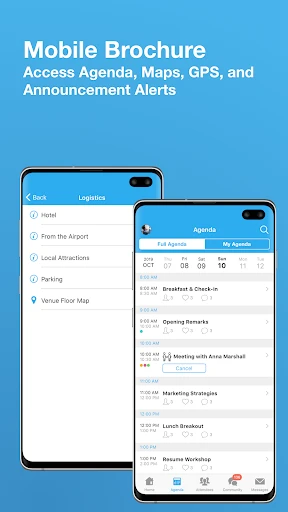
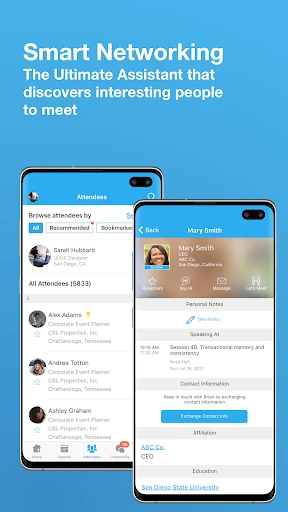
Whova's core functionality revolves around simplifying and enriching the event journey for all participants. For attendees, the app provides a personalized agenda builder, interactive maps for venue navigation, and direct access to session materials. During sessions, features like live Q&A, polls, and community discussions facilitate real-time interaction. A powerful networking tool allows users to browse attendee profiles, schedule one-on-one meetings, and exchange virtual business cards. For organizers, Whova offers a robust dashboard for event promotion, registration management, and real-time analytics on engagement metrics. Sponsors and exhibitors benefit from dedicated virtual booths, lead retrieval tools, and enhanced visibility through branded profiles. Essentially, Whova consolidates all event-related activities—from planning and communication to participation and follow-up—into a single, intuitive mobile and web application.
Chapter 2: Value
Whova's primary value proposition lies in its ability to significantly increase event engagement, streamline operations, and deliver measurable ROI for organizers and participants alike. Its key advantages are multifaceted. First, it boosts attendee satisfaction by removing logistical friction; personalized agendas and notifications ensure no one misses important sessions, while in-app networking breaks the ice and fosters valuable professional connections that often extend beyond the event itself. Second, for organizers, Whova reduces administrative burden through automated processes and provides deep insights into attendee behavior, helping to tailor content and improve future events. The platform's versatility in supporting hybrid and virtual events expands an organizer's reach and inclusivity. Third, the app creates tangible value for sponsors and exhibitors through high-visibility digital placements and efficient lead capture, improving their return on investment. Unlike basic event apps, Whova emphasizes community building, using AI to suggest relevant connections and sessions, thereby transforming a passive audience into an active, interacting community. This focus on creating lasting value through technology-driven engagement is what distinguishes Whova in a crowded market, making events more impactful, memorable, and productive for everyone involved.
Chapter 3: Scenarios
Whova is ideally suited for a wide range of user groups across various scenarios. Primary target users include event organizers from professional associations, corporations, academic institutions, and non-profits who need a reliable platform to manage conferences, trade shows, or internal meetings. Attendees at these events, such as professionals seeking industry knowledge, researchers presenting papers, or business developers looking for partners, use Whova to navigate the schedule and network efficiently. Exhibitors and sponsors rely on its tools to generate leads and showcase their offerings. In everyday use, an attendee might use Whova before an event to plan their schedule and message potential contacts. During the event, they might participate in a live poll during a keynote, use the in-app map to find a breakout room, or schedule a coffee meeting with a newfound connection. Post-event, they can access recorded sessions and continue conversations in the community feed. For a corporate training manager, Whova becomes the central platform for hosting a hybrid annual summit, engaging remote employees with live streams and virtual networking lounges while tracking attendance and feedback in real-time. These scenarios illustrate how Whova integrates seamlessly into the entire event lifecycle, catering to the practical and strategic needs of its diverse user base.
Uninstall Instructions
For step-by-step guidance on how to safely remove this application from your device, please refer to our 《Uninstall Instructions》 document.
Pros
- centralizes event agenda
- networking
- and updates in one feed
- attendee matching algorithm suggests relevant connections automatically
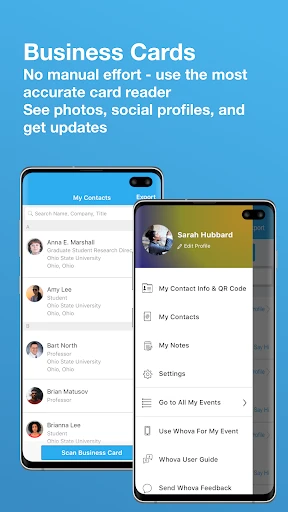
- supports in-app lead retrieval for exhibitors via business card scan
- live polling and Q&A integrate directly into session screens
- offline mode allows access to key materials without Wi-Fi
Cons
- complex event setup requires significant organizer training
- networking features can overwhelm attendees at large conferences
- deep linking to session details sometimes fails on custom schedules
- exhibitor booth maps lack real-time crowd density indicators
- tablet interface is not optimized for hybrid meeting moderation
Frequently Asked Questions
What is Whova and what does it do?
Whova is a mobile and web application designed for event and conference management. Its core functions include providing digital agendas, speaker profiles, attendee networking tools, live Q&A, and interactive maps. It serves as a centralized hub for participants to access event information, connect with others, and engage with sessions, aiming to enhance the overall event experience.
Is Whova free for event attendees to use?
For general attendees, downloading and using the Whova app to access a specific event is typically free. However, the event organizers themselves pay Whova for the platform and its management features. Some events may offer premium tiers or in-app purchases for enhanced features, but basic participation like viewing the agenda and networking is usually included at no cost to the attendee.
What devices and systems does Whova support?
Whova supports a wide range of devices and operating systems. It offers native mobile apps for both iOS (via the App Store) and Android (via Google Play). A web-based version is also accessible through modern browsers on desktops and laptops. The app is designed to be used by general attendees, speakers, and organizers across these platforms.
How can I network with other attendees on Whova?
Whova facilitates networking through features like a community board for discussions, direct messaging between attendees, and detailed participant profiles. You can browse the attendee list, send connection requests, and exchange messages within the app. These tools are designed to help you schedule meetings and interact with other participants before, during, and after the event.
What should I do if I have technical issues during an event?
For technical support during an event, Whova recommends first checking the in-app help resources. For issues specific to an event (like agenda access), contact the event organizers directly, as they manage the event's Whova portal. For general app functionality problems, you can submit a request through Whova's official website support center. There is no direct phone support listed for end-users.
App Info
Technical Info
Recommended For You

Microsoft Edge: AI browser
Communication

Carrier Services
Communication

Flyers, Poster Maker, Design
Business

CarParts.com
Auto & Vehicles

ReadAnywhere
Books & Reference

Face Swap Magic: AI Avatars
Art & Design

TeamViewer Remote Control
Business

CDisplayEx Comic Reader Lite
Comics

Power Apps
Business

Messenger: Text Messages, SMS
Communication

Glitter Beauty Coloring Pages
Art & Design

Recraft
Art & Design

AR Drawing: Sketch, Art, Paint
Art & Design

FunSwap - AI Face Swap
Beauty

DIKIDI Online
Beauty

Whistle Express Car Wash
Auto & Vehicles

Paylocity
Business

Outlined Watch Face
Art & Design

MangaToon: Comic & Manga
Comics

Samsung Accessory Service
Communication