ibis Paint
Screenshots




Description
About ibis Paint Feature - A Professional Drawing Tool at Your Fingertips
ibis Paint is a powerful and popular mobile drawing application renowned for its professional-grade features and user-friendly interface. It caters to digital artists, illustrators, and hobbyists, offering a comprehensive suite of tools that emulate real-world art materials while leveraging the advantages of digital creation. Available on both iOS and Android platforms, ibis Paint combines robust functionality with social sharing elements, making it not just a drawing tool but also a community hub for artists to learn, share, and inspire.
Chapter 1: Function
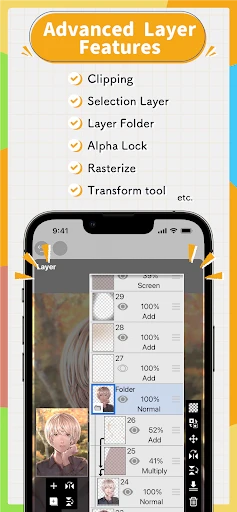
ibis Paint's core functionality revolves around providing a full-featured digital canvas. It boasts over 15,000 brushes, including realistic pens, pencils, watercolors, and airbrushes, each with customizable settings for size, opacity, and texture. The app supports an unlimited number of layers with various blending modes, such as multiply and overlay, essential for complex illustrations. Key features include advanced rulers like symmetrical and perspective rulers for precise line work, a robust text tool with numerous fonts, and over 2,000 screentones for manga creation. Its recording function captures the entire drawing process as a time-lapse video, perfect for tutorials. Furthermore, it offers clipping mask functions, layer folders for organization, and supports high-resolution canvases, ensuring artwork is suitable for both screen display and print.
Chapter 2: Value
The primary value proposition of ibis Paint lies in delivering professional desktop-class drawing capabilities in a mobile format, all at an accessible price point, with a robust free version supported by ads. Its key advantage is the unparalleled depth of customization; artists can fine-tune brushes to an exceptional degree or even create their own from scratch, achieving unique artistic effects that rival expensive desktop software. The integration of a social network within the app, ibis Paint SNS, is a significant differentiator. Artists can share their work, follow others, and most importantly, learn by watching the recorded drawing process of fellow creators, fostering a collaborative learning environment. Unlike many competitors, ibis Paint maintains a lightweight and responsive performance even on mid-range devices, ensuring a smooth drawing experience without lag. The one-time purchase model for the premium 'Prime Membership' removes ads and unlocks additional brushes and fonts, which is often more cost-effective than subscription-based alternatives. This combination of power, community, and affordability empowers a wide range of users to create high-quality digital art anytime, anywhere, lowering the barrier to entry for digital artistry.
Chapter 3: Scenarios
ibis Paint primarily targets aspiring and professional digital artists, illustrators, manga artists, and hobbyists who seek a serious drawing tool on their mobile devices. It is ideal for students and young artists who may not have access to a desktop setup like a PC with a drawing tablet, allowing them to practice and create on their smartphones or tablets with a stylus. Everyday use cases are diverse: an illustrator might use it for quick concept sketches and full-color illustrations during their commute; a manga artist relies on its screentones and panel rulers to draft comics directly on a tablet; a hobbyist enjoys creating fan art and sharing the process video on social media. It is also widely used for designing social media graphics, creating custom lettering and calligraphy, and making digital notes or planners. The app serves as a portable sketchbook for artists to capture inspiration instantly, making it an indispensable tool for both casual creation and professional workflow supplementation.
Uninstall Instructions
For step-by-step guidance on how to safely remove this application from your device, please refer to our 《Uninstall Instructions》 document.
Pros
- offers over 15000 brushes including realistic watercolor and felt-tip pens
- frame-by-frame animation toolset within a drawing app
- records and exports the entire drawing process as a video
- robust layer system with clipping and folder organization
- active community for sharing timelapse videos and techniques
Cons
- mandatory video ads for unlocking premium brushes
- advanced features require a separate subscription purchase
- interface feels cluttered with numerous tool panels
- large canvas sizes can slow performance on older devices
- cloud save functionality is not provided for free users
Frequently Asked Questions
What is ibis Paint and what are its main functions?
ibis Paint is a professional-grade drawing and painting application designed for digital artists and illustrators. Its core functions include providing over 15,000 brushes, advanced layer management with various blending modes, and support for creating comics with features like frame division and tone editing. It is primarily positioned as a versatile, mobile-first art studio that combines powerful raster illustration tools with social sharing capabilities within its community.
Is ibis Paint free to use, and what do in-app purchases include?
ibis Paint is free to download and use with core functionality. It is supported by video ads, which can be removed via a one-time purchase. Key in-app purchases include a 'Prime Membership' for accessing all premium brushes (over 15,000), additional fonts, and advanced layer features. Other purchases involve buying specific brush sets or items individually. The app does not require subscription for basic use.
What devices and operating systems is ibis Paint compatible with?
ibis Paint is primarily available for iOS and Android smartphones and tablets. It also has versions for Windows and macOS. The app supports stylus pressure sensitivity for compatible devices like Apple Pencil and various S-Pen or USI styluses. It is optimized for touch interfaces and does not require additional hardware, though a stylus is recommended for precise drawing. System requirements vary by platform version.
How does the time-lapse replay feature work in ibis Paint?
The time-lapse replay feature automatically records your entire drawing process. You can replay, share, or export this recording as a video file directly from the app. This function is primarily for sharing your workflow on social media or for self-review. The recording is saved locally, and its availability does not depend on a network connection. Storage space is required for saving these video files.
Can I recover a drawing if the app crashes or I delete it accidentally?
ibis Paint has an auto-save function that periodically saves your work. For recovering from a crash, reopen the app; it usually prompts to restore the last session. For deleted artwork, recovery is only possible if you have previously exported the project file (.ipv format) to your device storage or cloud service. The app itself does not have a built-in 'trash' or cloud backup for deleted files, so regular manual backup is recommended.
App Info
Technical Info
Recommended For You

Watch Duty (Wildfire)
Communication

Forex Trading for Beginners
Books & Reference

Yolla: International Calling
Communication

Flashlight : SMS & Call Alert
Communication

Bookmory - reading tracker
Books & Reference

Glassdoor | Jobs & Community
Business

Sky Tonight - Star Gazer Guide
Books & Reference

Car Launcher
Auto & Vehicles

SALLY BEAUTY
Beauty

Face Swap Magic: AI Avatars
Art & Design

Calibre Sync
Books & Reference

Face Shape & Color Analysis
Beauty

USPS MOBILE®
Business
Librera PRO - Book reader
Books & Reference

Gencraft - AI Art Generator
Art & Design

Daily Bible - KJV Holy Bible
Books & Reference

Universalis
Books & Reference

Perfect Viewer Donation
Comics

Color by Number for Adults
Art & Design

Typology Paris - Skincare
Beauty