
CamToPlan
Screenshots

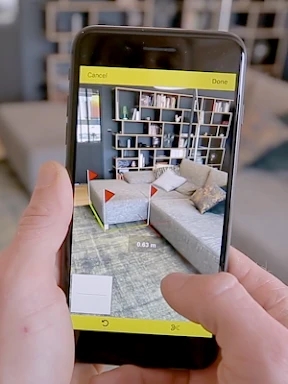


Description
About CamToPlan Feature – From Camera to Precise Floor Plan
CamToPlan is a professional mobile measurement application that transforms a smartphone's camera into a powerful tool for creating accurate floor plans and measuring dimensions. By leveraging augmented reality (AR) and computer vision technology, it allows users to quickly measure distances, areas, and volumes in physical spaces, generating digital plans instantly. It eliminates the need for traditional measuring tapes and complex CAD software entry barriers, catering to a wide range of users from homeowners to field professionals. The app stands out for its simplicity, precision, and efficiency, making spatial measurement and documentation an intuitive process accessible to anyone with a smartphone.
Chapter 1: Function
CamToPlan's core functionality revolves around using the smartphone camera to perform spatial measurements and generate floor plans. Users simply point their camera at a room, mark starting and ending points on the screen to measure distances between walls, objects, or any features in real-time. The app calculates lengths, heights, and widths with notable accuracy. Furthermore, it can automatically detect room contours to create a complete 2D floor plan by walking around the space. Key functions include measuring straight lines, perimeters, and rectangular areas; calculating total area and volume; adding doors, windows, and furniture to the plan; and exporting the final results as PDF, DXF, or image files for sharing or further use in other design software.
Chapter 2: Value
The primary value proposition of CamToPlan lies in its ability to democratize professional-grade measurement and planning, saving significant time, reducing errors, and lowering costs. For professionals like real estate agents, interior designers, contractors, and facility managers, it streamlines site surveys and client reporting, enhancing productivity and service credibility. Its key advantages are multifaceted. First is precision: utilizing advanced ARKit (iOS) and ARCore (Android) technologies, it delivers measurement accuracy sufficient for planning and estimation purposes. Second is remarkable efficiency: creating a detailed floor plan takes minutes instead of hours, accelerating project initiation. Third is cost-effectiveness: it negates the need for expensive laser measuring devices or specialized software for basic plans. Fourth is user-friendliness: the intuitive interface requires minimal training. Fifth is versatility: it supports both metric and imperial units and offers various export formats for seamless integration into workflows. Ultimately, CamToPlan turns a ubiquitous device—the smartphone—into a potent tool, bridging the gap between physical spaces and digital documentation.
Chapter 3: Scenarios
CamToPlan primarily targets users who require quick and reliable spatial measurements and floor plans in their personal or professional activities. Key user groups include homeowners and DIY enthusiasts planning renovations, furniture arrangements, or home projects who need to assess room dimensions. Real estate agents and property managers use it to efficiently document property layouts for listings and reports. Interior designers and architects employ it for initial site surveys and client presentations. Contractors, builders, and craftsmen utilize it for on-site measurements and material estimations. Even event planners can map out venue spaces. Everyday use cases are diverse: measuring a living room to check if a new sofa fits, creating a floor plan for an apartment rental listing, documenting the dimensions of a construction site for quoting, planning office layouts, or simply calculating the area for painting or flooring. In any scenario where understanding and recording space dimensions is needed, CamToPlan offers a swift and practical solution.
Uninstall Instructions
For step-by-step guidance on how to safely remove this application from your device, please refer to our 《Uninstall Instructions》 document.
Pros
- instantly measures room dimensions via phone camera
- exports precise floor plans as PDF or DXF files
- no manual measurements or complex tools required
- augmented reality overlay guides scanning process
- calculates area and perimeter automatically post-scan
Cons
- requires well-lit environments for accurate scanning
- complex room shapes may reduce measurement precision
- dxf export locked behind premium subscription
- scanning process can drain battery quickly
- furniture clutter significantly disrupts plane detection
Frequently Asked Questions
What is CamToPlan and what does it do?
CamToPlan is a utility app for iOS and Android that turns your smartphone camera into a measurement tool. Its core function is to create accurate floor plans and measure distances, heights, and areas in real-time using augmented reality (AR) technology. It is designed for quick room measurements, property assessments, and planning furniture layouts without the need for physical measuring tapes.
Is CamToPlan free to use, or does it have in-app purchases?
The measurement accuracy of CamToPlan depends on your device's camera and sensor quality, lighting conditions, and surface texture. Under optimal conditions, it can provide measurements with a high degree of precision suitable for planning and estimation purposes. However, for critical construction or legal documentation, it is recommended to verify measurements with professional tools.
What devices and systems are compatible with CamToPlan?
CamToPlan operates on a freemium model. You can download and use basic measurement features for free. However, for advanced functionalities like exporting high-resolution plans, removing watermarks, or using area calculation tools, you need to purchase a Pro subscription within the app. The app does not require any additional physical equipment.
How accurate are the measurements from CamToPlan?
CamToPlan is available for both iOS and Android devices. It requires a device with a camera and support for ARCore (for Android) or ARKit (for iOS). This generally means iPhones/iPads from recent years and compatible mid-to-high-range Android phones. The app is suitable for homeowners, real estate agents, interior designers, and DIY enthusiasts.
Can I export or share the plans I create with CamToPlan?
Yes, exporting and sharing plans is a core feature. The free version typically allows sharing of basic plans, often with a watermark. The Pro subscription enables exporting measurements and floor plans in various formats (like PDF, JPG, DXF) and at higher resolutions for use in other software or for printing. Sharing is done directly from the app via email or cloud services.
App Info
Technical Info
Recommended For You

myAudi
Auto & Vehicles

Yaelokre OC Maker
Art & Design

Toyota
Auto & Vehicles

Twenty-Four Hours a Day
Books & Reference

Avatar Maker - Avatar Creator
Comics

FolderSync Pro
Communication

Amazon A to Z
Business

Madison Reed App - Hair Color
Beauty

Pixel Studio PRO: editor
Art & Design

AI Logo Generator, Logo Maker
Art & Design

Phone by Grice
Communication

Google Chrome
Communication

Flyers, Poster Maker, Design
Business

RingCentral
Business

FamilySearch Tree
Books & Reference

Xcel Energy
Business

Staples - Deals & Shopping
Business

WASticker-Sticker for WhatsApp
Comics

Floor Plan Creator
Art & Design

Gospel Library
Books & Reference