
Firefox Fast & Private Browser
Screenshots


Description
About Firefox Fast & Private Browser Features
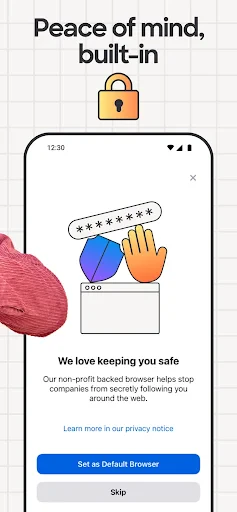
Firefox Fast & Private Browser, developed by the non-profit Mozilla, is a renowned web browser that champions user privacy, speed, and an open internet. It stands as a powerful alternative to mainstream browsers, offering robust tracking protection, customizable features, and cross-platform synchronization. Built on the Gecko engine, Firefox delivers a fast, efficient browsing experience while putting user control and data protection at the forefront. It is available on mobile devices, desktops, and tablets, providing a consistent and secure gateway to the web for millions of users worldwide.
Chapter 1: Function
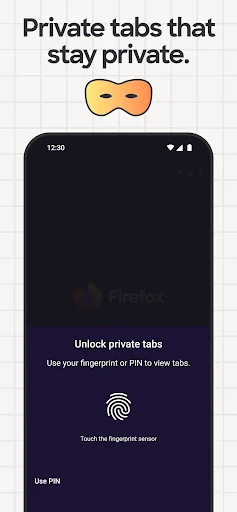
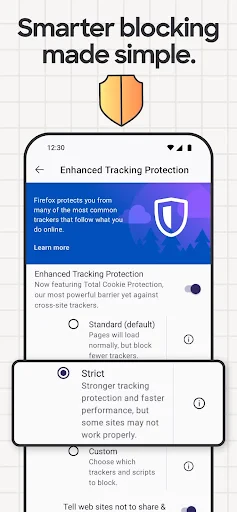
Firefox Fast & Private Browser excels with core functions centered on privacy, performance, and personalization. Its Enhanced Tracking Protection actively blocks third-party cookies, social media trackers, and cryptominers by default, preventing websites from following your online activity. The browser features a private browsing mode with additional security, and it includes a built-in password manager, Firefox Lockwise, for securely storing and syncing passwords. Performance is boosted through efficient page loading and reduced memory usage. Users can personalize their experience with a vast library of extensions and themes from the Firefox Add-ons store. Furthermore, seamless synchronization across all devices allows access to bookmarks, history, tabs, and passwords anywhere.
Chapter 2: Value
The primary value proposition of Firefox lies in its unwavering commitment to user privacy without compromising on speed or functionality. Unlike many competitors whose business models rely on data collection, Mozilla's non-profit ethos ensures that user interests come first. This translates into tangible advantages such as strong default privacy settings that require minimal user configuration. Key features like Enhanced Tracking Protection and Facebook Container, which isolates Facebook activity from the rest of your browsing, offer superior defense against surveillance and fingerprinting. The browser's value is also evident in its open-source nature, allowing for transparency and community-driven development. Performance-wise, Firefox's Quantum engine provides a noticeably fast and smooth experience, even with multiple tabs open. The ability to customize the browser extensively with add-ons empowers users to tailor their web experience precisely to their needs. Ultimately, Firefox delivers a trustworthy, efficient, and user-empowering browsing environment, making it an invaluable tool for anyone seeking to reclaim their online privacy and autonomy.
Chapter 3: Scenarios
Firefox Fast & Private Browser is ideally suited for privacy-conscious individuals, researchers, students, and professionals who prioritize security and control over their digital footprint. It is a daily essential for users who are wary of targeted advertising and corporate data harvesting, providing peace of mind during routine online shopping, banking, and social media use. Students and academics benefit from its efficient tab management and extensions for research and productivity. Professionals handling sensitive information can rely on its robust privacy features for secure communication and data access. Furthermore, tech-savvy users and developers appreciate its customization capabilities and open-source foundation. Common use cases include conducting private research without tracking, securely logging into accounts across devices via synced passwords, using browser extensions to block ads and enhance functionality, and maintaining a clutter-free, fast browsing session for work and entertainment. It serves as a reliable default browser for anyone seeking a balanced combination of speed, privacy, and personalization.
Uninstall Instructions
For step-by-step guidance on how to safely remove this application from your device, please refer to our 《Uninstall Instructions》 document.
Pros
- blocks trackers by default for faster page loads
- syncs tabs across mobile and desktop seamlessly
- add-ons library for deep browser customization
- picture-in-picture for floating video playback
- minimal data collection with transparent privacy policy
Cons
- some complex sites favor chrome optimization
- extension support lags behind chromium browsers
- frequent updates can disrupt workflow automation
- high memory usage with multiple tabs open
- limited profile management on mobile versions
Frequently Asked Questions
What is Firefox Fast & Private Browser?
Firefox is a free web browser developed by Mozilla, focusing on speed and privacy protection. Its core positioning is a fast, secure, and user-respecting alternative to mainstream browsers. Key features include Enhanced Tracking Protection, which blocks many third-party trackers by default, and a private browsing mode with tracking protection. It allows extensive customization through add-ons and supports syncing bookmarks, history, and passwords across devices.
Is Firefox completely free to use?
Yes, the Firefox browser is completely free to download and use. There are no charges for its core browsing, privacy, and security features. Mozilla primarily funds the project through partnerships like the default search engine agreement. The browser does not contain ads. Optional paid services, such as Mozilla VPN or Firefox Relay email masking, are separate products and not required for browser functionality.
What devices and systems does Firefox support?
Firefox supports a wide range of devices and operating systems. For desktop, it is available on Windows, macOS, and Linux. For mobile, you can install Firefox for Android on phones and tablets, and Firefox for iOS on iPhones and iPads. It also offers a preview version for Android called Firefox Nightly. Using a Firefox Account, you can sync your data like tabs, bookmarks, and passwords across all these supported platforms.
How does Firefox protect my privacy while browsing?
Firefox protects privacy through multiple built-in features. Enhanced Tracking Protection automatically blocks social media trackers, cross-site tracking cookies, cryptominers, and fingerprinters. Private Browsing mode with tracking protection doesn't save your history or cookies after the session. It also includes protections against harmful sites and prompts for password breaches. You can adjust privacy settings to Strict mode for more blocking or use extensions for further control.
Can I use Chrome extensions on Firefox?
No, you cannot directly install extensions made for Google Chrome on Firefox. Firefox uses a different extension framework. However, many popular extensions have versions specifically ported for Firefox. You can find and install them from the official Firefox Add-ons store. Firefox also supports a wide array of its own unique extensions. Developers can often adapt Chrome extensions for Firefox, but the installation files are not cross-compatible.
App Info
Technical Info
Recommended For You

MTS Urent
Auto & Vehicles

Metro
Communication

PAeDocket
Books & Reference

Clay Box
Art & Design

FAB Adblocker Browser:Adblock
Communication

Al Quran MP3 Audio Offline App
Books & Reference

HiPaint -Sketch Draw Paint it!
Art & Design

VistaCreate: Graphic Design
Art & Design

Stickers and Emoji - WASticker
Comics

Switch Natural
Beauty

Draw Cartoon - AR Drawing App
Art & Design

Duo Call - Dual Global Calling
Communication

RingCentral
Business

GIF Sticker & WAsticker
Communication

Carista OBD2
Auto & Vehicles

StyleKorean
Beauty

inCarDoc Pro | OBD2
Auto & Vehicles

Inky - Run Inkscape on Android
Art & Design

Messages: SMS Messaging
Communication

AI Photo Editor: BG Remover
Art & Design