
Floor Plan Creator
Screenshots


Description
About Floor Plan Creator Feature
Floor Plan Creator is a professional yet accessible mobile application designed for creating detailed and accurate floor plans directly on a smartphone or tablet. It serves as a powerful digital drafting tool, enabling users to visualize spatial layouts for residential, commercial, and interior design projects. The app bridges the gap between complex architectural software and simple sketching, offering a balanced set of features that cater to both amateurs and professionals. By providing an intuitive interface for drawing walls, adding doors, windows, and furniture, it transforms abstract ideas into clear, scaled diagrams. Its core strength lies in its portability and ease of use, allowing planning and design work to happen anywhere, anytime, without the need for expensive desktop software or extensive technical training.
Chapter 1: Function
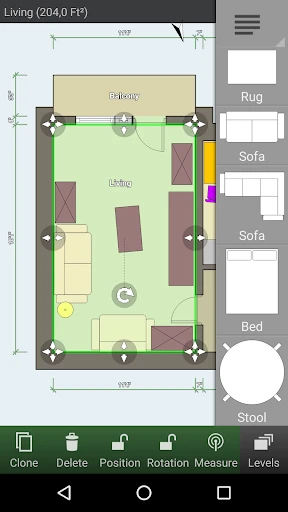
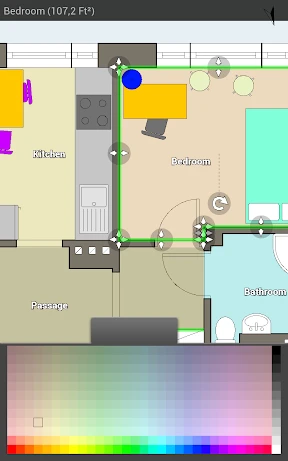
Floor Plan Creator's core functionality centers on precise digital drafting and spatial visualization. Users begin by setting a scale for their project, ensuring all elements are proportionally accurate. The primary toolset allows for drawing straight, curved, or angled walls with adjustable thickness. A comprehensive library of symbols is available, including various door types (swinging, sliding, double), windows, and an extensive collection of furniture and fixtures categorized by room type like kitchen, bathroom, and living room. Each object can be resized, rotated, and positioned with precision. The app supports creating multiple floors or levels within a single project, connecting them with stairs. Key features also include real-time area and dimension calculations, the ability to add textual notes, and the option to export creations in multiple formats such as PDF, PNG, DXF, and SVG for sharing, printing, or further editing in other software.
Chapter 2: Value
The value proposition of Floor Plan Creator is multifaceted, offering significant advantages over traditional sketching or complex CAD programs. Its foremost value is democratizing architectural drafting by making it affordable, mobile, and user-friendly. For homeowners, DIY enthusiasts, and real estate agents, it eliminates the guesswork from renovation planning, furniture arrangement, and property showcasing, saving both time and potential costly mistakes. The precision in measurement and scaling provides reliable data for estimating material quantities and costs. For professionals like interior designers, contractors, or facility managers, it serves as an excellent on-site tool for quick surveys, client presentations, and draft modifications, enhancing productivity and communication. The app's export capabilities, especially to the widely compatible DXF format, ensure seamless integration into professional workflows and collaboration with engineers or architects using full-scale CAD software. Unlike many simplistic drawing apps, Floor Plan Creator maintains a focus on accuracy without sacrificing intuitiveness. This balance provides a tangible return on investment by streamlining the planning phase, improving visualization, and facilitating clearer communication among all stakeholders in any space-related project.
Chapter 3: Scenarios
Floor Plan Creator's primary user groups span from casual home users to industry professionals. Homeowners and renters frequently use the app to plan room layouts before purchasing new furniture, ensuring optimal fit and traffic flow. DIY renovators rely on it to design kitchen remodels, bathroom upgrades, or home extensions, creating plans to guide their work and communicate with contractors. Real estate agents utilize the app to generate clear, professional floor plans for property listings, enhancing marketing materials and helping potential buyers understand the space. Interior designers and decorators employ it for initial space planning and client consultations, quickly iterating on different furniture arrangements and style concepts. Small business owners can plan office layouts, retail store setups, or restaurant seating. Furthermore, students studying architecture, interior design, or real estate find it an invaluable learning tool for understanding spatial relationships and drafting fundamentals. In everyday use, a user might open the app to sketch a plan for rearranging their living room, document the dimensions of a house they are considering buying, or create a detailed plan for a custom-built closet, all from their mobile device at the location of interest.
Uninstall Instructions
For step-by-step guidance on how to safely remove this application from your device, please refer to our 《Uninstall Instructions》 document.
Pros
- exports vector floor plans to CAD software
- room measurement tool uses phone camera AR
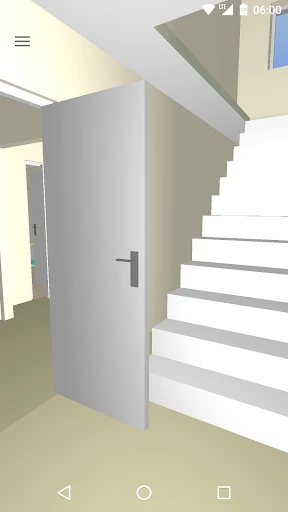
- generates real-time 3D models from 2D drawings
- offers precise imperial/metric unit toggling
- operates fully offline after initial download
Cons
- steep learning curve for advanced CAD features
- AR measurement requires well-lit
- clear spaces
- free version restricts export file formats
- 3D rendering slows on older mobile devices
- manual wall angle input lacks auto-correction
Frequently Asked Questions
What is Floor Plan Creator and what does it do?
Floor Plan Creator is a mobile application for creating detailed 2D and 3D floor plans. Its core function is to allow users to design room layouts, place furniture, and generate measurements. Unique features include real-time 3D walkthroughs, calculation of room areas and perimeters, and the ability to create multi-floor projects. It is primarily used for home planning, interior design, and space management, functioning as a practical CAD-style tool for non-professionals.
Is Floor Plan Creator free to use, or are there in-app purchases?
The app provides high precision for digital planning. You manually define the scale by setting a known wall length, and all subsequent drawings adhere to this scale. Measurements for walls, areas, and perimeters are calculated based on your input and drawings. However, the accuracy of the final plan depends entirely on the precision of your manual inputs and drawings; it is not a automated measurement tool for physical spaces.
On which devices and operating systems does the app work?
Floor Plan Creator operates on a freemium model. The app can be downloaded and used for free with a comprehensive set of basic features. However, advanced features like exporting in high-resolution formats (PDF, PNG, DXF), creating multi-floor plans, or removing watermarks are locked behind a one-time purchase or a subscription. The specific pricing tiers are detailed within the app's shop section.
How accurate are the measurements and scaling in the app?
Floor Plan Creator is primarily available for Android devices. It is optimized for phones and tablets and can be downloaded from the Google Play Store. There is no official version for iOS (iPhone/iPad) or for desktop operating systems like Windows or macOS. The app requires a device running a relatively recent version of the Android operating system for optimal performance.
Can I share or print my created floor plans?
Yes, sharing and printing are core functions. You can share your plans as images or project files directly from the app. For professional printing and use in other software, export functions are available. Exporting to formats like PDF, PNG, or DXF typically requires the premium version. The free version may allow sharing with limitations, such as lower resolution or a watermark.
App Info
Technical Info
Recommended For You

Freepik: Design & edit with AI
Art & Design

Mark - AI Logo Generator
Art & Design

PayPal Business
Business

Microsoft Authenticator
Business

Arvin® - AI Logo Maker
Art & Design

Alpha Manga: Read Isekai Manga
Comics

ParkMobile: Park. Pay. Go.
Auto & Vehicles

TrueCar Used Cars and New Cars
Auto & Vehicles

FolderSync Pro
Communication

Typology Paris - Skincare
Beauty

Paychex Flex
Business

Google Meet
Communication

Yes Madam - Salon at Home
Beauty

Getcontact
Communication

World History Atlas
Books & Reference

Gocrypto: Crypto Trading
Business

Sweet Editor Camera Lite
Beauty

Zoom Rooms Controller
Business

Securus Mobile
Communication

Hangouts
Communication