
Tattoo Simulator Tattoo Maker
Screenshots


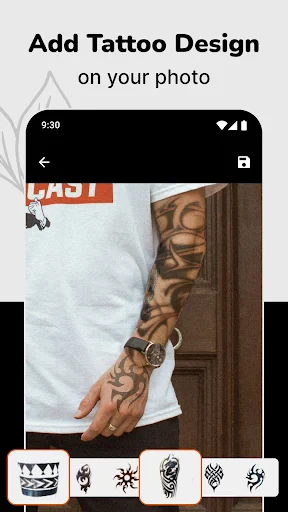


Description
About Tattoo Simulator Tattoo Maker Features – A Digital Canvas for Body Art Exploration
Tattoo Simulator Tattoo Maker is a mobile application designed for individuals considering getting a tattoo. It serves as a virtual try-on tool, allowing users to visualize how different tattoo designs would look on their own body before making a permanent commitment. By leveraging augmented reality (AR) technology and an extensive library of designs, the app provides a risk-free, creative, and personalized platform for exploring body art. It bridges the gap between imagination and reality, empowering users to experiment with placement, size, and style directly through their device's camera, thereby transforming the tattoo ideation process into an interactive and informed experience.
Chapter 1: Function
The core functionality of Tattoo Simulator Tattoo Maker centers on virtual tattoo application and customization. Users can either select from a vast built-in catalog of pre-made tattoo designs, ranging from traditional to contemporary styles, or import their own custom images. The app's primary tool is its AR-powered camera feature. By activating the camera, users can see a live feed of their skin—on an arm, leg, back, or any other body part—and superimpose the chosen tattoo design onto it in real-time. This allows for precise adjustment of the design's position, rotation, and scale to fit the body's contours perfectly. Additional functions include the ability to adjust the design's opacity for a more realistic preview, save multiple simulations for comparison, and share these virtual results with friends or a tattoo artist for feedback. Essentially, it transforms a smartphone into a dynamic, portable tattoo studio for preview purposes.
Chapter 2: Value
The primary value proposition of Tattoo Simulator Tattoo Maker lies in its empowerment of users through informed decision-making and creative freedom. Its key advantage is the elimination of uncertainty and potential regret associated with permanent body art. By providing a highly realistic preview, the app significantly reduces the anxiety of the unknown, allowing users to confidently choose a design and placement they will be happy with for years to come. This positions the app not just as a novelty, but as a practical planning tool that fosters a collaborative relationship between the client and the tattoo artist, as users can arrive at consultations with a clear visual reference. Furthermore, the app offers immense creative value. It encourages experimentation without limits—users can try bold, large-scale pieces or subtle minimalist art in seconds, exploring combinations and styles they might not have otherwise considered. The extensive, often categorized design library also serves as a source of inspiration, helping users discover new artistic trends and motifs. From a cost and time perspective, it is an invaluable resource, saving users from the potential financial and emotional cost of tattoo removal or cover-ups by making the right choice the first time. It democratizes tattoo planning, making the creative process accessible, fun, and deeply personal.
Chapter 3: Scenarios
The app's primary target users are individuals contemplating their first tattoo, who may feel hesitant and seek reassurance before committing. It is equally valuable for tattoo enthusiasts looking to plan additional pieces, ensuring new art complements existing work. Another key user group includes professionals in the tattoo industry; artists can use the app as a client consultation tool to visualize ideas collaboratively, streamline the design process, and set clear expectations. In everyday use, a person might use the app in the comfort of their home, trying a small wrist script or a full sleeve design while looking in a mirror. Before a social event, someone could simulate a temporary tattoo for fun. Prior to a consultation, a user would experiment with various options, save the best simulations, and bring them directly to the tattoo studio to guide the conversation. It is also used in social scenarios, where friends gather to experiment with designs on each other, sharing and debating ideas in a lighthearted, pressure-free environment. Ultimately, the app fits into any scenario where imagination about body art meets the need for a tangible, realistic preview.
Uninstall Instructions
For step-by-step guidance on how to safely remove this application from your device, please refer to our 《Uninstall Instructions》 document.
Pros
- offers realistic skin texture and hair simulation
- extensive library of authentic tattoo studio designs
- precise placement with 3D body mapping technology
- allows custom artwork import for personalization
- non-permanent visual trial reduces commitment anxiety
Cons
- requires high-performance device for smooth AR rendering
- limited accuracy on complex body contours and joints
- premium design packs necessitate frequent in-app purchases
- simulation may appear distorted on darker skin tones
- lives offline mode with basic editing tools only
Frequently Asked Questions
What is Tattoo Simulator Tattoo Maker?
Tattoo Simulator Tattoo Maker is a mobile application in the lifestyle and design category. Its core function is to allow users to virtually preview tattoo designs on photos of their own body parts. It enables users to upload personal photos, select from a library of tattoo designs or import custom images, and adjust the size, placement, and rotation to simulate how a tattoo would look before getting the real thing.
Is the app free to use?
The app is free to download and offers basic functionality. However, it typically operates on a freemium model. This means access to the full library of premium tattoo designs, high-resolution exports, or the removal of watermarks and ads usually requires a one-time purchase or a subscription. Specific pricing details are available within the app's store listing.
What devices and systems is the app compatible with?
Tattoo Simulator Tattoo Maker is primarily designed for modern smartphones. It is available for both iOS and Android operating systems. For optimal performance, it requires a device with a decent camera for photo capture and sufficient processing power to handle image editing. Exact minimum version requirements (e.g., iOS 13.0 or Android 8.0) should be verified on the respective app store page.
How accurate is the tattoo simulation?
The simulation provides a visual approximation for planning and inspiration. Accuracy is limited by factors like photo quality, skin tone matching, and the app's ability to account for body curvature. The final result from a professional tattoo artist will differ. The app is a design tool, not a precise predictor, and does not guarantee the exact look, color, or placement of a real tattoo.
Can I share or print the tattoo designs I create?
Yes, a core feature of the app is the ability to save and share your simulated tattoo images to your device's gallery or directly to social media. Printing quality depends on the resolution of the saved image, which may be limited in the free version. For professional printing consultations, it is recommended to discuss the final design directly with your chosen tattoo artist.
App Info
Technical Info
Recommended For You

Freelancer: Hire & Find Jobs
Business

Holy Bible - KJV+Verse
Books & Reference

Google Meet
Communication

Dwell: Audio Bible
Books & Reference

Phone Dialer - Contacts
Communication

Knots 3D
Books & Reference

Anime Avatar Maker & Creator
Beauty

مانجا للصغار
Comics

Flowbird Parking
Auto & Vehicles

Ai Vista
Art & Design

Autolink
Auto & Vehicles

Snapchat
Communication

How To Draw Comics
Comics

Torque Pro (OBD 2 & Car)
Communication

Novellair-Your Book Nook
Books & Reference

GigSmart Get Gigs
Business

Animation Creator: Flipbook 2D
Art & Design

Phone Dialer - Call Recorder
Communication

Car-Part.com Used Auto Parts
Auto & Vehicles

AMarkets: Trade & Invest
Business