
Messenger
Screenshots


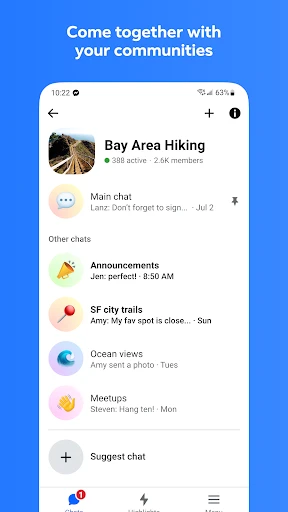
Description
About Messenger Features - Seamless Connection in a Digital World
Messenger, developed by Meta, is a globally renowned instant messaging application that facilitates free and instantaneous communication. Initially launched as an extension of Facebook's messaging feature, it has evolved into a standalone, multifunctional platform supporting text, voice, and video conversations. It seamlessly integrates with the Facebook social network while also allowing users to connect via phone numbers, making it a versatile tool for maintaining personal and professional relationships. With its user-friendly interface and continuous innovation in features, Messenger has become an indispensable communication hub for billions of users worldwide, transcending geographical barriers and enabling rich, interactive exchanges.
Chapter 1: Function
Messenger's core functionality revolves around enabling real-time, multimodal communication. Users can send and receive unlimited text messages, create group chats for collaborative discussions, and share a variety of media including photos, videos, and documents. The app supports high-quality voice and video calls, both one-on-one and in groups, with features like screen sharing and interactive filters enhancing the experience. Integrated GIF search, stickers, and emojis add expressiveness to conversations. Beyond basic chat, it incorporates features like Stories for sharing ephemeral updates, a dedicated space for connecting with businesses, and peer-to-peer payment services in supported regions. Its functionality is designed to be a comprehensive communication suite, all within a single, accessible application.
Chapter 2: Value
Messenger's primary value proposition lies in its ability to create a unified, reliable, and feature-rich communication ecosystem. Its key advantage is deep integration with the Facebook social graph, allowing users to effortlessly connect with their entire network without needing contact details, though phone number-based access ensures inclusivity. The app provides exceptional value through free, cross-platform communication that works over Wi-Fi or mobile data, significantly reducing traditional SMS and call costs. It enhances interaction with playful features like AR effects and games, making conversations more engaging. For businesses, Messenger offers verified pages, automated chatbots, and advertising tools, transforming it into a vital customer service and marketing channel. Its commitment to privacy with options like secret conversations (end-to-end encrypted), message controls, and active monitoring for safety builds user trust. Furthermore, continuous updates ensure the platform remains at the forefront of communication technology, balancing innovation with widespread accessibility and ease of use, thereby delivering consistent value to a diverse global user base.
Chapter 3: Scenarios
Messenger primarily targets individuals seeking to maintain close connections with friends and family, regardless of distance. It is equally valuable for professionals and teams requiring a quick, informal channel for project coordination and remote meetings via its robust video call feature. Everyday use cases are abundant: a family spread across different countries uses group video calls for weekly catch-ups; friends planning an event create a group chat to share details, photos, and location pins; a student abroad makes free video calls to parents back home. Users quickly share moments through Stories or react to friends' updates. Small business owners utilize it to respond to customer inquiries in real time, share catalogs, and even process orders. In scenarios requiring privacy, users activate secret conversations for sensitive discussions. From casual check-ins and sharing daily life snippets to coordinating complex group activities and conducting informal business, Messenger seamlessly integrates into the daily digital routines of a broad spectrum of users.
Uninstall Instructions
For step-by-step guidance on how to safely remove this application from your device, please refer to our 《Uninstall Instructions》 document.
Pros
- seamlessly integrates SMS and chat in one unified inbox
- offers end-to-end encryption for secret conversations
- enables cross-app communication with Instagram contacts
- provides lightweight
- fast performance on low-end devices
- supports instant video chat directly from the message thread
Cons
- mandatory Facebook account for full feature access
- lacks message scheduling and advanced automation tools
- secret conversations not synced across multiple devices
- SMS integration only available on Android
- not iOS
- can feel bloated with forced Stories and gaming features
Frequently Asked Questions
What is Messenger and what does it do?
Messenger is a free instant messaging and social networking app developed by Meta. Its core function is to send text, voice, and video messages to individuals or groups. It integrates with Facebook for seamless communication with your Facebook friends list, but can also be used with just a phone number. Unique features include video chat rooms (Messenger Rooms), fun filters and effects, and integration with games and businesses for customer support.
Is Messenger completely free to use?
Yes, the core messaging, calling, and video chat features of Messenger are completely free to download and use. It does not have a subscription fee. However, the app may display ads. Some in-app purchases exist for optional features like sending virtual gifts or using certain custom emojis in chats. Standard data charges from your mobile or internet provider may apply.
What devices and systems does Messenger support?
Messenger is widely adapted. It is available as a native app for iOS (iPhone/iPad) and Android devices. You can also access a web version at messenger.com from most desktop browsers like Chrome, Safari, or Edge. A Facebook account is common for use, but it is not strictly required as you can sign up with a mobile phone number. It supports communication across these platforms.
How does Messenger handle privacy and message requests?
Messenger provides privacy controls. You can manage who can message you directly and who sends messages to a separate 'Message Requests' folder, which you can review without accepting. End-to-end encryption is available but is an optional feature called 'Secret Conversations' that must be manually enabled for each specific chat. For standard chats, messages are secured in transit but not end-to-end encrypted by default.
Can I use Messenger without a Facebook account?
Yes, you can use Messenger without an active Facebook account. You can sign up and create a Messenger profile using only your mobile phone number. This allows you to message other contacts who use Messenger with their phone number. However, some features, like easily finding friends who use Facebook or accessing connected Instagram chats, may require linking or having a Facebook account.
App Info
Technical Info
Recommended For You

Infinite Design
Art & Design

Remove Background From Video
Beauty

BOMTOON - 正版授權網漫
Comics

AI Dress up-Try Clothes Design
Beauty

مانجا بلاير - Manga Player
Comics

Solo: Your Gig Business App
Business

Online chat, calls - Gem Space
Communication

Recover Deleted Messages App
Communication

Google Play Books & Audiobooks
Books & Reference

Amazon Relay
Business

Bible For Women-Holy Bible App
Books & Reference

Car Launcher
Auto & Vehicles

Session - Private Messenger
Communication

MECH.AI: Diagnostic & Repair
Auto & Vehicles

Comicle Manga: Manhwa & Manga
Comics

Power Apps
Business

Batman Miniature Game
Comics

Whitepages - Find People
Communication

Messages
Communication

Al QURAN - القرآن الكريم
Books & Reference