
FlipArtify - 2D Draw Animation
Screenshots


Description
About FlipArtify - 2D Draw Animation Feature
FlipArtify - 2D Draw Animation is a professional-grade yet accessible mobile application designed for creating traditional hand-drawn frame-by-frame animations. It transforms the complex art of 2D animation into an intuitive digital process, allowing users to sketch, sequence, and bring their drawings to life directly on their smartphones or tablets. By emulating the classic flipbook technique with modern digital tools, FlipArtify serves as a portable animation studio, bridging the gap between artistic creativity and technical execution. It caters to a wide spectrum of users, from animation students and hobbyists exploring motion for the first time to seasoned artists seeking a convenient platform for ideation and prototyping. The app's core philosophy is to demystify animation, making it a tangible and enjoyable creative outlet for anyone with a story to tell through moving images.
Chapter 1: Function
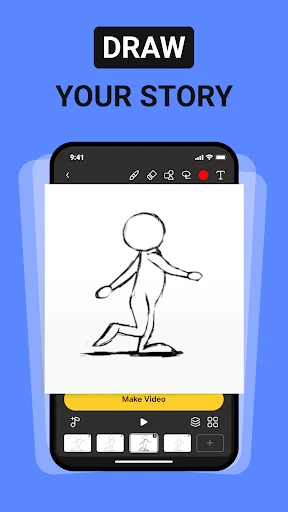
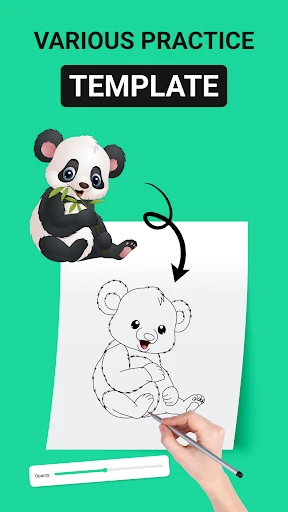
FlipArtify's functionality is centered on a streamlined, layer-based drawing and sequencing workflow. At its heart is the onion skinning tool, which allows animators to see several previous and upcoming frames as semi-transparent overlays, ensuring smooth and consistent motion. Users can create projects with customizable frame rates and canvas sizes, drawing directly with a stylus or finger using a variety of digital brushes, pencils, and erasers. Each frame is managed on a timeline where they can be easily duplicated, reordered, or deleted. The app supports multiple layers per frame, enabling separation of background and character elements for more complex scenes. Basic color palettes and fill tools are provided for adding life to sketches. Finally, completed animations can be previewed in real-time, exported as video files (like MP4) or GIFs, and shared directly to social platforms or saved to the device's gallery, encapsulating the entire creation process from sketch to shareable asset.
Chapter 2: Value
The primary value of FlipArtify lies in its empowerment of individual creators by placing professional-grade animation principles into an affordable and mobile format. Its key advantage is accessibility; it lowers the barrier to entry for animation, requiring no expensive desktop software or hardware, thus fostering a new wave of digital storytellers. For educators and students, it is an invaluable teaching tool that makes learning the fundamentals of timing, spacing, and squash-and-stretch both practical and engaging. Compared to more complex software, FlipArtify offers a focused, distraction-free environment that emphasizes the core skill of drawing in sequence, which is fundamental to all animation. The app's intuitive interface reduces the learning curve, allowing users to concentrate on creativity rather than navigating cumbersome menus. Furthermore, its portability means inspiration can be captured and developed anywhere, turning idle moments into productive creative sessions. By providing a direct digital analogue to a paper flipbook, it preserves the tactile charm of traditional animation while leveraging digital conveniences like undo/redo, layer management, and easy sharing, offering exceptional utility and creative freedom at a fraction of the cost and complexity of traditional animation suites.
Chapter 3: Scenarios
FlipArtify is ideally suited for several key user groups and daily scenarios. Firstly, it is perfect for animation students and beginners who are mastering the basics of motion and need a hands-on, practical tool to experiment with frame-by-frame techniques outside the classroom. Secondly, digital artists and illustrators can use the app to sketch motion concepts, create animated loops for social media, or add simple animated elements to their static artwork, enhancing their online portfolio. Content creators, such as YouTubers or educators, can produce custom animated explainers, title sequences, or engaging educational content directly from their tablets. In everyday use, a hobbyist might use FlipArtify to create a personalized animated birthday card, while a professional storyboard artist could quickly prototype scene transitions. The app also serves as a digital sketchbook for animators on the go, allowing them to jot down ideas during commutes or in coffee shops. Ultimately, any individual with an interest in bringing drawings to life, whether for professional development, educational purposes, or personal enjoyment, will find FlipArtify a practical and inspiring companion.
Uninstall Instructions
For step-by-step guidance on how to safely remove this application from your device, please refer to our 《Uninstall Instructions》 document.
Pros
- intuitive frame-by-frame onion skinning for hand-drawn animation
- exports lightweight GIFs directly suitable for social platforms
- minimalist timeline editor reduces learning curve for beginners
- offline functionality allows creation without internet dependency
- pressure-sensitive stylus support mimics traditional pencil feel
Cons
- limited to 2D raster graphics without vector layer support
- audio syncing capabilities are absent for sound-based animation
- project resolution caps at 1080p restricting professional output
- no cloud sync or collaborative editing features for teams
- advanced tweening and rigging tools not included in toolkit
Frequently Asked Questions
What is FlipArtify and what does it do?
FlipArtify is a 2D drawing and animation app designed for creating traditional frame-by-frame animations. Its core function is to provide a digital flipbook experience, allowing users to draw and sequence individual frames to bring illustrations to life. It positions itself as an accessible tool for hobbyists, students, and aspiring animators to learn and practice basic animation principles.
Is FlipArtify free to use or does it have in-app purchases?
FlipArtify's onion skinning is a core technical feature for animation. It allows you to see several previous and/or next frames as semi-transparent overlays while drawing on the current frame. This provides crucial visual guidance for maintaining consistency and creating smooth motion. You can typically adjust the opacity and the number of visible ghost frames in the settings.
Can I export my animations to share on social media?
FlipArtify operates on a freemium model. The app can be downloaded and used for free with a basic set of drawing and animation tools. It offers in-app purchases to unlock advanced features such as additional brush libraries, higher frame limits, export options without watermarks, and more layers per frame. There are no ads in the core drawing workspace.
What devices and systems is FlipArtify compatible with?
FlipArtify is currently available as a mobile application for iOS and Android devices, including phones and tablets. It is optimized for touchscreen use with a stylus, like an Apple Pencil or S Pen, but can also be used with a finger. There is no desktop or web version at this time. It requires a relatively recent OS version for optimal performance.
How does FlipArtify's onion skinning feature work?
Yes, you can export your animations. The free version typically allows exporting as a video file (like MP4) or an animated GIF, often with a watermark or at a standard resolution. Purchasing the Pro version through an in-app purchase usually enables exports without watermarks, at higher resolutions, and potentially in formats like image sequences for further editing in other software.
App Info
Technical Info
Recommended For You

Opera GX: Gaming Browser
Communication

Asana: Where work connects
Business

FlipaClip: Create 2D Animation
Art & Design

Papercopy - Tracer
Art & Design

Adblock Browser: Fast & Secure
Communication

Infocar - OBD2 ELM Scanner
Auto & Vehicles

Hexa AI: Logo & Design Creator
Art & Design

Wonder Beauties
Beauty

봄툰
Comics

Ancestry: Family History & DNA
Books & Reference

Color by Number for Adults
Art & Design

Aosu
Communication

INKR — Comics, Manga, Webtoons
Comics

AI Drawing : Trace & Sketch
Art & Design

Sketchbook Lite - Artbook
Art & Design

IPSY: Personalized Beauty
Beauty

Tracer (Donation Package)
Art & Design

My Total Wireless: Account App
Communication

Jobber: Field Service Software
Business

Comicle Manga: Manhwa & Manga
Comics