
Invoice Simple: Invoice Maker
Screenshots

Description
About Invoice Simple: Invoice Maker Feature
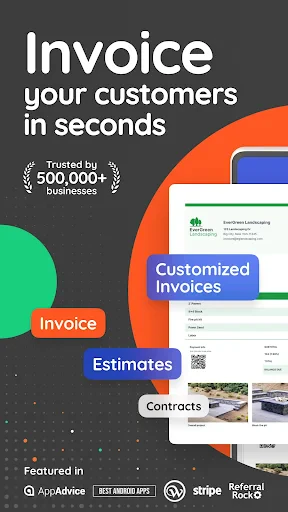
Invoice Simple: Invoice Maker is a mobile application designed to streamline the invoicing and billing process for freelancers, small business owners, and independent contractors. It transforms smartphones into efficient invoicing tools, allowing users to create, send, and manage professional invoices within minutes. The app emphasizes simplicity and speed, eliminating the complexity often associated with traditional accounting software. With an intuitive interface, users can generate customized invoices, track payments, and monitor their cash flow from anywhere. It serves as a digital financial assistant, catering specifically to the needs of individuals and micro-enterprises who require a straightforward, reliable, and professional solution to handle their billing needs without a steep learning curve or significant financial investment.
Chapter 1: Function
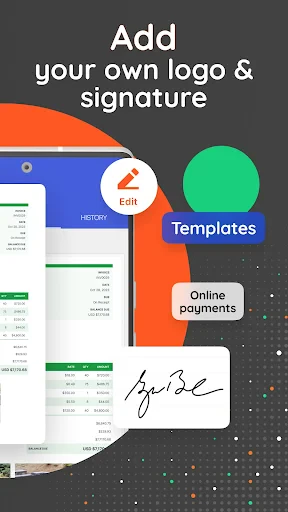
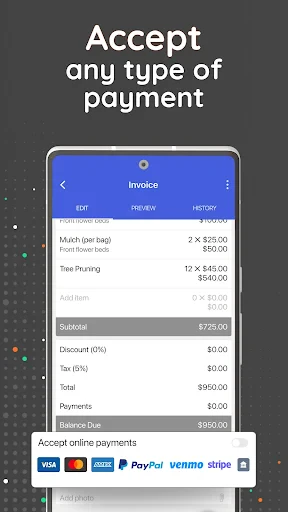
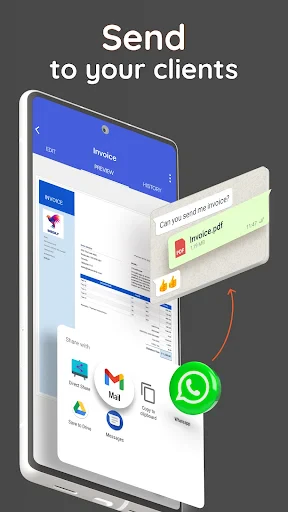
Invoice Simple's core functionality revolves around the swift creation and management of invoices. Users can generate a new invoice by selecting from clean, professional templates and filling in details such as client information, itemized lists of services or products, quantities, rates, taxes, and discounts. The app automatically calculates totals, including tax adjustments. It allows for customization by adding logos, personalized notes, and terms. Beyond creation, the app enables users to send invoices directly to clients via email or messaging apps with a single tap. It also provides essential management tools, including the ability to save client and item information for future use, track the status of sent invoices (such as pending, paid, or overdue), and record payments manually. Basic reporting offers insights into earned revenue and outstanding balances, consolidating key billing functions into a single, mobile-friendly platform.
Chapter 2: Value
The primary value proposition of Invoice Simple lies in its ability to save time, enhance professionalism, and improve cash flow management for solopreneurs and small teams. Its key advantage is unparalleled ease of use; the app is designed for immediate productivity, requiring no accounting knowledge or extensive setup. This democratizes professional billing, allowing anyone to present a polished, credible image to clients through well-designed invoices. Financially, it is a cost-effective alternative to complex accounting software or hiring a bookkeeper. The efficiency gains are significant—what might take an hour manually is reduced to minutes, enabling users to focus more on their core work rather than administrative tasks. Furthermore, by providing timely reminders and clear records of unpaid invoices, it actively helps in reducing payment delays and improving liquidity. The app's reliability and consistent performance ensure that users can issue invoices on-the-go, immediately after completing a job, which psychologically encourages faster client payment. Unlike generic spreadsheet templates, Invoice Simple offers a structured, error-minimizing environment that reduces calculation mistakes and presents all critical information clearly. This combination of simplicity, professional output, and financial utility delivers tangible value by simplifying operations, reinforcing brand credibility, and ultimately contributing to a more stable and organized business foundation.
Chapter 3: Scenarios
Invoice Simple is ideally suited for freelancers, independent contractors, and small business owners across various service-oriented industries. Primary user groups include consultants, photographers, handymen, tutors, personal trainers, graphic designers, and IT professionals—anyone who bills clients for projects or hourly work. A common use case is a freelance graphic designer who completes a logo design. Immediately after the client approves the work, the designer uses the app to quickly generate an itemized invoice listing the design hours and any additional asset costs, applies the agreed-upon rate, and emails the professional PDF directly from their phone. Another typical scenario involves a local plumber who, after finishing a repair at a customer's home, can create and send an invoice on the spot before leaving, speeding up the payment cycle. For a small retail vendor at a weekend market, the app helps track sales and send formal invoices to wholesale clients. In everyday use, these users rely on the app to monitor all outstanding payments, send polite payment reminders for overdue invoices, and maintain a clear, searchable history of all transactions for tax preparation and financial review. It effectively replaces paper pads, spreadsheets, and manual tracking for mobile professionals who need a centralized, accessible billing system.
Uninstall Instructions
For step-by-step guidance on how to safely remove this application from your device, please refer to our 《Uninstall Instructions》 document.
Pros
- generates professional invoices in under a minute
- tracks payment statuses with clear visual indicators
- offers customizable invoice templates for branding
- works offline and syncs data when back online
- exports detailed reports for basic accounting needs
Cons
- advanced features require a subscription plan
- limited integration with major accounting software
- template designs feel generic compared to competitors
- no multi-user or team collaboration features
- recurring invoice automation is relatively basic
Frequently Asked Questions
What is Invoice Simple and what does it do?
Invoice Simple is a mobile application designed for freelancers and small business owners to create, send, and manage professional invoices. Its core functions include generating customizable invoices, tracking payments, and sending payment reminders. It positions itself as a straightforward tool to streamline billing without complex accounting features.
Is Invoice Simple free to use, or are there in-app purchases?
Invoice Simple allows users to back up their invoice data to cloud services like iCloud (iOS) or Google Drive (Android) for safekeeping and transfer between devices. The app states it uses standard device and platform security measures. For specific details on data encryption and privacy policies, users should refer to the app's official privacy documentation.
What devices and operating systems does Invoice Simple support?
Invoice Simple operates on a freemium model. The basic version is free and includes core invoice creation features. For advanced functionalities like recurring invoices, client portals, or removing watermarks, a paid subscription is required. Details of specific plans and pricing are available within the app's settings or on the official website.
How does Invoice Simple handle data backup and security?
Invoice Simple is primarily a mobile application available for both iOS and Android devices. It can be downloaded from the Apple App Store and Google Play Store. The app is designed for smartphones and tablets. There is no information regarding a dedicated desktop or web version at this time.
Can I use Invoice Simple for recurring billing and payment tracking?
Yes, but advanced features like automated recurring invoices and detailed payment tracking reports are typically part of the paid subscription plans. The free version allows manual creation and basic status marking (paid/unpaid). For automated reminders and comprehensive income reporting, an upgrade is necessary.
App Info
Technical Info
Recommended For You

Sketchbook Lite - Artbook
Art & Design

Logos Bible Study App
Books & Reference

Clipboard
Business

Taximeter
Auto & Vehicles

Anime AI - Photo Maker
Art & Design

Magic Beauty Makeup Camera
Beauty

Doodle Master - Glow Art
Art & Design

Opera Mini: Fast Web Browser
Communication

RingCentral
Business

EOBD Facile: OBD 2 Car Scanner
Auto & Vehicles

King James Bible - KJV Offline
Books & Reference

POCKET COMICS: Premium Webtoon
Comics

Vivaldi Color Analysis
Beauty

Pixl - Face Retouch & Blemish
Beauty

RSA Authenticator (SecurID)
Communication

Draw Animation - Anim Creator
Art & Design

Merlin Bird ID by Cornell Lab
Books & Reference

Fonts - Logo Maker
Art & Design

PayPal Business
Business

Square Point of Sale: Payment
Business