
Print Photo - Print to Size
Screenshots



Description
About Print Photo - Print to Size Feature
Print Photo - Print to Size is a specialized mobile application designed to simplify the process of preparing and printing digital photographs. It serves as a practical bridge between the digital images on your smartphone and physical prints, addressing common issues such as incorrect aspect ratios, poor cropping, and wasted paper. The app provides users with intuitive tools to precisely adjust, crop, and layout their photos according to standard print sizes or custom dimensions before sending them to a printer. By focusing on accuracy and user control, it transforms the often-frustrating task of home photo printing into a straightforward and reliable experience, ensuring that the final print matches the user's vision perfectly.
Chapter 1: Function
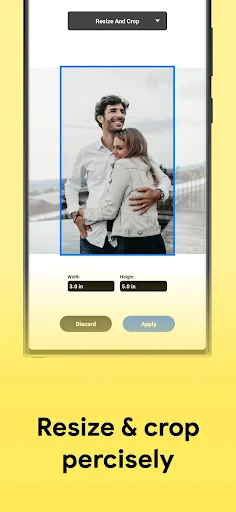
The core functionality of Print Photo - Print to Size centers on precise photo preparation for printing. Upon selecting a photo from the device's gallery, the user is presented with a selection of standard print sizes such as 4x6, 5x7, or 8x10 inches, as well as options for custom dimensions. The app's primary tool is a dynamic cropping and adjustment interface. This interface allows users to drag, resize, and position the photo within the target print frame, with visual guides ensuring critical elements of the composition are not cut off. It automatically handles resolution checks to warn users if an image is too low-quality for their chosen print size. Furthermore, the app includes basic editing features like rotation and simple color correction to make final tweaks. Once satisfied, users can directly send the formatted image to a connected wireless printer or save it as a perfectly sized file for later use, effectively eliminating guesswork.
Chapter 2: Value
The primary value proposition of Print Photo - Print to Size lies in its ability to deliver precision, convenience, and cost savings. Its key advantage is the elimination of wasted resources. By ensuring photos are cropped to the exact paper size before printing, users avoid the common disappointment of mismatched aspect ratios that result in unwanted white borders or cropped-out subjects, thereby saving ink, paper, and time. The app democratizes high-quality photo preparation, offering professional-level layout control in a simple, consumer-friendly package without the complexity or subscription fees of advanced photo editing software. It adds significant value by integrating seamlessly into the user's existing ecosystem—working directly with photos on the device and compatible home printers. This turnkey solution empowers users to create physical photo albums, wall art, or project materials with confidence. The assurance that the digital preview translates accurately to the physical print fosters creativity and encourages more frequent printing of cherished memories, enhancing the tangible connection to digital content in an efficient and user-controlled manner.
Chapter 3: Scenarios
Print Photo - Print to Size is ideally suited for a broad range of users who engage in home printing. A primary target group is families and photography enthusiasts who regularly print personal photos for albums, frames, or scrapbooking. These users benefit from the app's simplicity in turning smartphone snapshots into keepsakes without resorting to online printing services. Another key user segment includes students and professionals working on projects, presentations, or visual materials that require specific print dimensions, such as posters or photo collages for school assignments or business displays. The app is also highly valuable for small business owners, like crafters or Etsy sellers, who need to print product photos, labels, or promotional materials consistently and accurately at home. Everyday use cases involve quickly printing a recent family portrait for a grandparent, preparing a series of uniformly sized photos for a DIY wall gallery, or printing a correctly sized image for a document or vision board. In all scenarios, the app serves as an essential tool for anyone seeking reliable, on-demand control over the physical output of their digital images.
Uninstall Instructions
For step-by-step guidance on how to safely remove this application from your device, please refer to our 《Uninstall Instructions》 document.
Pros
- previews exact print layout before sending
- automatically crops and sizes for standard frames
- local printing only
- no cloud upload required
- supports borderless printing for full-bleed photos
- simple interface with minimal editing options
Cons
- requires specific printer models for full features
- no integrated photo editing or filter tools
- limited to standard photo paper sizes only
- local network printing can be unstable
- lacks direct ordering from professional labs
Frequently Asked Questions
What is Print Photo - Print to Size used for?
Print Photo - Print to Size is a mobile photo printing utility app. Its core function is to prepare and resize your digital photos for physical printing. It allows you to select standard photo paper sizes (like 4x6, 5x7, or A4), adjust crop and layout, and generate a properly formatted image file. This file can then be sent to a home printer or a professional printing service, ensuring the final print matches the intended size without unexpected cropping or quality loss.
Is the app free to use or are there in-app purchases?
The app is free to download and use for its basic photo resizing and layout functions. However, it may offer optional in-app purchases. These typically include premium features such as removing watermarks from saved images, accessing advanced editing tools, or obtaining additional layout templates. The app itself does not handle physical printing or sell photo paper; it only prepares the digital file for printing.
What devices and systems is this app compatible with?
Print Photo - Print to Size is designed for mobile devices. It is primarily available for iOS on the Apple App Store, compatible with iPhone and iPad. There is no information regarding an Android version. The app operates locally on your device to process photos from your camera roll. It does not require connection to specialized hardware but works with any printer that can receive image files from your device.
How does the app ensure my photo prints at the correct size?
The app uses the exact DPI (dots per inch) specifications required for professional-quality prints. When you select a paper size, it creates a canvas at the correct print resolution. You can then adjust and scale your photo within that canvas, with visual guides showing the safe area. This process ensures the image pixels match the physical dimensions, preventing blurry or pixelated prints. The final output is a standard image file formatted for your chosen size.
Can I print multiple photos on a single sheet with this app?
Yes, a key feature of the app is creating multi-photo collages on one standard paper size. You can select multiple photos from your library and choose from various grid templates (like 2x2, 3x3, or custom layouts). The app automatically arranges them on the virtual sheet, and you can adjust spacing and borders. This is designed for printing wallet-sized photos or multiple images efficiently on a single page of photo paper.
App Info
Technical Info
Recommended For You

BlueDriver OBD2 Scan Tool
Auto & Vehicles

Spam Call Blocker for Android
Communication

Phoenix - Fast & Safe
Communication

Ice Princess Makeup Salon
Comics

Chevron
Auto & Vehicles

SAP Concur
Business

Logo Maker : Graphic Designer
Business

Pashto short stories پښتو قیصی
Comics

Blue Yonder Workforce
Business

AutoScout24: Buy & sell cars
Auto & Vehicles

La Biblia en Español
Books & Reference

Gmail
Communication

Mens Hairstyles And Haircuts
Art & Design

DScanner - Camera Scanner
Business

Cartoon Photo Editor ・Toon AI
Art & Design

Shipt: Shopper and Driver
Business

Pixelcut AI Photo Editor
Art & Design

Translateasy Lingual Assistant
Books & Reference

ThinkDiag+
Auto & Vehicles

SpanishDictionary.com Learning
Books & Reference