
Cat Maker: Cat Emoji Sticker
Screenshots



Description
About Cat Maker: Cat Emoji Sticker Feature
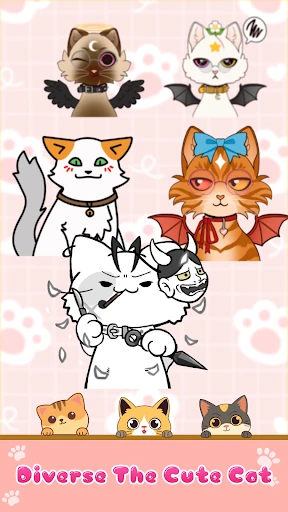
Cat Maker: Cat Emoji Sticker is a creative and entertaining mobile application designed for cat lovers and digital communicators. It allows users to design personalized cat-themed emojis and stickers by combining various facial features, accessories, and expressions. The app transforms simple ideas into a vast library of unique, shareable cat avatars, filling a niche in digital expression with feline charm. Its intuitive, playful interface makes it accessible to users of all ages, serving as a delightful tool to enhance messaging, social media posts, and personal digital content with a touch of customized cuteness.
Chapter 1: Function
The core function of Cat Maker: Cat Emoji Sticker is a modular, drag-and-drop creation studio. Users start with a basic cat face template and then customize it by selecting from an extensive catalog of elements. This includes different eye shapes, pupil styles, eyebrow positions, mouths, noses, and blushes. Beyond facial features, the app offers a wide array of accessories like hats, glasses, bows, and other quirky items to add character. Each element can be adjusted in size, rotated, and layered to achieve the desired look. Once the cat avatar is complete, users can save it directly as a transparent PNG sticker to their device's gallery or share it instantly through various messaging and social media platforms. The app essentially functions as a personal sticker factory, turning creative whims into tangible digital assets for everyday communication.
Chapter 2: Value
The primary value of Cat Maker: Cat Emoji Sticker lies in its ability to empower personalized digital expression. In an era where generic emojis dominate conversations, this app provides a unique outlet for users to create stickers that truly reflect their personality, current mood, or inside jokes. This level of customization adds a deeply personal and engaging layer to digital interactions, making messages more memorable and expressive. Its key advantages are multifaceted. First, it offers immense creative freedom with hundreds of combinable elements, ensuring no two creations are exactly alike. Second, the user experience is streamlined and satisfying; the interface is designed for simplicity, allowing for quick creation without a steep learning curve, which is crucial for casual use. Third, it directly addresses the practical need for diverse visual content in messaging and social media, providing an endless, self-generated supply. Furthermore, it taps into the universal appeal of cats and the culture of cute, offering emotional value through stress-relieving, joyful creation. Unlike many apps that offer pre-made sticker packs, Cat Maker gives users ownership and agency over their digital expression tools, making it a valuable and reusable asset in their communication toolkit.
Chapter 3: Scenarios
The app primarily targets several user groups. The most obvious are cat enthusiasts and pet owners who enjoy incorporating their love for felines into every aspect of their digital life. It also appeals heavily to younger demographics, including teenagers and young adults, who are active on social media platforms and messaging apps like WhatsApp, Instagram, and Discord, where unique stickers are a key part of social interaction and community identity. Furthermore, it serves casual users looking for a fun, creative pastime or a way to personalize their communications beyond standard emojis. Common use cases are varied. In everyday messaging, users create stickers to react specifically to friends' messages, celebrate occasions with custom birthday cat stickers, or simply say hello in a distinctive way. In online communities, especially gaming or hobby-based groups, these custom cat avatars can become personal mascots or reaction images. Content creators might use them to add branded, playful elements to their social media stories or videos. The app is typically used in short, creative sessions—whether during a commute, a break, or while chatting—to spontaneously generate the perfect sticker for the moment.
Uninstall Instructions
For step-by-step guidance on how to safely remove this application from your device, please refer to our 《Uninstall Instructions》 document.
Pros
- generates cat emojis from user photos instantly
- offers breed-specific sticker customization options
- local processing ensures no image data upload
- stickers integrate with major messaging keyboards
- requires minimal permissions for core functionality
Cons
- limited to cat faces; other pets not supported
- sticker styles lack dynamic or animated formats
- requires clear frontal pet photos for best results
- no social platform for sharing creations directly
- breed detection accuracy varies with photo quality
Frequently Asked Questions
What is Cat Maker and what does it do?
Cat Maker: Cat Emoji Sticker is a creative utility app in the personalization category. Its core function is to allow users to design and generate custom cat-themed emoji stickers. You can combine various cat faces, bodies, accessories, and text to create unique stickers for use in messaging apps and social media. It focuses on providing a simple, playful tool for personal expression rather than photo editing or professional design.
Is Cat Maker free to use or does it have in-app purchases?
The app is free to download and use with basic features. However, it offers in-app purchases to unlock additional sticker elements, premium accessories, more style variations, or to remove advertisements. The specific items and pricing for these purchases are detailed within the app's shop section. No additional physical equipment is required to use the app.
On which devices and platforms is Cat Maker available?
Cat Maker: Cat Emoji Sticker is available for download on mobile devices. It is primarily developed for the iOS platform and can be found on the Apple App Store. Information regarding specific version requirements (e.g., iOS 13.0 or later) and compatibility with iPad or Android devices should be verified on its official App Store page, as the developer may update these specifications.
How do I use the stickers I create in other apps?
After creating a cat sticker within Cat Maker, you can save it directly to your device's photo library. Once saved, you can access these image files from within other applications like WhatsApp, Instagram, or iMessage. Typically, you use the attachment or photo insert function in your chosen messaging or social media app to select and send the sticker you created.
What should I do if the app crashes or fails to save a sticker?
First, ensure your device's operating system is updated to a version supported by the app. Then, try closing and restarting the Cat Maker app. If the problem persists, restart your device. For persistent crashes or save failures, check your device's available storage space, as insufficient space can cause these issues. For further technical support, you can contact the developer through the support links provided in the App Store listing.
App Info
Technical Info
Recommended For You

Infinite Painter
Art & Design

All Email Connect
Communication

WOMBO Dream - AI Art Generator
Art & Design

scan my tesla
Auto & Vehicles

Hwahae(Korea’s Beauty APP)
Beauty

Hushed: US Second Phone Number
Communication

ABP for Samsung Internet
Communication

Easy Hairstyles for Girls
Beauty

WebComics - Webtoon & Manga
Comics

Sticker.ly - Sticker Maker
Communication

e-Sword: Bible Study to Go
Books & Reference

3D Modeling App: Sculpt & Draw
Art & Design
Drawing Pad Pro - Sketchpad
Art & Design

Orbot: Tor for Android
Communication
Tor OBD2 Diagnostics
Auto & Vehicles

My SafeLink
Communication

DailyBible Lite - KJV Version
Books & Reference

BambooHR
Business

Package Tracker - pkge Mobile
Business

Tayasui Sketches
Art & Design