
Remove Background From Video
Screenshots


Description
About Remove Background From Video Feature – A Professional Tool for Instant Video Editing
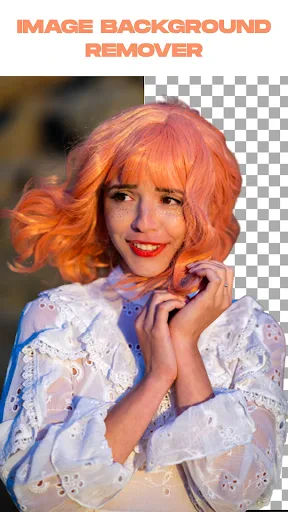
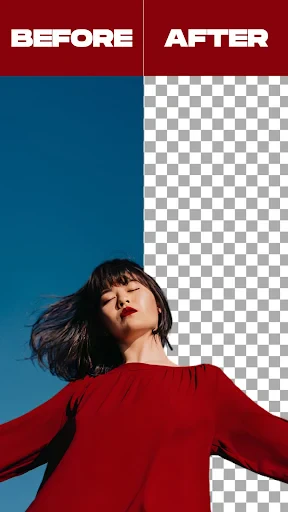
Remove Background From Video is a specialized mobile application designed to effortlessly separate subjects from their backgrounds in video clips. Utilizing advanced artificial intelligence and machine learning algorithms, it automates the complex process of video matting, which traditionally required sophisticated software and professional skills. The app provides a user-friendly interface that allows both casual users and content creators to achieve clean, precise background removal directly on their smartphones. By simplifying this technical task, it opens up a world of creative possibilities, enabling users to replace backgrounds, create composite scenes, or produce content with transparent backgrounds for various platforms, all with just a few taps.
Chapter 1: Function
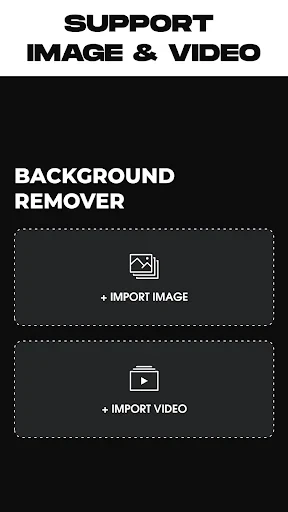
The core function of the Remove Background From Video app is precisely as its name suggests: to automatically detect and remove the background from any video footage. Users simply import a video from their device's gallery, and the AI goes to work, identifying the primary subject and meticulously separating it from the surrounding environment. The resulting output is a video with a transparent or green screen background, ready for further editing. Key functional features include the ability to process videos in high resolution, adjust the sensitivity of the subject detection for finer details like hair or translucent objects, and preview the results in real-time. The app also typically offers basic editing tools to refine the cutout, such as trimming the video length or applying a matte to clean up edges. The entire process is designed to be completed in minutes, transforming a technically demanding edit into a straightforward, automated task.
Chapter 2: Value
The primary value proposition of the Remove Background From Video app lies in its democratization of advanced video editing. It delivers professional-grade results through an automated, accessible, and cost-effective solution, eliminating the need for expensive software suites like Adobe After Effects or complex techniques like rotoscoping. Its key advantages are speed, simplicity, and quality. Where manual background removal can take hours, this app processes clips in seconds, significantly boosting productivity for creators on tight deadlines. The simplicity of its interface lowers the barrier to entry, making powerful editing feasible for marketers, educators, social media enthusiasts, and small business owners without formal training. Furthermore, the AI engine is continually refined to handle challenging scenarios, such as complex motions or detailed edges, ensuring a high-quality matte that maintains the subject's integrity. This combination empowers users to produce polished, attention-grabbing content for YouTube, TikTok, Instagram Reels, or professional presentations, enhancing their visual storytelling and brand presence without a substantial investment in time or resources. It turns a smartphone into a portable video studio, offering immense creative freedom and practical utility.
Chapter 3: Scenarios
The app serves a diverse range of target user groups across personal, professional, and educational contexts. Primary users include social media content creators and influencers who need to produce engaging, stylized videos with custom backgrounds or trendy transparent effects to stand out on platforms like TikTok and Instagram. Small business owners and digital marketers utilize it to create polished product demonstration videos, promotional content with branded backgrounds, or clean footage for advertisements. Educators and students find it valuable for creating dynamic instructional materials or presentation videos where the focus must remain solely on the speaker or a specific object. Additionally, it is immensely useful for individuals crafting personalized content, such as custom greetings, wedding videos, or hobby-related clips. Everyday use cases involve a user filming a simple clip indoors, then using the app to replace their living room wall with a scenic beach, a dynamic graphic, or a solid color for a professional look. Another common scenario is an online seller removing a cluttered background from a product video to present the item more attractively on an e-commerce site. Essentially, anyone needing to isolate a subject in a video quickly and effectively is part of this app's target audience.
Uninstall Instructions
For step-by-step guidance on how to safely remove this application from your device, please refer to our 《Uninstall Instructions》 document.
Pros
- one-click removal for video backgrounds in seconds
- processes 4K videos while preserving fine details
- no watermark on exported videos for free users
- local processing ensures no data upload delays
- maintains consistent edge accuracy with moving subjects
Cons
- high-resolution exports require substantial device storage
- real-time preview limited on older smartphone models
- struggles with semi-transparent objects like glass
- no integrated editor for post-removal adjustments
- batch processing unavailable for multiple video files
Frequently Asked Questions
What is Remove Background From Video and what does it do?
Remove Background From Video is a specialized mobile app designed for automatic video background removal. Its core function is to isolate the main subject from the background in your video clips using AI technology. You can then replace the original background with a different color, image, or video, or keep it transparent. It's primarily used for creating content for social media, presentations, or creative projects where a clean or custom background is needed.
Is the app free to use or does it have in-app purchases?
The app typically operates on a freemium model. You can download and use basic features for free, which often includes processing short videos with a watermark. To access advanced features like HD export, longer video lengths, removing watermarks, or using premium background libraries, you will need to subscribe to a premium plan or make a one-time purchase. Specific pricing details are available within the app's subscription settings.
What devices and systems is this app compatible with?
Remove Background From Video is primarily available as a mobile application. It is commonly developed for both iOS (via the Apple App Store) and Android (via Google Play) platforms. The app is designed to run on smartphones and tablets. For optimal performance, it requires a relatively recent operating system version, and processing speed may vary depending on your device's hardware capabilities and the length/resolution of the video.
How accurate is the AI at removing video backgrounds?
The AI background removal accuracy is generally good for videos with clear contrast between a distinct subject and background, such as a person against a plain wall. It may struggle with complex details like fine hair, transparent objects, or fast-moving subjects, which can result in imperfect edges. Results vary based on video quality, lighting, and subject matter. Manual refinement tools are sometimes provided in premium versions to improve the final cutout.
What should I do if the app crashes or fails to process a video?
First, ensure your device meets the system requirements and has a stable internet connection, as AI processing may require online servers. Try restarting the app and your device. If the issue persists, check for app updates in your device's app store, as updates often contain bug fixes. You can also try processing a shorter or lower-resolution video clip. For further support, contact the developer through the official support channel listed in the app's description on the app store.
App Info
Technical Info
Recommended For You

Messages - SMS Texting App
Communication

Skincare Routine
Beauty

ibis Paint X
Art & Design

Bible-Daily Bible Verse
Books & Reference

FoxEyes - Change Eye Color
Beauty

Magnificat Lenten 2025
Books & Reference

AR Draw Sketch & Paint
Art & Design

FX File Explorer: Plus License
Business

FunSwap - AI Face Swap
Beauty

Passport Photo: ID Photo Print
Art & Design

Picrew PFP & OC Maker
Art & Design

Handshake Jobs & New Careers
Business

Caller ID - Block Spam Call
Communication

BimmerCode for BMW and MINI
Auto & Vehicles

HD Camera for Android
Beauty

Learn Drawing
Art & Design

Messages - SMS, Chat Messaging
Communication

GoDaddy Studio: Create & Grow
Art & Design

Flyers, Poster Maker, Design
Business

Universalis
Books & Reference