
Invitation Maker & Card Design
Screenshots



Description
About Invitation Maker & Card Design App Features
Invitation Maker & Card Design is a comprehensive mobile application designed to simplify the process of creating personalized invitations and greeting cards. It caters to users seeking a professional and creative touch for their events without requiring advanced design skills. The app provides an extensive library of templates, design tools, and customization options, enabling users to craft unique digital or printable cards for any occasion directly from their smartphones or tablets.
Chapter 1: Function
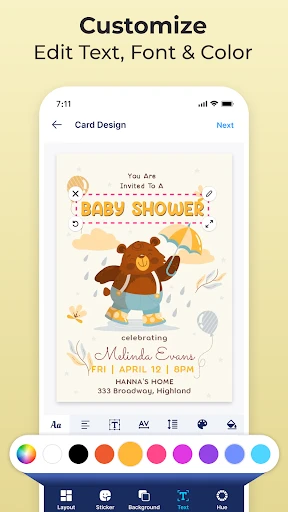
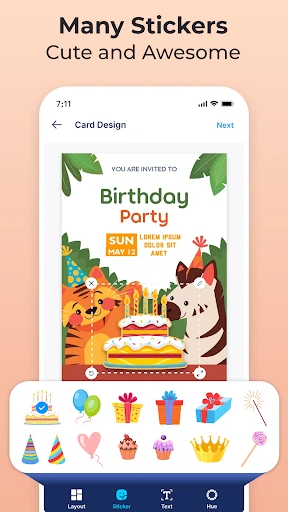
The app's core functionality revolves around a user-friendly design studio. It offers thousands of professionally designed templates for events like weddings, birthdays, corporate gatherings, and holidays. Users can select a template and personalize every element: text, fonts, colors, and images. The tool includes a robust editor for adding photos from the device's gallery, applying filters, and adjusting layouts. Furthermore, it provides options to manage guest lists, add event details like maps and RSVP links, and share the final creation via multiple channels. The output can be saved as a high-quality image, PDF for printing, or shared digitally through messaging apps, email, or social media platforms, making the entire process from conception to distribution seamless.
Chapter 2: Value
The primary value of Invitation Maker & Card Design lies in its empowerment of users to become their own designers, offering significant cost savings, time efficiency, and creative freedom. Compared to traditional professional design services or generic store-bought cards, this app provides an affordable, one-stop solution with immense variety and instant results. Its key advantages include a vast and constantly updated template library that ensures modern and trendy designs for every conceivable occasion. The intuitive drag-and-drop interface makes professional design accessible to everyone, regardless of technical expertise. The integration of practical features like guest list management and RSVP tracking adds organizational value beyond mere design. The ability to instantly share digital cards reduces paper waste and postage costs, appealing to eco-conscious and budget-aware users. Moreover, the deep personalization possible—from embedding family photos to customizing wording—ensures each creation feels unique and heartfelt, adding a personal touch that mass-produced cards cannot match. This combination of convenience, affordability, and creative control delivers exceptional value for personal and light professional use.
Chapter 3: Scenarios
This app is ideally suited for individuals and small business owners who frequently organize events and value personalization. Primary user groups include busy parents planning birthday parties or family celebrations, couples organizing weddings or baby showers, corporate assistants coordinating office events or seminars, and small entrepreneurs hosting launch parties or promotional workshops. Everyday use cases are diverse: a mother can quickly design a themed birthday invitation for her child's party, add a photo, and share it in a parent group chat within minutes. A freelance event planner can create cohesive, branded invitations for a client's networking event, complete with a logo and RSVP link. A friend might use it to craft a heartfelt, custom congratulatory card for a graduation. The app is also valuable for creating digital flyers for community fundraisers, holiday greetings for distant relatives, or thank-you cards after a gathering. Essentially, it serves anyone needing a polished, personalized, and timely communication piece for social or semi-formal occasions.
Uninstall Instructions
For step-by-step guidance on how to safely remove this application from your device, please refer to our 《Uninstall Instructions》 document.
Pros
- offers extensive templates for diverse social events
- integrates guest list management with card creation
- enables real-time collaboration on a single design
- exports high-resolution prints and digital shares
- provides precise RSVP tracking and analytics
Cons
- premium templates require a subscription
- advanced editing has a steep learning curve
- collaboration needs stable internet connection
- large guest lists slow down older devices
- limited customization for non-standard card sizes
Frequently Asked Questions
What is Invitation Maker & Card Design for?
Invitation Maker & Card Design is a mobile application designed for creating custom digital and printable invitations, greeting cards, and announcements. Its core function is to provide users with a template-based design tool, enabling easy customization for events like weddings, birthdays, and parties. It positions itself as an all-in-one solution for personal and semi-professional card design without requiring advanced graphic skills.
Is the app free to use or are there in-app purchases?
The app is free to download and use with access to a basic set of templates and design tools. However, it operates on a freemium model, offering in-app purchases. Premium features, such as exclusive high-quality templates, advanced editing tools, removal of watermarks, and high-resolution exports for printing, typically require a one-time purchase or a subscription.
What devices and systems is this app compatible with?
Invitation Maker & Card Design is primarily available for iOS and Android mobile devices. It is optimized for smartphones and tablets. The app requires a recent version of the operating system (e.g., iOS 13+ or Android 8+) for full functionality. It does not require any additional external hardware. Users should check their respective app stores for the most current compatibility information.
How do I save or share my finished card design?
After designing your card, you can save the project within the app for future edits. To share or use the final design, you can export it. The app typically allows sharing directly to social media, messaging apps, or via email as a digital image. For physical printing, you can export a high-resolution PDF or image file, which may be a premium feature. Always ensure you have the correct permissions for saving to your device's gallery.
Can I use my own photos and fonts in the designs?
Yes, a key feature of the app is the ability to import and use personal photos from your device's library. You can add these photos to templates and customize them with cropping and filters. Regarding fonts, the app provides a curated selection of fonts. The ability to upload and use custom external fonts is not typically a standard feature and depends on the app's specific capabilities, which may be limited to its built-in font library.
App Info
Technical Info
Recommended For You

Proton Mail: Encrypted Email
Communication

Chumba Casino Real Money ayuda
Comics

Gruveo - Video Conferencing
Communication

MangaGo - Ultimate Manga App
Comics

PrinterShare Mobile Print
Business

ArcStory - AI Comic generator
Comics

Bazaart AI Photo Editor Design
Art & Design

TeslaMirror
Auto & Vehicles

Maverik Rewards
Business

Meeting - Video Conference
Business

Tappytoon Manhwa & Novels
Comics

PENUP – Drawing-sharing SNS
Art & Design

Car Key Smart Remote Connect
Auto & Vehicles

AR Drawing: Paint & Sketch App
Art & Design

PDF Scanner app - TapScanner
Business

Text, Call & Phone number
Communication

Whistle Express Car Wash
Auto & Vehicles

مانجا للصغار
Comics

Anime tv - Anime Tv Online HD
Comics

Quran for Android
Books & Reference