
CDisplayEx Comic Reader
Screenshots


Description
About CDisplayEx Comic Reader Feature
CDisplayEx Comic Reader is a powerful and versatile application designed for reading digital comic books and graphic novels across multiple platforms, including Android and iOS. It stands as a modern successor to the classic CDisplay software, tailored for mobile and tablet devices. The app supports a wide array of popular comic archive formats such as CBR, CBZ, PDF, and more, providing a seamless and immersive reading experience. Its primary focus is on delivering high-performance rendering, intuitive navigation, and extensive customization options to cater to both casual readers and dedicated comic enthusiasts. By combining robust functionality with a user-friendly interface, CDisplayEx has established itself as a reliable tool for managing and enjoying digital comic collections on the go.
Chapter 1: Function
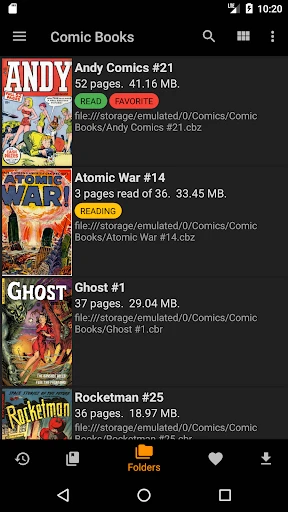
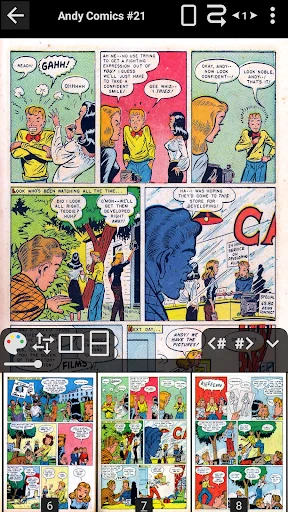
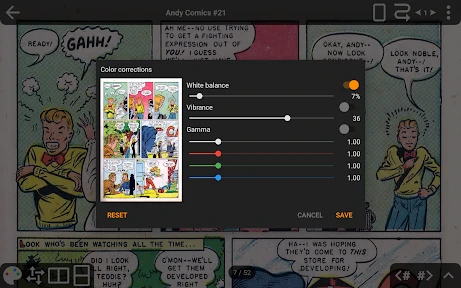
CDisplayEx Comic Reader excels in its core function of displaying digital comic archives with precision and speed. It natively opens files in CBR, CBZ, CB7, CBT, and PDF formats, automatically organizing pages for sequential reading. The app features a customizable viewing engine that allows users to adjust zoom modes, including fit to width, fit to height, or manual zoom, with smooth scrolling and tapping gestures for page navigation. It supports both portrait and landscape orientations and can automatically rotate double-page spreads for optimal viewing. Key functional tools include a library manager for organizing files locally or from cloud storage, a bookmarking system to save progress, and a thumbnail view for quick page selection. Additionally, it offers advanced options like color adjustment filters, reading direction settings for manga, and support for encrypted archives, ensuring a tailored reading session for every user.
Chapter 2: Value
The value proposition of CDisplayEx Comic Reader lies in its uncompromising dedication to performance, compatibility, and user control, distinguishing it from many simpler readers. Its foremost advantage is exceptional format support, handling nearly every common comic archive type without requiring external converters, which saves time and preserves file integrity. The app's rendering engine is highly optimized, enabling rapid loading of high-resolution images even in large archives, ensuring a stutter-free experience. For users with extensive collections, its robust library management and folder-based organization are invaluable. Beyond basics, CDisplayEx offers deep customization; users can fine-tune gesture controls, display settings like brightness and color temperature for night reading, and even configure precise zoom locks. This level of control empowers users to create a perfectly personalized reading environment. Furthermore, its minimalist interface avoids clutter, focusing attention on the artwork, while powerful options remain accessible. The app receives consistent updates, addressing compatibility and adding features based on community feedback, which underscores its long-term reliability. For the price, it delivers professional-grade utility, making it a cost-effective, one-time purchase that serves as a comprehensive solution for serious comic readers who value efficiency and quality over gimmicky features.
Chapter 3: Scenarios
CDisplayEx Comic Reader primarily targets dedicated comic book and manga enthusiasts who maintain personal digital libraries. Its core user group includes collectors who have amassed large archives of comics in formats like CBR and CBZ, requiring a reliable, high-fidelity viewer for regular reading. It is equally valuable for manga readers who need support for right-to-left reading direction and seamless scrolling through long, vertical strips. Everyday use cases are varied: a commuter might use it on a tablet to read a few pages during a train ride, utilizing the smart bookmarking to easily resume later. A collector at home could connect the app to a network share or cloud drive to browse and read from their entire collection directly on a large-screen device, enjoying the crisp display of double-page spreads. The app is also practical for reviewers or artists who need to examine comic artwork in detail, leveraging the precise zoom and color adjustment tools. Its simplicity and power make it suitable for older teens and adults who prefer a no-nonsense, highly functional reader over apps laden with social features or storefronts, focusing purely on the immersive enjoyment of sequential art.
Uninstall Instructions
For step-by-step guidance on how to safely remove this application from your device, please refer to our 《Uninstall Instructions》 document.
Pros
- opens virtually any comic archive format seamlessly
- two-page view perfectly mimics physical comic reading
- highly configurable keyboard shortcuts for rapid navigation
- minimalist interface maximizes screen space for artwork
- lightweight with near-instantaneous loading of pages
Cons
- interface feels dated and lacks modern visual polish
- no built-in library management for large collections
- primarily keyboard-driven
- with limited touchscreen optimization
- advanced settings may overwhelm casual readers
- lacks integrated cloud sync or backup features
Frequently Asked Questions
What is CDisplayEx Comic Reader and what does it do?
CDisplayEx is a dedicated comic and manga reader app for Windows. Its core function is to open and display digital comic book files in formats like CBZ, CBR, PDF, and ZIP/RAR archives containing images. It provides a streamlined, full-screen reading experience with features such as two-page viewing, zoom, and bookmarking, positioning itself as a lightweight, fast alternative to general-purpose image viewers for comic enthusiasts.
Is CDisplayEx free to use or does it have in-app purchases?
CDisplayEx follows a freemium model. The basic version is free with core reading functionality. A one-time purchase Pro license unlocks advanced features like folder monitoring, additional archive formats (7Z, PDF), enhanced image processing, and removes occasional reminder dialogs. There are no subscriptions or recurring in-app purchases. The Pro upgrade is handled externally, not through an in-app store.
What devices and operating systems does CDisplayEx support?
CDisplayEx is primarily a Windows desktop application. It is compatible with Windows 10 and Windows 11. There are no official versions for macOS, Linux, iOS, or Android. It is optimized for use on PCs, laptops, and tablets running Windows, and it supports both touchscreen and traditional keyboard/mouse input methods for navigation.
How does CDisplayEx handle different comic file formats and archives?
The app natively supports CBZ and CBR files, which are ZIP and RAR archives of images, respectively. The free version can also read images directly from ZIP/RAR folders. The Pro version adds support for 7Z archives and PDF files. It automatically extracts and sequences images within these archives for seamless page-by-page reading, handling common image formats like JPG, PNG, and GIF.
Can I organize my comic library or create reading lists in CDisplayEx?
CDisplayEx is primarily a viewer, not a full-featured library manager. It excels at opening and reading individual files or all files in a selected folder sequentially. It lacks integrated metadata tagging, complex shelving, or cloud sync features. For organization, users typically rely on their operating system's folder structure. The Pro version's folder monitoring can auto-open new files in a watched directory.
App Info
Technical Info
Recommended For You

Paint
Art & Design

QuickBooks Online Accounting
Business

Penny Puss 2.0
Business

Vector Ink: SVG, Illustrator
Art & Design

UKG Dimensions
Business

Whitepages - Find People
Communication

Watch Duty (Wildfire)
Communication

Show My Colors: Color Palettes
Beauty

myAudi
Auto & Vehicles

ElevenReader - Text to Speech
Books & Reference

All Email Login
Communication

Switch Natural
Beauty

Robokiller - Spam Call Blocker
Communication

Monster Job Search
Business

UKG Pro
Business

Good Morning Wishes
Communication

Birthday Invitation Card Maker
Art & Design

Messenger
Communication

GigU
Auto & Vehicles

SketchPad - Doodle On The Go
Art & Design