
EPUB Reader for all books
Screenshots
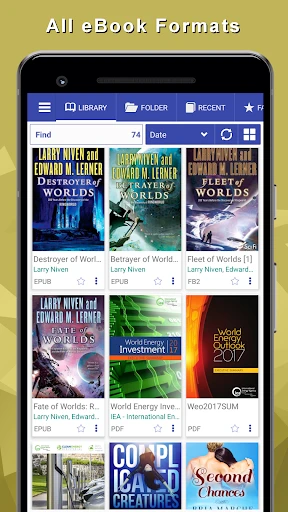


Description
About EPUB Reader for All Books Feature – Your Portable Digital Library
EPUB Reader for All Books is a dedicated application designed to provide a seamless and powerful reading experience for EPUB format e-books on mobile devices. It serves as a versatile digital library, enabling users to effortlessly import, organize, and read their EPUB book collections. The app prioritizes user comfort with customizable reading interfaces and supports a wide range of functionalities tailored for book enthusiasts, students, and professionals alike. By focusing on the open EPUB standard, it offers a reliable and feature-rich alternative to platform-specific reading apps, making it an essential tool for anyone who consumes digital literature.
Chapter 1: Function
The core functionality of EPUB Reader for All Books centers on robust EPUB file management and an enhanced reading engine. Users can import books from various sources, including local device storage, cloud services, or direct downloads. The app automatically catalogs imported books, allowing for organization by title, author, or user-defined shelves. Its reading interface is highly customizable, offering adjustable font styles, sizes, background colors, margins, and line spacing to reduce eye strain. Key features include a precise table of contents navigation, bookmarking, text highlighting, and note-taking capabilities. The app supports both reflowable text and fixed-layout EPUBs, ensuring compatibility with a vast majority of digital publications. Furthermore, it integrates a built-in dictionary for instant word lookups and often includes text-to-speech functionality for auditory learning or hands-free listening.
Chapter 2: Value
The primary value proposition of EPUB Reader for All Books lies in its commitment to being a universal, user-centric, and distraction-free reading environment. Unlike many ecosystem-locked apps, it champions format freedom, empowering users to build and access their personal ebook collections from any source without vendor lock-in. This represents significant long-term value, preserving users' digital book investments. Its key advantages are multifaceted. First, the depth of customization surpasses many generic readers, allowing users to craft the perfect visual experience for prolonged reading sessions, which is crucial for comfort and comprehension. Second, its comprehensive annotation toolkit—highlighting, notes, and bookmarks—transforms passive reading into an interactive study session, making it invaluable for students and researchers. Third, the app's performance is optimized for handling large libraries and complex EPUB files smoothly, ensuring quick opening and page rendering. Additionally, features like cross-device synchronization (often via cloud), night mode, and reading progress statistics add layers of convenience and insight. By combining these elements, the app delivers superior utility, control, and a personalized experience that directly enhances the user's engagement with digital text, making it a powerful tool for knowledge acquisition and leisure reading alike.
Chapter 3: Scenarios
EPUB Reader for All Books caters to a diverse spectrum of users whose common need is a reliable and flexible digital reading tool. The primary target groups include avid readers and book collectors who maintain extensive personal EPUB libraries sourced from free repositories or purchases outside major platforms. Students and academics form another core user base, utilizing the app's annotation and reference features to study textbooks, research papers, and academic journals in EPUB format. Professionals may use it to read industry reports, manuals, or lengthy documents during commutes or travel. Everyday use cases are varied: a commuter customizing the screen for glare-free reading on a train; a student highlighting key passages and adding marginal notes for an upcoming exam; a language learner tapping on unfamiliar words for instant dictionary definitions; or a fiction enthusiast adjusting font and brightness for a comfortable bedtime reading session. The app seamlessly integrates into daily routines, serving as a portable, personalized library accessible anytime, anywhere, turning idle moments into productive or enjoyable reading opportunities.
Uninstall Instructions
For step-by-step guidance on how to safely remove this application from your device, please refer to our 《Uninstall Instructions》 document.
Pros
- opens DRM-protected EPUBs without conversion
- vertical scrolling mimics web page reading flow
- custom CSS injection for precise typography control
- integrates directly with cloud storage for library sync
- background audio playback for embedded book audio
Cons
- advanced customization requires CSS coding knowledge
- no built-in store or social annotation sharing
- vertical scrolling may disorient traditional ebook users
- cloud sync limited to configured personal accounts
- audio playback drains battery during long sessions
Frequently Asked Questions
What is EPUB Reader and what does it do?
EPUB Reader for all books is a dedicated e-book application designed to open, manage, and read EPUB format files. Its core function is to provide a seamless reading experience with features like customizable fonts, themes, and reading progress tracking. It positions itself as a versatile, user-friendly tool for accessing a personal digital library, eliminating the need for multiple reading apps.
Is EPUB Reader free to use or does it have in-app purchases?
The app is free to download and use for basic reading functionality. It may offer optional in-app purchases to unlock advanced features such as ad-free reading, additional theme packs, or advanced library organization tools. The app does not require any additional physical equipment to function.
What devices and systems is this app compatible with?
EPUB Reader is primarily available for Android devices. It is designed to be compatible with a wide range of smartphones and tablets running on modern versions of the Android operating system. There is no official information regarding its availability on iOS, Windows, or other platforms.
How can I transfer my own EPUB books into the app?
You can import your EPUB files into the app through several methods. Common ways include using your device's file manager to open the EPUB file with this app, transferring files via USB to your device's storage, or importing from cloud storage services if supported. The app typically scans designated folders for compatible book files automatically.
Does the app support bookmarking and text highlighting?
Yes, EPUB Reader supports core reading features including adding bookmarks, highlighting text in various colors, and adding notes. These annotations are saved within the app and are tied to the specific book file, allowing you to resume your study or reading session seamlessly across different devices using the same library.
App Info
Technical Info
Recommended For You

Challenger Comics Viewer
Comics

Hairstyles step by step
Beauty

CarParts.com
Auto & Vehicles

Sky Map
Books & Reference

Visual Voicemail
Business

XBrowser - Mini & Super fast
Communication

Time Clock: Easy Tracker
Business

Repixel: AI Photo Enhancer
Art & Design
Daily Bible Study: Audio, Plan
Books & Reference
Tor OBD2 Diagnostics
Auto & Vehicles

InnoCaption Live Call Captions
Communication

PENUP – Drawing-sharing SNS
Art & Design

Grubhub for Drivers
Business

Sketchbook Lite - Artbook
Art & Design

PrinterShare Mobile Print
Business

CallApp: Caller ID & Block
Communication

DailyBible Lite - KJV Version
Books & Reference

Superhero Flying speedster
Comics

Girls Hairstyle Step By Step
Beauty

PDF Reader: Edit & Convert PDF
Business