
SAP Concur
Screenshots

Description
About SAP Concur Feature – Streamlining Travel, Expense, and Invoice Management
SAP Concur is a comprehensive cloud-based solution designed to automate and integrate corporate travel booking, expense reporting, and invoice management. It serves as a centralized platform that connects spending data, policy controls, and process workflows, providing organizations with real-time visibility and control over employee-initiated expenditures. By digitizing traditionally manual and paper-heavy processes, SAP Concur helps businesses enhance compliance, improve operational efficiency, and gain deeper insights into spending patterns, ultimately driving smarter financial decisions and cost savings.
Chapter 1: Function
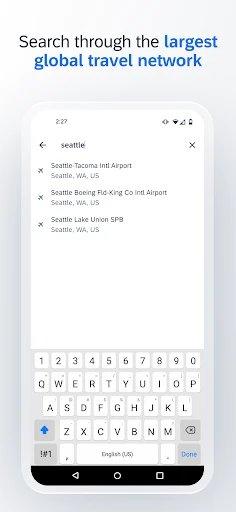
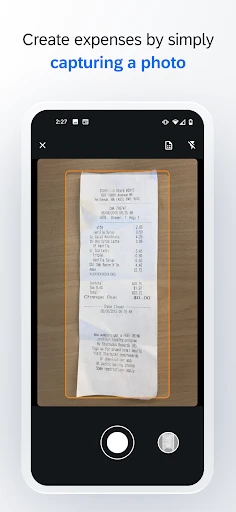
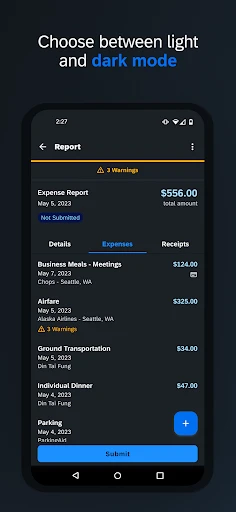
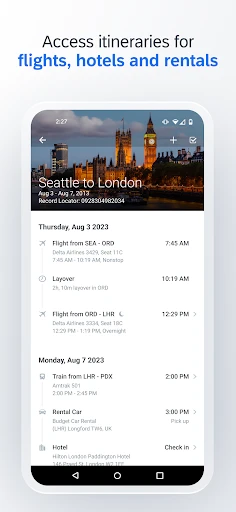
SAP Concur's core functionality revolves around three interconnected modules: Travel, Expense, and Invoice. The Travel module allows employees to book trips within company policy, integrating with a global network of travel suppliers. The Expense module enables users to capture receipts digitally via mobile scanning, automatically generate expense reports by importing card transactions and travel bookings, and submit them for approval with minimal manual entry. The Invoice module handles supplier invoice capture, processing, and approval workflows. These modules work in unison, automatically applying corporate spending policies, flagging out-of-policy items, and routing transactions through configured approval hierarchies. The system also facilitates direct reimbursement to employees and provides integration capabilities with major ERP and financial systems like SAP S/4HANA for seamless data synchronization.
Chapter 2: Value
The primary value proposition of SAP Concur lies in its ability to transform spend management from a reactive, administrative burden into a strategic, data-driven function. Its key advantages start with unparalleled visibility. By consolidating T&E and invoice data into a single platform, finance leaders gain real-time insights into company-wide spending, enabling proactive budget management and policy enforcement. This visibility directly enhances compliance; the system can automatically enforce spending rules at the point of booking or expense entry, reducing policy violations and audit risks. Secondly, it drives significant operational efficiency. Automating data capture and report generation saves employees and approvers countless hours, boosting productivity and improving the user experience. For finance teams, automation reduces manual processing errors, accelerates reimbursement cycles, and shortens the financial close. Thirdly, the integrated data empowers strategic decision-making. Advanced analytics and detailed reporting help identify cost-saving opportunities, negotiate better rates with preferred vendors, and optimize travel programs. The platform's scalability and global compliance features make it a robust solution for organizations of all sizes, particularly those operating internationally, ensuring adherence to diverse tax and regulatory requirements.
Chapter 3: Scenarios
SAP Concur primarily targets mid-sized to large enterprises across all industries, especially those with a mobile workforce and substantial travel and expense volumes. Key user groups include employees who frequently travel for work, managers who approve reports and budgets, and finance/accounting professionals responsible for compliance, auditing, and financial reporting. In everyday use, a sales representative uses the mobile app to book a flight and hotel for a client visit, scan and upload dinner receipts instantly, and submit a completed expense report within minutes after the trip. A project manager, as an approver, receives notifications, reviews submitted reports on their phone, checks policy compliance flags added by the system, and approves with a tap. Meanwhile, the finance team uses the platform's dashboard to monitor real-time spending against departmental budgets, run reports on vendor spending to leverage negotiation, and ensure all invoices are processed and paid accurately ahead of the quarterly close. The system is equally critical for organizations enforcing strict governance or operating in highly regulated sectors, where audit trails and policy adherence are paramount.
Uninstall Instructions
For step-by-step guidance on how to safely remove this application from your device, please refer to our 《Uninstall Instructions》 document.
Pros
- automates expense report creation from scanned receipts
- enforces corporate travel policy via real-time compliance checks
- direct integration with major airlines and hotel booking systems
- provides detailed analytics on company-wide spending patterns
- supports complex multi-currency and tax calculation workflows
Cons
- requires significant initial configuration and employee training
- mobile receipt capture can be slow with poor connectivity
- custom reporting features have a steep learning curve
- per-user licensing model can be costly for small businesses
- occasional sync delays with non-native accounting software
Frequently Asked Questions
What is SAP Concur and what does it do?
SAP Concur is a comprehensive travel, expense, and invoice management platform designed for businesses. Its core functions include automating expense report creation, streamlining corporate travel booking, and managing supplier invoices. The app allows employees to capture receipts via mobile camera, automatically extract data, and submit expenses on the go. It helps organizations enforce policy compliance, gain spending insights, and simplify reimbursement processes, positioning itself as an end-to-end spend management solution.
Is SAP Concur free for individual users to download and use?
No, SAP Concur is not a free consumer app. It is an enterprise-grade software solution sold to companies. Individual employees typically access the mobile or web app as part of their company's subscription. The pricing, features, and availability are determined by the contractual agreement between the employer and SAP Concur. End-users do not pay directly; they use the service provided by their organization to manage business-related travel and expenses.
What devices and systems does the SAP Concur mobile app support?
The SAP Concur mobile app is available for both iOS and Android devices. It supports iPhones and iPads running recent versions of iOS, as well as smartphones and tablets running Android. The app is optimized for mobile use, allowing offline receipt capture with sync once online. For full functionality, including detailed reporting and administrative tasks, users often access the companion web platform via desktop browsers. Specific version requirements are listed on the official Apple App Store and Google Play Store pages.
How does SAP Concur handle receipt scanning and data extraction?
SAP Concur uses mobile camera integration for receipt scanning. Users can photograph receipts, and the app employs optical character recognition (OCR) and intelligent data extraction technology to read merchant names, dates, amounts, and currencies. This data automatically populates expense line items, reducing manual entry. The system can also match receipts to specific corporate card transactions. It supports various receipt formats and stores digital copies for audit trails. Accuracy depends on receipt clarity and format, so users are advised to review auto-filled details.
What should I do if I encounter a technical issue or need support?
Support for SAP Concur is primarily channeled through your company's internal administrator or finance team, as they manage the corporate account and service agreement. For common user issues like login problems or app errors, first consult your organization's internal help resources or designated Concur coordinator. If directed, you can use the 'Help' section within the app or web platform. SAP Concur provides direct support to the subscribing company's administrators, who are responsible for troubleshooting and escalating issues on behalf of their employees.
App Info
Technical Info
Recommended For You

أرت نوين
Comics

Libby, the Library App
Books & Reference

Veryable: Work. Next Day Pay
Business

My Bible - Verse+Audio
Books & Reference

Advance Auto Parts
Auto & Vehicles

Telegram
Communication

Sideline: 2nd Phone Line App
Communication

Car play/Android Auto Sync
Auto & Vehicles

Autowini
Auto & Vehicles

StyleKorean
Beauty

X Launcher Pro
Art & Design

漫画 ”Renta”マンガ レンタル漫画アプリ
Comics

Package Tracker - pkge Mobile
Business

Flowt Wear
Auto & Vehicles

DreamPic - AI Image Generator
Art & Design

Session - Private Messenger
Communication

Messenger - Texting App
Communication

Amazon A to Z
Business

Girls Hairstyle Step By Step
Beauty

Opera GX: Gaming Browser
Communication