
Invoice Maker & Estimate Maker
Screenshots



Description
About Invoice Maker & Estimate Maker Features
Invoice Maker & Estimate Maker is a professional mobile application designed for freelancers, small business owners, and service providers to create, manage, and send invoices and estimates directly from their smartphones. It streamlines the billing process by offering a suite of tools that transform complex financial documentation into a simple, quick task. The app serves as a digital assistant for financial transactions, enabling users to maintain a professional image, ensure timely payments, and keep accurate records without the need for extensive accounting knowledge or desktop software.
Chapter 1: Function
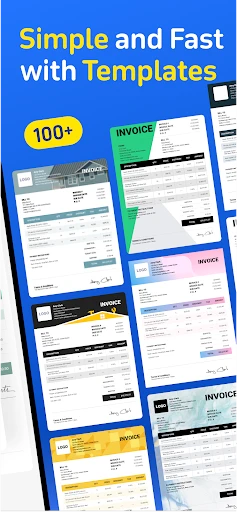
The core functionality of Invoice Maker & Estimate Maker centers on the effortless creation and management of financial documents. Users can generate detailed invoices and estimates by selecting from customizable templates. The app allows for the addition of business logos, client details, itemized lists of products or services, taxes, discounts, and payment terms. It automatically calculates totals and taxes. Beyond creation, the app functions as an organizer, storing client information, tracking sent documents, and monitoring payment statuses such as paid, pending, or overdue. Users can send documents directly via email or messaging apps from within the application and can save them as PDF files for offline use or printing. Basic reporting features provide insights into income and outstanding payments.
Chapter 2: Value
The primary value proposition of Invoice Maker & Estimate Maker lies in its ability to democratize professional billing, saving significant time and reducing administrative overhead for micro-businesses and independent professionals. Its key advantages are multifaceted. First, it enhances professionalism by providing polished, brand-consistent documents that build trust with clients. Second, it promotes financial organization by centralizing client data, document history, and payment tracking in one secure, portable location, effectively replacing paper trails and scattered spreadsheets. This organization leads to improved cash flow through faster invoicing and clearer payment reminders. Third, the app offers substantial cost-effectiveness, eliminating the need for expensive accounting software or outsourcing for basic invoicing needs. The intuitive interface ensures a shallow learning curve, making it accessible to users regardless of their technical or financial background. Furthermore, the convenience of managing business finances on-the-go allows users to issue invoices immediately after a service is rendered, which psychologically encourages quicker client payment. By automating calculations and record-keeping, it minimizes human error, ensuring accuracy in billing. Overall, the app delivers a powerful return on investment by streamlining a critical business operation, allowing users to focus more on their core work and less on administrative paperwork.
Chapter 3: Scenarios
The app primarily targets freelancers, solo entrepreneurs, and owners of small to medium-sized service-based businesses. Common user groups include independent contractors such as photographers, consultants, personal trainers, repair technicians, and digital freelancers like writers, graphic designers, and web developers. It is equally valuable for small retail shop owners, beauty salon operators, and tradespeople like plumbers or electricians who need to provide estimates before starting work and detailed invoices upon completion. Everyday use cases are varied: a consultant can draft and send an invoice right after a client meeting at a cafe; a handyman can create a detailed estimate on-site at a client's home for approval; a freelance designer can track multiple outstanding invoices from different clients and send polite payment reminders with a single tap. The app is also instrumental during tax season, as users can quickly compile a record of annual income and paid invoices for their accountant. For businesses without a dedicated administrative staff, this app acts as a virtual financial secretary, ensuring that the crucial billing cycle is maintained efficiently and professionally.
Uninstall Instructions
For step-by-step guidance on how to safely remove this application from your device, please refer to our 《Uninstall Instructions》 document.
Pros
- generates professional invoices in under 60 seconds
- unique feature for converting estimates to invoices instantly
- offline mode allows creation without internet connectivity
- includes tax and discount auto-calculation per item line
- exports directly to PDF with customizable business branding
Cons
- advanced reporting requires a subscription plan
- template designs are limited compared to desktop software
- bulk send or batch operations are not supported
- client portal sync can be delayed on some mobile networks
- no direct integration with accounting software like QuickBooks
Frequently Asked Questions
What is Invoice Maker & Estimate Maker?
Invoice Maker & Estimate Maker is a business utility app designed for freelancers, contractors, and small businesses. Its core function is to create, send, and manage professional invoices and estimates directly from a mobile device or tablet. It automates calculations, allows for branding with logos, and helps track payment statuses, positioning itself as a portable tool to streamline billing and improve cash flow management.
Is the app free to use with all features?
The app typically operates on a freemium model. You can download it for free and access basic invoice and estimate creation features. However, advanced functionalities like unlimited invoices, custom templates, brand removal, cloud backup, or exporting in specific formats usually require a one-time purchase or a subscription plan. Check the app's in-app purchase section for current pricing details.
What devices and systems does this app support?
Invoice Maker & Estimate Maker is primarily available for iOS (iPhone/iPad) and Android devices. It is optimized for mobile use but may offer limited functionality on tablets. The app does not require specialized additional hardware. For syncing across devices, it may use its own cloud service or integrate with common storage platforms. Always verify the latest system version compatibility on your device's app store.
How does the app handle data security and backups?
The app stores data locally on your device by default. For backup and security, it may offer optional cloud synchronization through its own service or integration with platforms like Google Drive or iCloud, often as part of a premium feature. The developer's privacy policy outlines data handling practices. It is the user's responsibility to regularly back up data to prevent loss, especially before device changes or app deletions.
Can I customize invoices with my business logo and details?
Yes, core customization is a key feature. You can typically add your business name, address, contact information, tax IDs, and a logo to invoices and estimates. The free version may include a watermark or limit logo usage, while paid tiers usually offer full branding control. The app provides various templates, but the degree of layout and color customization may vary based on the specific plan.
App Info
Technical Info
Recommended For You

OfficeSuite Pro + PDF
Business

ShiftLock
Books & Reference

FaceSwap: Aging & Cartoon Me
Beauty

Mark - AI Logo Generator
Art & Design

Photo Editor - Retouch Photos
Art & Design

Standup Wireless
Communication

OBD JScan
Auto & Vehicles

Thumbtack for Professionals
Business

Google Ads
Business

Concepts: Sketch, Note, Draw
Art & Design

Skincare and Face Care Routine
Beauty

HerBible--Verses&Prayer
Books & Reference

AutoExpreso Móvil
Auto & Vehicles

AR Drawing : Trace Anything
Art & Design

VSD Viewer for Visio Drawings
Business

Shonen Jump Manga & Comics
Comics

DIKIDI Online
Beauty

Keys simulator and cars sounds
Auto & Vehicles

Bible Daily, KJV Bible + Audio
Books & Reference

Member Tools
Books & Reference