
Sticker.ly - Sticker Maker
Screenshots
Description
About Sticker.ly - Sticker Maker Feature
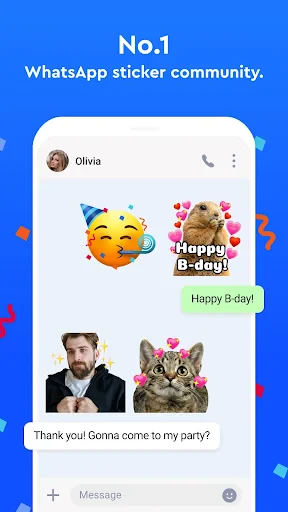
Sticker.ly - Sticker Maker is a comprehensive mobile application designed for the creation, customization, and management of personalized stickers. It transforms personal photos, text, and drawings into expressive digital stickers that can be seamlessly used across various messaging and social media platforms. The app caters to the growing demand for personalized digital communication, offering an intuitive interface that makes sticker creation accessible to users of all skill levels. By bridging the gap between simple emojis and fully custom artwork, Sticker.ly empowers users to enhance their digital conversations with unique, fun, and meaningful visual elements, fostering more engaging and personalized interactions in everyday messaging.
Chapter 1: Function
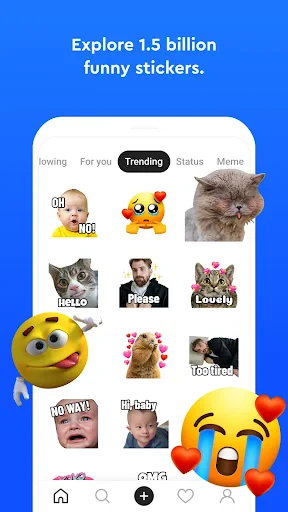
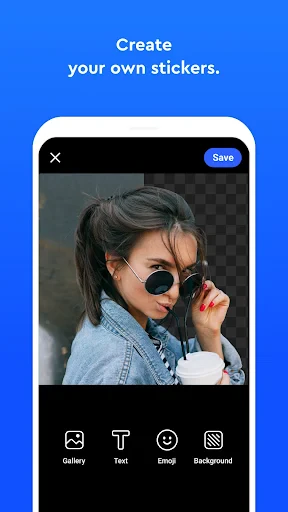
Sticker.ly operates as a multifaceted sticker studio within your smartphone. Its core function is a robust sticker maker tool that allows users to create stickers from any image in their gallery. Users can easily cut out subjects using smart cropping and eraser tools, add decorative borders, and apply visual effects. Beyond basic creation, the app includes a powerful editor for adding text with various fonts and colors, drawing freehand designs, and layering multiple elements. It also features a vast integrated library of pre-made, trendy stickers and animated GIFs for immediate use. Once created or selected, stickers are automatically organized into personal albums within the app and can be exported directly to the keyboard. The app integrates with popular messaging platforms, enabling users to access their custom sticker collections seamlessly during chats without switching apps.
Chapter 2: Value
The primary value of Sticker.ly lies in its empowerment of personal expression in the digital realm. In a communication landscape often dominated by generic emojis, it provides a tool for users to inject their personality, inside jokes, and unique style into every conversation. The app's key advantage is its all-in-one ecosystem, combining a creator tool, a curated library, and seamless messenger integration, eliminating the need for multiple applications. Its user-friendly design lowers the barrier to entry for custom content creation, requiring no professional graphic design skills. This democratization of sticker making allows anyone to become a creator. Furthermore, by offering both static and animated options, it caters to diverse communication tones, from humorous to sentimental. For social media enthusiasts and frequent messengers, this translates to more engaging, memorable, and visually rich interactions. The app continuously updates its sticker library with trending content, ensuring users have access to fresh and relevant expressions. Ultimately, Sticker.ly enhances digital dialogue by making it more visual, personal, and fun, adding a layer of creativity that standard emoji keyboards cannot match.
Chapter 3: Scenarios
Sticker.ly's primary user groups are individuals who actively use messaging apps like WhatsApp, Telegram, iMessage, and social media platforms such as Instagram and Facebook. Teenagers and young adults form a significant segment, using custom stickers to define group chat cultures, express inside jokes with friends, and elevate their social media stories and comments. Content creators and small business owners utilize the app to design branded stickers for community engagement or light-hearted marketing, adding a personal touch to customer interactions. Families, especially parents with young children, find value in creating stickers featuring family photos or children's drawings to share in private groups, making digital communication feel more intimate and connected. In everyday use, a user might quickly turn a funny pet photo into a sticker to react in a group chat, design a custom birthday sticker pack for a friend, or use trending animated stickers from the library to comment on a viral post. The app serves as a creative companion for any scenario where users wish to move beyond standard emojis and communicate with a more personalized visual voice.
Uninstall Instructions
For step-by-step guidance on how to safely remove this application from your device, please refer to our 《Uninstall Instructions》 document.
Pros
- creates custom stickers from any photo instantly
- live previews while editing with intuitive gestures
- exports transparent PNGs ready for major messaging apps
- batch processes multiple images into a sticker pack
- no watermark on exported high-resolution stickers
Cons
- advanced cut-out tools require a paid subscription
- large sticker packs slow down older device performance
- limited text and drawing tools compared to graphic editors
- sharing to some platforms requires manual app switching
- auto-background removal struggles with complex edges
Frequently Asked Questions
What is Sticker.ly and what does it do?
Sticker.ly is a mobile app for creating and managing custom stickers. Its core function is to let you easily turn any image, emoji, or text into a sticker pack for use in messaging apps like WhatsApp, Telegram, and Instagram. It provides basic editing tools, such as cropping and removing backgrounds, to prepare images. The app positions itself as a user-friendly sticker maker, requiring no advanced design skills.
Is Sticker.ly free to use or does it have in-app purchases?
Sticker.ly is free to download and use for basic sticker creation and management. However, it offers in-app purchases for premium content and features. These purchases typically include access to exclusive sticker packs, advanced editing tools like high-resolution exports, and the removal of watermarks from your custom stickers. The app may also display advertisements.
On which devices and platforms is Sticker.ly available?
Sticker.ly is primarily available as a mobile application for both Android and iOS devices. It is optimized for smartphones and may not have a dedicated tablet or desktop version. The app requires a relatively recent version of the operating systems to function properly. It is designed for general users and does not target specific professional or age groups beyond standard app store ratings.
How do I use the stickers I create in other messaging apps?
After creating a sticker pack within Sticker.ly, the app provides direct export and integration guides for popular platforms. Typically, for apps like WhatsApp, you use the 'Add to WhatsApp' button within Sticker.ly, which automates the installation of your custom pack into WhatsApp's sticker library. The process is similar for Telegram. Ensure you have the target messaging app installed and grant necessary permissions when prompted.
Why are my custom stickers blurry or not sending correctly?
Blurry stickers often result from using low-resolution source images. Ensure your original image is clear and sufficiently large. For sending issues, check that you have followed the correct export path for your specific messaging app and have a stable internet connection. Also, verify that the messaging app supports custom stickers and that you have granted Sticker.ly the required storage permissions to save and access the sticker files.
App Info
Technical Info
Recommended For You

Garmin Drive™
Auto & Vehicles

FantacyStory: novels, fictions
Books & Reference

Tracer (Donation Package)
Art & Design

Draw Anime: AR Drawing Sketch
Art & Design

Meeting - Video Conference
Business

RingCentral
Business

Sweet Camera Selfie
Beauty

BikeWale- Bikes & Two Wheelers
Auto & Vehicles

Sketchbook
Art & Design

MediBang Paint:Draw Art, Comic
Art & Design

AT&T Visual Voicemail
Communication

One Block for Minecraft Maps
Books & Reference

Face scan - How old do I look
Beauty

Staffmark WorkNOW
Business

Zello PTT Walkie Talkie
Communication

JOB TODAY: Hire & Find Jobs
Business

Talk360: International Calling
Communication

Learn to Draw Anime by Steps
Art & Design

Ulta Beauty: Makeup & Skincare
Beauty

Wear OS by Google Smartwatch
Communication