NDI HX Camera: Easy Streaming
Screenshots

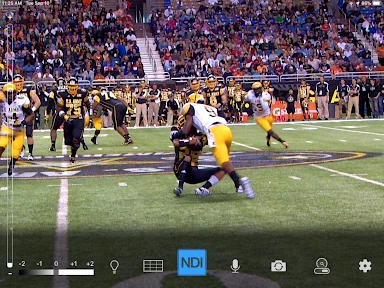
Description
About NDI HX Camera: Easy Streaming Feature – Overview
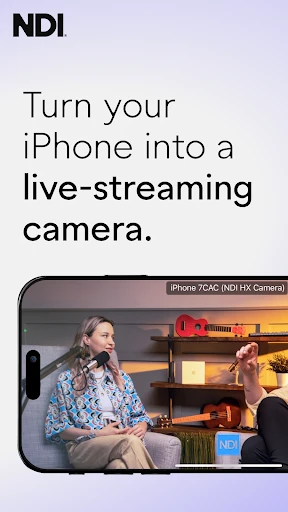
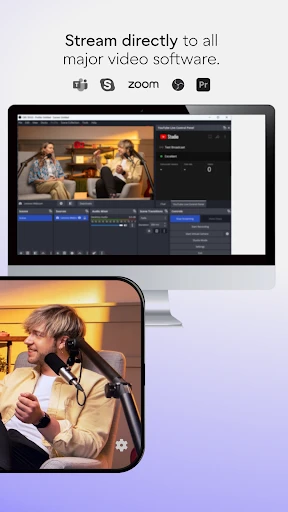
NDI HX Camera: Easy Streaming is a professional mobile application that transforms a smartphone into a high-quality, wireless video source for live production and streaming workflows. By leveraging the NDI HX protocol, the app allows users to seamlessly integrate live camera feeds from their mobile devices into popular broadcasting software like OBS Studio, vMix, and hardware mixers that support NDI. It is designed for content creators, educators, and professionals seeking a reliable and low-latency method to add flexible camera angles without the constraints of cables, offering a bridge between mobile convenience and professional streaming setups.
Chapter 1: Function
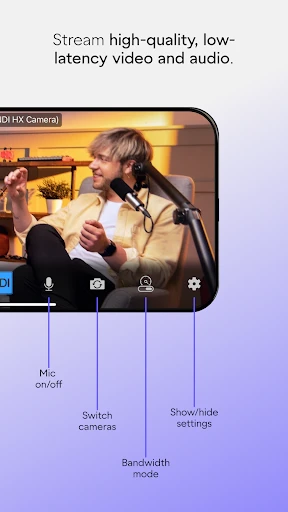
The core function of NDI HX Camera: Easy Streaming is to encode and transmit the live video and audio feed from a smartphone's camera and microphone over a local network using the NDI HX standard. Upon launching the app and connecting to the same Wi-Fi network as the receiving system, it generates an NDI source signal. This signal can be instantly discovered and added as a video input within compatible production software. The app provides essential controls for adjusting video resolution, frame rate, and audio levels directly from the device. It also supports features like locking focus and exposure for consistent shot quality, and can transmit metadata such as the device name for easy identification in a multi-camera setup. Essentially, it functions as a wireless camcorder, delivering a stable real-time feed that integrates directly into professional live streaming environments.
Chapter 2: Value
The primary value proposition of NDI HX Camera lies in its ability to democratize and streamline professional-grade live video production. Its key advantage is the elimination of complex cabling and capture hardware; a standard smartphone becomes a fully functional, high-definition PTZ (pan-tilt-zoom) camera operated remotely. By utilizing the efficient NDI HX protocol, it offers a compelling balance between video quality and network bandwidth usage, ensuring reliable performance on common Wi-Fi networks with remarkably low latency. This translates to significant cost savings, as users can augment their camera setups without investing in additional dedicated cameras or HDMI capture cards. Furthermore, the app enhances production flexibility. Directors can instantly deploy multiple angles from smartphones placed in unique locations—be it overhead shots, audience perspectives, or mobile follow-cams—all controlled and switched from a central production hub. The seamless integration with industry-standard software creates a future-proof and scalable workflow. For solo streamers, it allows the use of a secondary phone as a dedicated facecam or content camera, elevating production value with minimal effort. The app's straightforward interface ensures that the technical complexity of NDI is abstracted away, delivering professional results through an accessible and user-friendly mobile tool.
Chapter 3: Scenarios
NDI HX Camera: Easy Streaming is ideally suited for a range of users operating in dynamic video production scenarios. Its primary adopters include live streamers and content creators on platforms like Twitch, YouTube, and Facebook Live, who use it to introduce multi-camera setups, share screen overlays, or incorporate mobile-generated content directly into their broadcasts. Educators and corporate trainers utilize the app to stream whiteboard sessions, document camera views, or provide a roaming perspective during lectures and hybrid meetings, integrating feed seamlessly into platforms like Zoom or Teams via OBS. Event producers and houses of worship employ it as a cost-effective solution for supplemental wireless cameras, capturing wide shots, audience reactions, or backstage moments. Small to mid-sized news or sports production teams can deploy reporter smartphones in the field for instant live feeds back to the main switcher. Even podcasters benefit by adding a high-quality video feed for recording or streaming discussions. In everyday use, a user might set up a smartphone as a top-down camera for crafting tutorials, use a second phone as a movable reaction cam during a gaming stream, or quickly set up a temporary camera for a one-time webinar, all while maintaining a unified, professional production standard.
Uninstall Instructions
For step-by-step guidance on how to safely remove this application from your device, please refer to our 《Uninstall Instructions》 document.
Pros
- streams directly to NDI-compatible software without extra hardware
- uses efficient HX compression for stable Wi-Fi streaming
- transforms any iOS device into a wireless NDI camera source
- low-latency feed suitable for live production switching
- simple one-touch connection to NDI network destinations
Cons
- requires a robust Wi-Fi network for reliable performance
- limited to the iOS device's camera capabilities
- dependent on NDI ecosystem
- not for standard RTMP streaming
- HX compression may affect ultimate video quality vs. full NDI
- no on-device recording or stream backup feature
Frequently Asked Questions
What is NDI HX Camera: Easy Streaming?
NDI HX Camera: Easy Streaming is a mobile application that transforms your smartphone into a professional-grade wireless camera source for live production. It utilizes the NDI HX protocol to stream high-quality, low-latency video and audio over a local network to compatible software like OBS Studio, vMix, or hardware systems. Its core positioning is to provide an accessible, cable-free camera solution for content creators, educators, and event streamers.
Is the app free to use with any limitations?
Most lag or connection problems are network-related. Ensure your phone and receiving computer are on the same, stable Wi-Fi network, preferably 5GHz for less interference. Reduce the stream resolution or bitrate within the app's settings. Close other bandwidth-intensive applications on your phone and computer. Also, verify that your firewall or security software is not blocking NDI traffic (port 5353 for discovery).
Can I use this app for live streaming to platforms directly?
The app typically operates on a freemium model. The core streaming functionality is often free, but advanced features like higher resolution output, custom overlays, LUT support, or removing watermark/branding may require a one-time purchase or subscription. No additional physical equipment is needed beyond your phone and a stable Wi-Fi network. Always check the current pricing model within the app's store listing.
What devices and systems are compatible with this app?
The app is primarily designed for iOS devices (iPhone/iPad). It requires a compatible version of iOS and a device with a capable camera. For reception, you need NDI-compatible software (e.g., OBS with NDI plugin) or hardware on a Windows or macOS computer, all connected to the same local network (Wi-Fi or wired). It is not a standalone broadcasting app; it functions as a camera source within a larger production workflow.
How do I resolve common lag or connection issues?
No, this app does not stream directly to platforms like YouTube or Twitch. It is designed to send a video feed over your local network using NDI HX. To go live, you must use receiving software (e.g., OBS Studio) on your computer that captures this NDI feed. You then configure and start the stream from that production software to your desired platform, allowing for professional mixing of multiple sources.
App Info
Technical Info
Recommended For You

Sunoco: Pay fast & save
Auto & Vehicles

DeepL Translate
Books & Reference

Good Morning Wishes
Communication

VIN Check Report for Used Cars
Auto & Vehicles

Coloring games: speed drawing
Art & Design

Threema. The Secure Messenger
Communication

Magnificat Lenten 2025
Books & Reference

AR Drawing Paint Sketch Trace
Art & Design

Holy Bible Time-Verses&Audio
Books & Reference

Magic Diamond Painting-Gem Art
Art & Design

MessengerX App
Books & Reference

KakaoTalk : Messenger
Communication

Receipt Scanner: Easy Expense
Business

Pray Daily - KJV Bible & Verse
Books & Reference

IPSY: Personalized Beauty
Beauty

Realtime Charts for Torque Pro
Auto & Vehicles

CLZ Comics comic book database
Comics

PhiApp
Beauty

Merlin Bird ID by Cornell Lab
Books & Reference

3D Modeling App: Sculpt & Draw
Art & Design