
Quran for Android
Screenshots


Description
About Quran for Android Feature – Your Comprehensive Digital Companion for Spiritual Recitation and Study
Quran for Android is a meticulously designed mobile application that serves as a complete digital resource for accessing, reciting, and understanding the Holy Quran. It provides users with an authentic and feature-rich platform to engage with the sacred text anytime, anywhere. The app integrates original Arabic scripture, multiple renowned translations, recitations by famous Qaris, and a suite of study tools, all within an intuitive and ad-free interface. It caters to both daily devotional practices and in-depth scholarly study, making it an essential tool for Muslims worldwide and anyone interested in exploring the Quran.
Chapter 1: Function
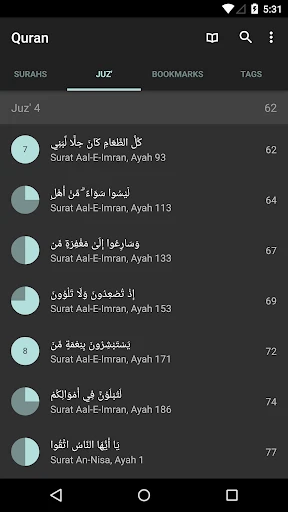
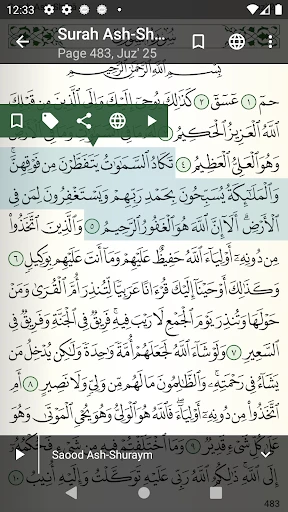
Quran for Android delivers a robust set of core functions centered around accessibility and study. It features the complete Uthmani script of the Quran with pristine clarity. Users can listen to high-quality audio recitations from a selection of over 100 reciters, synchronized with the text for easy following. The app includes translations in more than 50 languages, allowing for cross-referential understanding. Key functionalities include a powerful search tool to find verses by keyword, bookmarks and notes for personal reflection, and customizable reading experiences with adjustable text size and themes. It also offers Tajweed color-coded rules, prayer time notifications based on location, and a comprehensive index of Surahs and Juz for effortless navigation.
Chapter 2: Value
The primary value of Quran for Android lies in its commitment to authenticity, comprehensive depth, and user-centric design, all offered free of charge. Unlike many basic apps, it provides a holistic ecosystem for Quranic engagement without intrusive advertisements, ensuring a focused and reverent experience. Its key advantage is the vast library of recitations and translations, which supports both memorization (Hifz) and comparative study. The synchronization between audio and text is exceptionally precise, aiding in learning proper pronunciation and rhythm. For students and scholars, features like word-by-word translation with grammatical analysis and access to multiple Tafsirs (exegeses) add immense educational value. The app respects user privacy, operates offline once content is downloaded, and is regularly updated with improvements and new content. This combination of scholarly rigor, technological reliability, and thoughtful design positions it as a trusted, portable companion that enhances daily spiritual practice and deepens one's connection to the Quranic text, effectively digitizing a sacred tradition without compromising its integrity.
Chapter 3: Scenarios
Quran for Android is ideally suited for a diverse range of Muslim users and seekers of knowledge. For the daily worshipper, it simplifies the routine of Dhikr and reading, providing quick access for recitation during commutes or breaks. New Muslims and non-Arabic speakers heavily rely on its parallel translations and transliterations to comprehend the meanings and learn Arabic pronunciation. Students enrolled in Islamic studies or Hifz programs utilize its audio repetition tools, Tajweed guides, and study bookmarks to support their curriculum. Travelers and professionals away from their physical Mushaf appreciate the offline capability for consistent practice. Parents use the app to teach children verses in an interactive manner. Furthermore, researchers and comparative religion scholars benefit from the aggregated translations and search functionality for academic work. In essence, the app seamlessly integrates into everyday life scenarios—from private devotion and family learning to formal education and scholarly research—making the wisdom of the Quran accessible in the digital age.
Uninstall Instructions
For step-by-step guidance on how to safely remove this application from your device, please refer to our 《Uninstall Instructions》 document.
Pros
- offline access to multiple translations and tafsirs
- precise audio synchronized with highlighted verse text
- customizable reading with themes and font controls
- robust search across translations and original Arabic
- detailed bookmarks with notes and prayer tracking
Cons
- large audio file downloads required for high quality
- advanced features require navigation through menus
- limited interactive learning tools for new learners
- occasional lag on older android devices
- some translations lack accompanying tafsir explanations
Frequently Asked Questions
What is Quran for Android and its main functions?
Quran for Android is a free digital Quran application designed for reading, listening, and studying the Islamic holy text. Its core functions include displaying the complete Arabic Quran with verse-by-verse audio recitations from multiple renowned reciters (Qaris). It also provides translations in numerous languages, bookmarks, and search functionality. The app positions itself as a comprehensive, portable tool for daily prayer, reflection, and learning, requiring no internet connection for basic reading after initial setup.
Is Quran for Android completely free to use?
Yes, the core application of Quran for Android is free to download and use. It offers the full Quranic text, several audio recitations, and many translations without charge. The app may contain optional in-app purchases for premium features such as access to additional high-quality reciters, detailed tafsir (exegesis) commentaries, or advanced learning tools. There are no ads in the primary reading experience, and it does not require any additional physical equipment.
What devices and Android versions does this app support?
Quran for Android is designed specifically for devices running the Android operating system. It supports a wide range of Android versions, typically from older versions like Android 4.1 up to the latest Android releases. The app is optimized for both phones and tablets. It does not have an official version for iOS (iPhone/iPad), Windows, or other platforms. Users should check the Google Play Store listing for the specific minimum Android version requirement at the time of download.
How can I listen to audio recitations offline?
To listen to audio recitations offline in Quran for Android, you must first download the audio files for your preferred reciter within the app. This is typically done via the app's settings or audio manager section while connected to the internet. Once downloaded, the audio files are stored locally on your device, allowing you to play them anytime without an active internet connection. The app supports background playback and offers repeat functions for specific verses or chapters.
Can I add personal notes or bookmarks to verses?
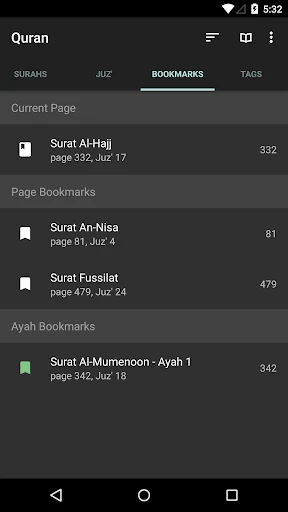
Yes, Quran for Android includes features for personalization and study. You can bookmark specific verses for quick access later. The app also allows you to add personal notes or tags to individual verses, which are saved locally on your device. These notes are private and can be edited or deleted. For synchronization of notes and bookmarks across multiple devices, the app may require an account or rely on your Google account backup, depending on the specific version and features implemented.
App Info
Technical Info
Recommended For You

Sound Amplifier
Communication

Avigilon Alta Open
Business

AI Video - AI Video Generator
Art & Design

AR Drawing: Sketch, Art, Paint
Art & Design

MySubaru
Auto & Vehicles

Comicle Manga: Manhwa & Manga
Comics

Meta Business Suite
Business

AUTODOC: buy car parts online
Auto & Vehicles

Clipboard
Business

طاقچه؛ کتاب الکترونیکی و صوتی
Books & Reference

OBD Scanner ELM327: GaragePro
Auto & Vehicles

AppSheet
Business

GetCode - Virtual Number SMS
Business

FOREO For You
Beauty

Tayasui Sketches
Art & Design

Photo Editor - Retouch Photos
Art & Design

JusTalk - Video Chat & Calls
Communication

Samsung Accessory Service
Communication

StyleSeat: Book Hair & Beauty
Beauty

Online chat, calls - Gem Space
Communication