AR Draw Sketch: Paint & Trace
Screenshots

Description
About AR Draw Sketch: Paint & Trace Feature
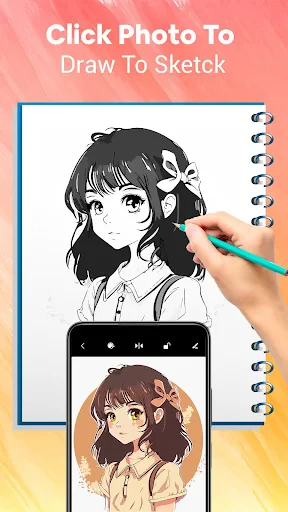
AR Draw Sketch: Paint & Trace is an innovative mobile application that revolutionizes the traditional drawing process by leveraging augmented reality technology. It serves as a digital bridge between inspiration and creation, allowing users to project any image from their device's gallery onto a physical surface like paper or canvas. By superimposing a virtual guide onto the real world through the smartphone camera, the app enables both beginners and seasoned artists to trace and replicate complex designs with remarkable precision. This fusion of digital convenience and tangible art-making demystifies drawing, making it accessible and enjoyable for anyone wishing to create accurate sketches, practice techniques, or bring ideas to life without the initial hurdle of freehand drafting.
Chapter 1: Function
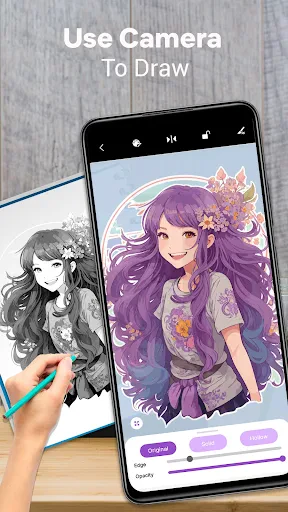
The core functionality of AR Draw Sketch: Paint & Trace centers on its augmented reality tracing system. Users begin by selecting a desired image or photo from their device. The app then uses the phone's camera to display this image as a semi-transparent overlay on the live feed of a physical drawing surface, such as a sketchbook. By adjusting parameters like opacity, brightness, and grid size, users can perfectly align and scale the virtual projection to match their paper. The app provides essential drawing tools, including various brush styles and an adjustable color palette, to facilitate the tracing process directly on screen if desired. Furthermore, it often includes features to lock the projection for stability, take progress photos, and manage a personal library of reference images, creating a seamless pipeline from digital reference to physical artwork.
Chapter 2: Value
The primary value proposition of AR Draw Sketch lies in its empowerment of artistic creation through technological assistance. It significantly lowers the barrier to entry for drawing and sketching, offering immense educational value. Beginners and hobbyists can build muscle memory, understand proportions, and learn composition by tracing, accelerating their skill development without initial frustration. For professionals and crafters, it provides unparalleled efficiency and accuracy for projects requiring precise replication, such as murals, detailed illustrations, calligraphy, or DIY crafts. The app transforms any environment into a potential studio, eliminating the need for physical lightboxes or projectors. Its key advantages include portability, cost-effectiveness compared to professional tracing equipment, and the ability to work with an unlimited array of reference images. By merging the digital and physical realms, it enhances creative confidence, ensures time efficiency, and fosters a focused, mistake-reduced artistic practice, making the journey from concept to finished sketch both smooth and rewarding.
Chapter 3: Scenarios
AR Draw Sketch: Paint & Trace caters to a diverse spectrum of users across various everyday scenarios. Art students and complete beginners form a core group, utilizing the app for daily practice, homework assignments, and learning fundamental drawing techniques by tracing masterworks or simple shapes. Hobbyists and DIY enthusiasts employ it for personal projects like creating custom greeting cards, detailed wall art, precise patterns for wood burning, or unique designs on fabrics and ceramics. Professional tattoo artists may use it to transfer intricate stencil designs onto skin preparation paper with exactitude. Additionally, parents find it valuable for engaging children in creative activities, helping them draw their favorite characters effortlessly. In educational settings, teachers can use it as a tool to demonstrate drawing concepts. The common thread across all scenarios is the need for a reliable, portable aid that translates digital inspiration into accurate physical lines, making it ideal for learning, crafting, professional drafting, and recreational art anywhere, anytime.
Uninstall Instructions
For step-by-step guidance on how to safely remove this application from your device, please refer to our 《Uninstall Instructions》 document.
Pros
- projects reference images onto real paper for tracing
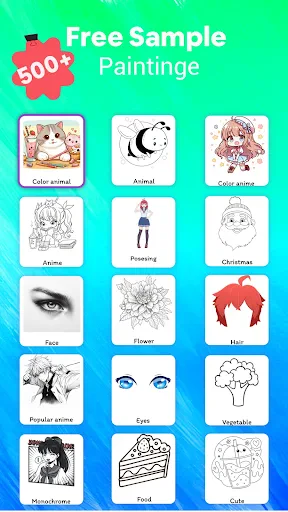
- offers a vast library of traceable templates and sketches
- uses device camera for stable augmented reality guidance
- eliminates need for lightboxes or transfer paper
- simple tap interface lowers barrier for drawing beginners
Cons
- requires a well-lit
- stable surface for AR to function
- premium template library requires a subscription to access
- camera overlay can drain battery quickly during long sessions
- AR projection may distort on uneven or textured paper
- lacks advanced editing tools for post-trace refinement
Frequently Asked Questions
What is AR Draw Sketch: Paint & Trace?
AR Draw Sketch: Paint & Trace is a drawing application that utilizes augmented reality (AR) technology. Its core function is to assist users in sketching by allowing them to trace over reference images or 3D models projected onto their physical drawing surface through their device's camera. It positions itself as a tool for learning drawing techniques, practicing proportions, and creating art with guidance.
Is the app free to use or does it have in-app purchases?
The app is typically free to download and use with basic functionality. However, it commonly offers in-app purchases. These purchases may unlock premium features such as a larger library of reference images, advanced tracing tools, removal of advertisements, or additional AR model packs. The specific pricing structure is subject to change and is detailed within the app's store listing.
What devices and systems are compatible with this app?
AR Draw Sketch requires a mobile device with a camera and support for ARCore (for Android) or ARKit (for iOS). Compatibility depends on your device's hardware capabilities. Generally, newer smartphones and tablets from major manufacturers running recent OS versions are supported. It is not designed for desktop computers or devices lacking advanced AR support.
How does the AR tracing feature actually work?
The app uses your device's camera to display a chosen image or 3D model as an overlay on your real-world paper or canvas. You then physically position your device on a stand or mount so the overlay aligns with your drawing surface. By looking at your device's screen, you can see the virtual guide and trace its lines onto your physical paper, helping with accuracy and perspective.
Can I use my own images for tracing in the app?
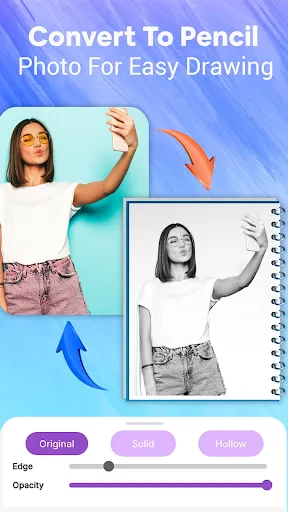
Yes, a key feature of this app is the ability to import your own photos or images from your device's gallery to use as custom tracing references. The app will convert these images into traceable AR projections. There may be limitations on file format and size, and some advanced editing features for custom images might be part of the premium offering.
App Info
Technical Info
Recommended For You

Metro
Communication

Spanish English Translator
Books & Reference

AI Image Generator: ImagineArt
Art & Design

Buenovela - Webnovel & Stories
Books & Reference

VINELink
Books & Reference
Drawing Apps: Draw, Sketch Pad
Art & Design

Car play/Android Auto Sync
Auto & Vehicles

NAPA PROLink
Auto & Vehicles

Mister Car Wash
Auto & Vehicles

iFnovel - Books,Web Novel
Books & Reference

Messages: SMS Text Messenger
Communication

Chumba Casino Real Money ayuda
Comics

네이버 - NAVER
Books & Reference

OpenSea: NFT marketplace
Art & Design

EPUB Reader for all books
Books & Reference

Carista OBD2
Auto & Vehicles

Mirror Study Bible
Books & Reference

Trace Drawing-Sketch and Paint
Art & Design
Tor OBD2 Diagnostics
Auto & Vehicles

Al Quran MP3 Audio Offline App
Books & Reference