
850 OBD-II
Screenshots


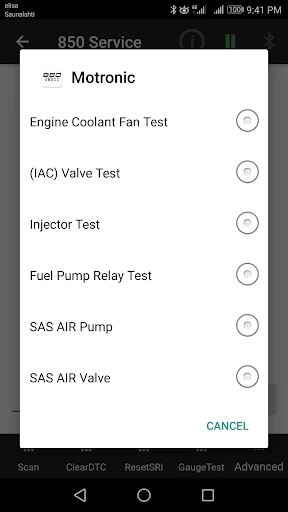


Description
About 850 OBD-II Feature – Your Vehicle's Digital Health Monitor
850 OBD-II is a professional-grade vehicle diagnostic application designed to interface with a compatible OBD-II Bluetooth adapter. It transforms a smartphone or tablet into a powerful car scanner, providing real-time access to a vehicle's onboard computer system. Primarily catering to car enthusiasts, DIY mechanics, and everyday drivers concerned with their vehicle's health, the app reads and clears diagnostic trouble codes, monitors live sensor data, and performs advanced functions. By leveraging the standard OBD-II port found in most vehicles manufactured after 1996, it demystifies the inner workings of the automobile, offering transparency and control over vehicle maintenance directly from the user's mobile device.
Chapter 1: Function
The core functionality of 850 OBD-II centers on comprehensive vehicle communication and data presentation. Upon connecting a compatible ELM327-based OBD-II Bluetooth adapter to the car's port, the app establishes a wireless link. Its primary function is reading and resetting standard Diagnostic Trouble Codes (DTCs), which illuminate the check engine light. Beyond code scanning, it displays real-time parameters through customizable dashboards, showing data like engine RPM, coolant temperature, vehicle speed, throttle position, and fuel system status. The app can also perform readiness monitors checks for emission tests, log sensor data for later review, and display freeze frame data captured when a fault occurs. These functions provide a detailed snapshot of the vehicle's operational state.
Chapter 2: Value
The value proposition of 850 OBD-II lies in its empowerment of the vehicle owner through accessibility, cost savings, and depth of information. It turns a ubiquitous smartphone into a sophisticated diagnostic tool at a fraction of the cost of professional scanners. The key advantage is immediate insight: instead of relying solely on a mechanic's initial assessment, users can read fault codes themselves, often diagnosing minor issues or verifying repair needs. This transparency can prevent unnecessary repairs and expenses. The app's real-time monitoring is invaluable for performance tuning and long-term health tracking, allowing users to observe how their vehicle behaves under different conditions. Furthermore, by being able to reset warning lights and emission monitors after a repair, it facilitates self-service and verification. The intuitive, if technical, interface presents complex data in an understandable format, bridging the gap between professional automotive knowledge and the average car owner. Its support for a wide range of protocols ensures compatibility with most modern vehicles, solidifying its role as a versatile and indispensable tool for proactive vehicle maintenance and troubleshooting.
Chapter 3: Scenarios
The primary target users for 850 OBD-II are DIY auto repair enthusiasts, cost-conscious vehicle owners, and performance-minded drivers. For the DIYer, the app is a first-response tool when the check engine light activates, enabling them to pinpoint issues like a faulty oxygen sensor or loose gas cap before visiting a shop. A student or budget-focused owner can use it to monitor fuel efficiency in real-time, adjusting driving habits to save money. Performance enthusiasts utilize the live data streams for tuning modifications and logging runs. In everyday use, a parent might use it before a long family trip to ensure all systems are nominal, checking for any pending codes. A used car buyer can employ the app during a pre-purchase inspection to scan for hidden fault codes or verify the proper function of emission systems. These scenarios highlight the app's role in fostering informed ownership, preventative maintenance, and financial prudence in vehicle care.
Uninstall Instructions
For step-by-step guidance on how to safely remove this application from your device, please refer to our 《Uninstall Instructions》 document.
Pros
- real-time engine diagnostics via bluetooth obd-ii
- customizable dashboard for vehicle performance metrics
- clears fault codes and resets check engine light
- tracks fuel efficiency and trip history in detail
- supports extensive car models from 1996 onward
Cons
- requires a compatible obd-ii adapter for connection
- advanced features need paid pro version unlock
- live data may have slight latency on older phones
- interface can be technical for non-enthusiast users
- some vehicle-specific parameters lack documentation
Frequently Asked Questions
What is 850 OBD-II and what does it do?
850 OBD-II is a diagnostic tool app for vehicles. It connects to your car's OBD-II port via a compatible Bluetooth adapter, allowing you to read and clear check engine lights, view real-time sensor data (like RPM, speed, coolant temp), and monitor your vehicle's health. Its core function is to turn your smartphone into a basic car diagnostic scanner.
What equipment do I need to use this app?
To use 850 OBD-II, you need a compatible OBD2 Bluetooth adapter (ELM327 or similar), which is purchased separately. You plug the adapter into your car's OBD-II port, typically under the dashboard. The app itself is free to download and connect, but it requires a smartphone with Bluetooth capability. No official information confirms if specific adapters are sold by the developer.
Is 850 OBD-II free or does it have in-app purchases?
The 850 OBD-II app is free to download and use for basic functions like connecting to an adapter and viewing some data. However, it typically offers in-app purchases to unlock advanced features. These may include enhanced diagnostic trouble code definitions, performance logging, or additional vehicle-specific parameters. The core connection and basic readouts remain free.
What vehicles and phone systems is this app compatible with?
850 OBD-II works with most gasoline vehicles sold in the US after 1996 and diesel vehicles after 2008, as they are mandated to have an OBD-II port. Compatibility with specific car models can vary. The app is primarily available for Android devices. There is no official information confirming its availability or full functionality on iOS (iPhone) systems.
Can this app clear all check engine light codes?
Yes, 850 OBD-II can clear Diagnostic Trouble Codes (DTCs), which often turns off the check engine light. However, this is a temporary fix if the underlying mechanical issue is not resolved. The light will likely return. The app is a diagnostic tool, not a repair solution. It cannot clear manufacturer-specific or permanent codes that require professional equipment.
App Info
Technical Info
Recommended For You

MangaToon: Comic & Manga
Comics

GroupMe
Communication

Whoosh
Auto & Vehicles

Men's Hair Cuts & Hairstyles
Beauty

GetCode - Virtual Number SMS
Business

AI Art Generator: AI Picture
Art & Design

Jooble — Job Search App
Business

Amazon Flex
Business

The General® Auto Insurance
Business

NDI HX Camera: Easy Streaming
Communication

DScanner - Camera Scanner
Business

MyWalmart
Business

Manga UP!
Comics

NovelFlow
Books & Reference

Remodel AI - Home Renovation
Art & Design

Books - Read and Download
Books & Reference

CCW – Concealed Carry 50 State
Books & Reference
NavRadio+
Auto & Vehicles

Glam AI
Beauty

RoughAnimator - animation app
Art & Design