
Draw Cartoons 2
Screenshots

Description
About Draw Cartoons 2 Features – Frame-by-Frame Animation Studio
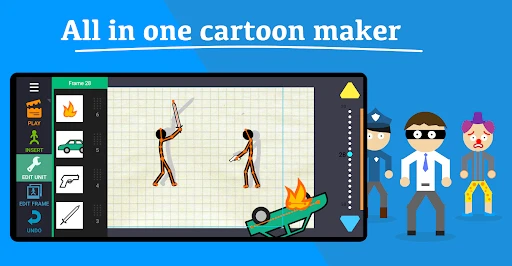
Draw Cartoons 2 is a powerful yet accessible animation application designed for mobile devices. It empowers users to create traditional, frame-by-frame 2D animations directly on their smartphones or tablets. Moving beyond simple drawing tools, the app provides a comprehensive suite of features tailored for the animation pipeline, including onion skinning, timeline editing, voice recording, and a built-in character rigging system. It serves as a portable animation studio, lowering the technical barrier to entry and making the art of cartoon creation possible for hobbyists, students, and aspiring animators alike, all through an intuitive touch-screen interface.
Chapter 1: Function
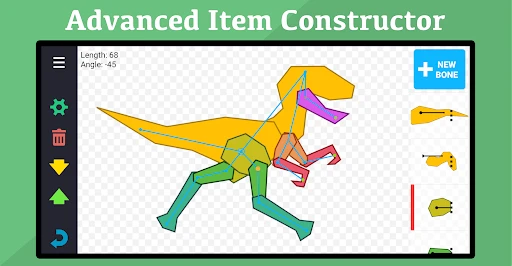
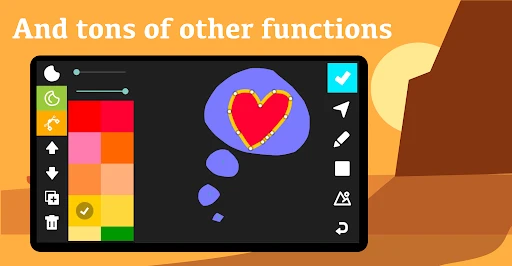
Draw Cartoons 2 functions as a complete frame-by-frame animation workstation. Its core revolves around a multi-layer timeline where users draw individual frames. The essential onion skinning feature allows artists to see several previous and upcoming frames as semi-transparent overlays, ensuring smooth motion and consistency. The app includes a robust vector-based drawing toolset with brushes, shapes, fill, and text. Beyond manual drawing, it offers a bone-based rigging system for creating puppets with movable joints, significantly speeding up character animation. Users can import images, record and sync audio directly to the timeline, and add keyframes for properties like layer position and scale. The final animations can be exported as video files or GIFs, or shared directly to social platforms.
Chapter 2: Value
The primary value of Draw Cartoons 2 lies in democratizing professional-grade 2D animation by packaging complex tools into a mobile-friendly and affordable format. Its key advantage is the seamless integration of both frame-by-frame and rig-based animation methods within a single app, offering flexibility for different styles and project needs. The bone tool system is particularly valuable, enabling users to create reusable, articulated characters without redrawing every limb movement, which saves immense time and effort. The interface, while feature-rich, is logically organized, making the animation process less daunting for beginners. Furthermore, the app operates locally on the device, providing instant feedback and allowing for creativity anywhere, without requiring a constant internet connection or expensive desktop software subscriptions. For educators, it is an excellent teaching tool for animation principles. For content creators, it provides a quick way to produce engaging animated clips, explainer videos, or social media content. The value proposition is clear: professional animation capability, unprecedented portability, and a low-cost entry point, fostering creativity and skill development in digital storytelling.
Chapter 3: Scenarios
Draw Cartoons 2 primarily targets animation enthusiasts, digital art students, and independent content creators. For students and beginners, it serves as a practical learning platform to understand the fundamentals of timing, spacing, and squash-and-stretch through hands-on practice. Hobbyists and amateur animators use it to bring their cartoon ideas and short stories to life, sharing their work online for feedback or enjoyment. Social media influencers and marketers find it ideal for creating eye-catching, custom animated stickers, short promotional clips, or educational explainer videos directly from a phone. Teachers can incorporate it into art or media classes as a collaborative project tool. Additionally, parents may use it with older children to nurture artistic skills in a structured, digital environment. Everyday use cases include sketching a bouncing ball animation to learn physics, rigging a character to wave and speak for a birthday greeting, creating a looping GIF for a message, or developing a short narrative cartoon series. It transforms idle moments into productive creative sessions, making animation a portable and everyday activity.
Uninstall Instructions
For step-by-step guidance on how to safely remove this application from your device, please refer to our 《Uninstall Instructions》 document.
Pros
- frame-by-frame onion skinning for smooth animation
- vector-based brush system prevents pixelation on zoom
- exports to multiple formats including GIF and video
- lightweight interface optimized for frame editing workflow
- supports pressure-sensitive stylus input on tablets
Cons
- steep learning curve for traditional illustrators
- limited pre-rigged character templates available
- audio syncing requires manual frame alignment
- no real-time collaboration features for team projects
- advanced lip-syncing tools require separate plugin purchase
Frequently Asked Questions
What is Draw Cartoons 2 and what does it do?
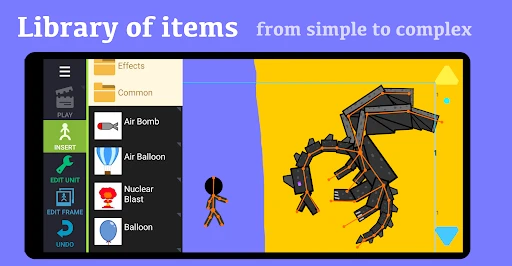
Draw Cartoons 2 is a 2D animation software for creating short cartoons and motion graphics. Its core function is a frame-by-frame editor with bone-based rigging, allowing users to animate characters and objects. It provides pre-made assets, sound effects, and a timeline for sequencing. The app is positioned as an accessible tool for hobbyists, educators, and beginners to learn basic animation principles without complex 3D modeling.
Is Draw Cartoons 2 free to use or does it have in-app purchases?
Draw Cartoons 2 is a free app. It does not contain in-app purchases or subscriptions. All animation tools, character assets, and features within the app are available at no cost. The app is supported by advertisements, which may appear during use. No additional equipment or premium upgrades are required to access its full functionality.
What devices and systems is Draw Cartoons 2 compatible with?
Draw Cartoons 2 is primarily available for Android devices. It is not officially available on iOS (iPhone/iPad) or desktop operating systems like Windows or macOS. It is adapted for touchscreen use and does not require a stylus, though one can be used. The app is suitable for a wide age group, but its interface and animation concepts are generally geared towards older children, teens, and adult beginners.
How do I save or export my animations from the app?
You can export your finished animations as video files (MP4 format) directly from the app. The process involves using the 'Export' function within the project menu. Exported videos can be saved to your device's gallery or shared on social media platforms. The app does not support exporting in layered project files (like PSD) for editing in other professional software.
Why does my animation look choppy or not play smoothly?
Choppy animation is often due to incorrect frame timing. In frame-by-frame animation, each drawing's duration on the timeline controls smoothness. Check and adjust the 'Frames Per Second' (FPS) setting and the hold time of each keyframe. Also, ensure your device has sufficient available memory, as complex scenes with many elements can cause performance issues on older hardware. The app does not have a dedicated customer support channel for technical troubleshooting.
App Info
Technical Info
Recommended For You

Spanish English Translator
Books & Reference

AI Home Design: Interior DecAI
Art & Design

Goods Unite Us
Books & Reference

Hushed: US Second Phone Number
Communication

World History Atlas
Books & Reference

Barnes & Noble NOOK
Books & Reference

FolderSync Pro
Communication

EOBD Facile: OBD 2 Car Scanner
Auto & Vehicles

Shipt: Shopper and Driver
Business

Meta Ads Manager
Business

Face Beauty Makeup Camera-Self
Beauty

GIMP
Art & Design

FaxCover Pro Create Cover Page
Business

KeyConnect Digital Car Key
Auto & Vehicles

Blend Photo Editor & Effect
Art & Design

clickworker
Business

Vivaldi Color Analysis
Beauty

Yolla: International Calling
Communication

СL Theme Line
Auto & Vehicles

Phoner 2nd Phone Number + Text
Communication