
Calibre Sync
Screenshots

Description
About Calibre Sync Feature
Calibre Sync is a dedicated mobile application designed to seamlessly bridge the gap between your extensive Calibre desktop library and your mobile reading devices. It serves as a powerful companion tool, enabling users to effortlessly transfer, organize, and enjoy their eBook collections on smartphones and tablets. By establishing a direct and wireless connection with the Calibre desktop software, it liberates your personal library from the confines of your computer, offering a streamlined solution for managing and reading eBooks on the go. The app prioritizes synchronization integrity, user-friendly navigation, and maintaining the rich metadata structure curated within Calibre, thus creating a unified and portable reading ecosystem.
Chapter 1: Function
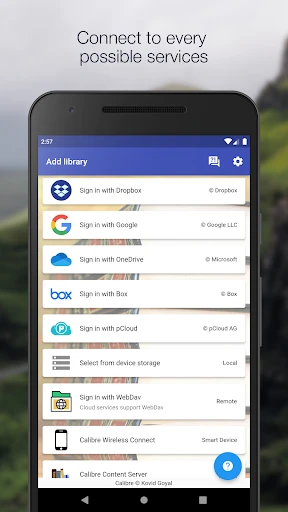
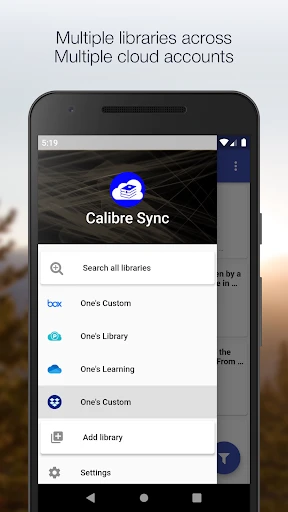
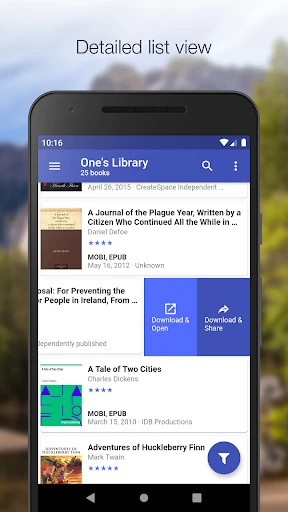
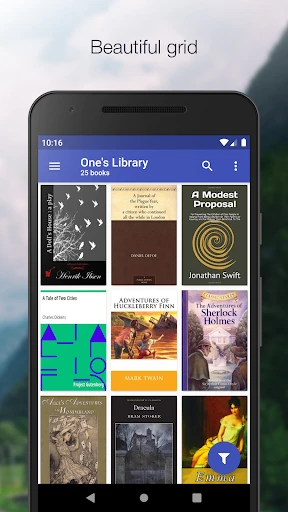
Calibre Sync operates primarily as a wireless conduit for your Calibre library. Its core function is to discover the Calibre Content Server running on your desktop computer within the same local network and establish a stable connection. Once linked, the app fetches the complete library catalog, including books, covers, metadata, tags, series information, and custom columns. Users can browse their entire collection, utilize sophisticated filtering and search tools to locate specific titles, and download eBooks directly to their mobile device for offline reading. The app supports transferring books in various formats compatible with mobile e-reader applications. Furthermore, it often includes management features such as marking books as read, updating metadata from the device back to the main Calibre library, and organizing downloads into local collections, effectively mirroring the desktop library's organizational structure on your mobile device.
Chapter 2: Value
The principal value of Calibre Sync lies in its ability to unlock the full potential of a meticulously managed Calibre library by making it truly mobile. Its key advantage is the elimination of manual file transfers via USB cables or cloud storage intermediaries, offering a direct, automated, and wireless synchronization process. This not only saves significant time but also preserves the complex organizational schema—tags, series, ratings, and custom metadata—that Calibre power users rely on. Unlike generic cloud services, Calibre Sync ensures privacy and control, as all data remains within your local network until you choose to transfer a book. The app adds substantial value by enhancing discoverability within large libraries through robust search and filter functions on mobile, turning an overwhelming collection into a easily navigable personal bookstore in your pocket. It respects the user's existing investment in the Calibre ecosystem, acting as a perfect extension rather than a replacement. The synergy between the powerful desktop management of Calibre and the convenient mobile access provided by Calibre Sync creates a seamless end-to-end workflow for serious eBook enthusiasts, making it an indispensable tool for anyone who views their digital library as a valuable, organized asset.
Chapter 3: Scenarios
Calibre Sync is ideally suited for avid readers and bibliophiles who use Calibre as their central eBook management hub on a desktop computer and wish to access that library on iOS or Android devices. The primary user group includes individuals with extensive personal eBook collections, often numbering in the hundreds or thousands, where organization and metadata are crucial. A common scenario involves a user finishing a book on their tablet during their commute and wanting to immediately start the next volume in a series, which they can effortlessly locate and sync from their home Calibre library. Researchers or students who use Calibre to manage a large corpus of PDFs or academic papers can benefit by having their annotated reference materials available on any device. Another typical use case is for travelers who wish to load their tablet with a fresh selection of books from their home library before a trip without needing to physically connect to their computer. The app also serves users who read across multiple mobile devices, allowing them to keep their reading progress and selections synchronized with the central Calibre database, ensuring a consistent experience whether they pick up a phone or a tablet.
Uninstall Instructions
For step-by-step guidance on how to safely remove this application from your device, please refer to our 《Uninstall Instructions》 document.
Pros
- directly syncs ebooks from Calibre library to Kindle
- wireless transfer bypasses Amazon's email attachment limit
- preserves original book metadata and cover art
- lightweight server runs on desktop without complex setup
- generates unique QR code for easy device pairing
Cons
- requires Calibre desktop application to be running
- syncing limited to local Wi-Fi network only
- no cloud storage or remote access functionality
- interface is minimalistic with few customization options
- initial setup requires manual IP address entry
Frequently Asked Questions
What is Calibre Sync and what does it do?
Calibre Sync is a mobile app companion for the Calibre desktop e-book management software. Its core function is to wirelessly sync your Calibre e-book library (including metadata, covers, and reading progress) from your computer to your mobile device. It allows you to browse, search, and read your personal e-book collection on the go. The app itself does not manage books; it syncs with an existing Calibre library running on a desktop computer.
Is Calibre Sync free to use or does it have in-app purchases?
Calibre Sync is a paid application with a one-time purchase. There is no free version or subscription model. The listed price is for the full app, granting access to all its syncing and reading features without further in-app purchases or recurring fees. You only need to ensure you have the free Calibre desktop program installed and configured on your computer.
What devices and systems does Calibre Sync support?
Calibre Sync is primarily available for Android mobile devices (phones and tablets) via the Google Play Store. It requires the Calibre desktop application (available for Windows, macOS, and Linux) to be installed and running on your computer as the source library. The sync connection is established over a local Wi-Fi network. There is no official iOS version available at this time.
How do I connect the app to my Calibre library?
Connection requires both devices to be on the same Wi-Fi network. First, enable 'Content server' in the Calibre desktop software's 'Connect/share' settings. Then, in the Calibre Sync app, enter the IP address and port number shown by Calibre's content server into the app's connection settings. The app will then discover and connect to your library for syncing. No cloud account or internet connection beyond local Wi-Fi is needed.
Can I read all my e-book formats with this app?
Calibre Sync includes a built-in reader that supports common formats like EPUB, PDF, and MOBI. However, its primary strength is syncing. For formats not natively supported by its reader, the app can often transfer the file to your device, allowing you to open it with another preferred reading app installed on your device. The sync process handles all formats stored in your Calibre library.
App Info
Technical Info
Recommended For You

Logo Maker : Graphic Designer
Business

GIMP
Art & Design

imo video calls and chat HD
Communication

AI Image Generator: ImagineArt
Art & Design

iVerify Basic
Business

Magic Cross Stitch: Pixel Art
Art & Design

Face Shape & Color Analysis
Beauty

Email - Email Login
Communication

aiMail - Al Email Accounts
Communication

My crochet designer
Art & Design

BookFunnel
Books & Reference

RSA Authenticator (SecurID)
Communication

ibis Paint X
Art & Design

Bolt for Tesla - Tasker Plugin
Auto & Vehicles

@Voice Aloud Reader (TTS)
Books & Reference

AI Photo Editor: BG Remover
Art & Design

Advent Magnificat 2024
Books & Reference

Comikey - Manga & Webcomics
Comics

Zebra Comics: Webtoons & Manga
Comics

AR Drawing - Trace Drawing App
Art & Design