
Hicut:Face Swap AI Video App
Screenshots
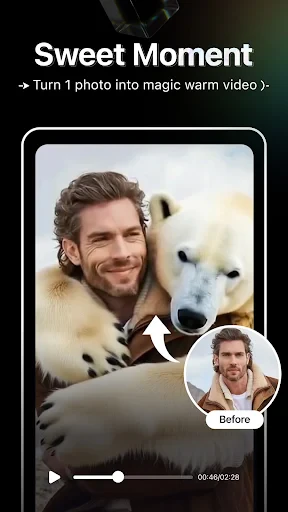
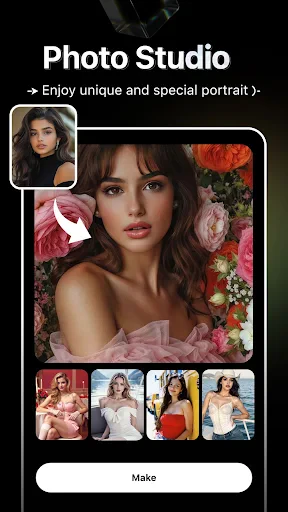
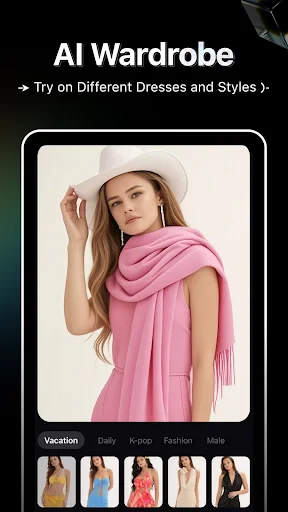
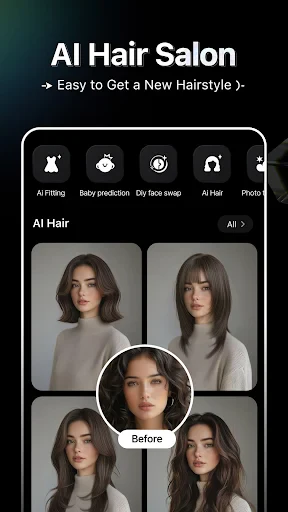

Description
About Hicut: Face Swap AI Video App Features
Hicut: Face Swap AI Video App is a mobile application that leverages advanced artificial intelligence technology to allow users to seamlessly swap faces in videos and photos. It provides an intuitive platform for creating entertaining, creative, and personalized content. By simplifying complex video editing processes, Hicut makes AI-powered face swapping accessible to a broad audience, enabling users to generate humorous clips, imaginative scenarios, or unique social media content with just a few taps.
Chapter 1: Function
The core function of Hicut centers on its AI-driven face swap capability. Users can select a video or photo from their gallery or record one directly within the app. The app's primary feature is its ability to accurately detect faces in the source material and replace them with a chosen face from another image. This process is powered by sophisticated machine learning algorithms that ensure realistic alignment, expression tracking, and lighting adjustment. Beyond basic swapping, the app typically includes tools for editing the swapped video, such as trimming clips, adding background music, applying filters, and adjusting the speed. The entire workflow is designed to be user-friendly, guiding individuals through selection, processing, and final export without requiring professional editing skills.
Chapter 2: Value
Hicut's primary value proposition lies in democratizing advanced AI video editing, transforming a complex technical process into simple, fun, and creative entertainment. Its key advantage is the accessibility and ease of use it offers; anyone can create impressive face-swap videos without prior expertise. The AI technology ensures high-quality, often surprisingly realistic results, with good facial feature alignment and natural movement, which sets it apart from simpler, less accurate alternatives. This provides significant entertainment value, enabling users to generate humorous content for sharing with friends or on social platforms, potentially increasing engagement and virality. For content creators and social media enthusiasts, it serves as a powerful tool for producing unique, attention-grabbing material quickly. The app also fosters creativity, allowing users to experiment with identities, star in movie scenes, or create fantastical scenarios. By offering a streamlined, all-in-one solution from capture to edit to share, Hicut saves time and eliminates the need for multiple software applications. Its continuous updates and improvements in AI models further enhance its value, promising better results and new features over time.
Chapter 3: Scenarios
Hicut's primary target users are social media enthusiasts, casual content creators, and individuals seeking entertainment. It is ideal for younger demographics, such as Gen Z and millennials, who frequently engage with short-form video platforms like TikTok, Instagram Reels, and Snapchat. Everyday use cases are diverse. Users often employ the app to create humorous content for personal amusement, such as swapping faces with friends in funny videos to share in group chats. It is also used for generating engaging social media posts, where users might insert their face into popular movie clips, music videos, or trending internet memes to participate in challenges and trends. During events like parties or family gatherings, the app can be a source of interactive fun, creating memorable collaborative videos. Additionally, some users explore creative storytelling, crafting short skits or narratives using face swap to play multiple characters. The app serves as a tool for lighthearted self-expression and digital play, fitting seamlessly into moments of boredom, social sharing, or content creation workflows.
Uninstall Instructions
For step-by-step guidance on how to safely remove this application from your device, please refer to our 《Uninstall Instructions》 document.
Pros
- one-tap face swap in videos with high precision
- offers unique AI-powered celebrity face templates
- processes HD videos with minimal quality loss
- intuitive timeline editor for multi-swap scenes
- requires no advanced editing skills for basic use
Cons
- heavy watermarks on free tier exports
- limited to 10-second clips in free version
- face detection struggles with extreme angles
- premium templates require weekly subscription
- high-resolution exports drain battery quickly
Frequently Asked Questions
What is Hicut and what does it do?
Hicut is an AI-powered video editing application in the entertainment category. Its core function is face swapping in videos, allowing users to seamlessly replace faces in a video clip with another person's face from an image. It also typically includes related features like creating funny videos, memes, or deepfake-style content for personal entertainment. Basic usage involves selecting a target video and a source photo for the AI to process and generate the swapped result.
Is Hicut free to use or does it have in-app purchases?
Hicut generally operates on a freemium model. The app can be downloaded for free, offering basic face swap functionality and limited access to features or templates. For higher-quality exports, removal of watermarks, access to premium templates, or increased processing limits, it requires in-app purchases through subscriptions or one-time payments. Specific pricing and plan details are available within the app's store page or settings.
What devices and systems is Hicut compatible with?
Hicut is primarily designed for mobile devices. It is available for both iOS and Android operating systems. You can download it from the Apple App Store for iPhones/iPads and from Google Play Store for Android phones/tablets. Compatibility may require a relatively recent OS version (e.g., iOS 13+ or Android 8.0+). It does not require additional specialized hardware and operates using the device's processor and camera.
How does Hicut handle user privacy and face data?
As an AI face manipulation app, Hicut's privacy policy is crucial. Typically, the app processes face data on its servers to perform the AI swap. It should state that user-uploaded photos and videos are used solely for generating the requested effect and are not stored permanently or used for other purposes without consent. Users should review the app's privacy policy directly for specifics on data retention, sharing, and security practices, as policies can update.
Why is my face swap video low quality or not processing?
Low output quality or processing failures can stem from several factors. Common causes include low-resolution source photos, poor lighting or angles in the target video, excessive movement or obstructions (like glasses/hair), or weak internet connectivity for server-based AI processing. Using clear, front-facing photos and stable, well-lit videos improves results. Also, check if you've reached a free usage limit, which may require an upgrade for full-quality, watermark-free exports.
App Info
Technical Info
Recommended For You

PrinterShare Premium Key
Business

Cat Maker: Cat Emoji Sticker
Art & Design

Drawing Apps: Draw, Sketch Pad
Art & Design

Duke Energy
Business

Perfect Viewer
Comics

DAT One
Business

Autotrader: Shop Cars For Sale
Auto & Vehicles

myQQ – Quick Quack
Auto & Vehicles

Pocket Novel
Books & Reference

Perfectme: AI Photo Enhancer
Beauty

Tracer (Donation Package)
Art & Design

Joyread
Books & Reference

밀리의 서재 - 독서와 무제한 친해지리
Books & Reference

FotoFusion - Editor Photo
Beauty

Magic Beauty Makeup Camera
Beauty

MyNISSAN®
Auto & Vehicles

Poster Maker - Flyer Maker
Art & Design

Chat Cloner Secretly View Chat
Communication

Portable WiFi - Mobile Hotspot
Communication

The Cepher
Books & Reference