
Security Camera Mod Minecraft
Screenshots


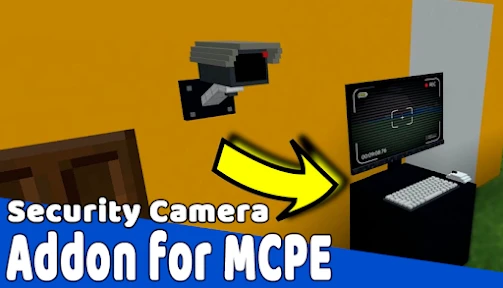
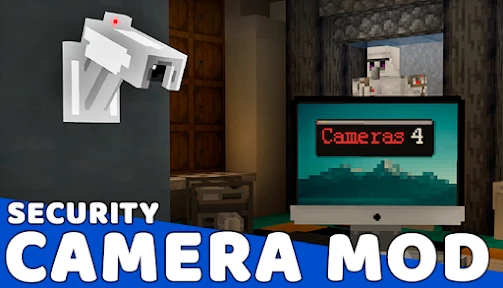
Description
About Security Camera Mod Minecraft Feature
Security Camera Mod is a popular modification for the sandbox game Minecraft, introducing modern surveillance and security mechanics into its blocky, open world. This mod allows players to craft, place, and monitor a network of functional security cameras, adding a layer of strategy, automation, and narrative depth to both creative builds and survival gameplay. It transforms the player from a mere builder or adventurer into a security overseer, enabling the monitoring of remote locations, automation of defenses, and creation of complex story-driven experiences. By blending contemporary surveillance concepts with Minecraft's iconic aesthetic, the mod opens up new possibilities for base defense, adventure map creation, and immersive role-playing.
Chapter 1: Function
The core function of the Security Camera Mod is to provide a working surveillance system within Minecraft. Players can craft camera items, camera monitors, and various supporting blocks. Once placed, cameras can be connected to monitor blocks via cables or wireless frequency settings. The primary monitor interface displays a live, first-person video feed from the selected camera, complete with a heads-up display showing coordinates, biome, and time. Key functionalities include the ability to pan, tilt, and zoom the camera view remotely, cycle through multiple camera feeds on a single monitor, and record footage onto in-game items like videotapes for later playback. The mod also integrates with redstone, allowing camera detection zones to trigger alarms, open doors, or activate traps, creating automated security systems. This transforms passive observation into an interactive and reactive tool for managing one's environment.
Chapter 2: Value
The value of the Security Camera Mod lies in its profound enhancement of Minecraft's gameplay dynamics, offering unique advantages in creativity, security, and storytelling. Firstly, it introduces a powerful layer of strategic defense. In survival mode, players can secure their bases by monitoring perimeter walls, farm areas, or mining entrances for hostile mobs or other players in multiplayer, enabling proactive responses instead of reactive repairs. It automates vigilance, a resource-intensive task in large complexes. Secondly, it is an unparalleled creative tool. Map makers and server administrators can design intricate puzzle maps, adventure scenarios, or role-playing servers with surveillance mechanics. Imagine a detective map where players must review camera footage to solve a mystery, or a prison escape map where monitoring guard movements is key. The mod adds narrative tension and modern thematic elements impossible with vanilla blocks. Furthermore, it fosters ingenuity with redstone integration, allowing for complex logic circuits triggered by visual detection. Compared to other security mods, its value is in its specific focus on a user-friendly, immersive surveillance experience—delivering a functional CCTV system with a believable interface that feels native to Minecraft's style while expanding its universe logically. It doesn't just add a block; it adds a new perspective and a new layer of interaction with the world.
Chapter 3: Scenarios
The Security Camera Mod primarily serves three user groups with distinct use cases. For the survival-focused player, it is a vital security utility. They will deploy cameras to watch over livestock pens from creeper explosions, monitor automatic farm outputs, or keep an eye on remote outposts and mining corridors. In multiplayer factions or towny servers, it becomes essential for protecting valuable resources and territories from theft or griefing, allowing small groups to oversee large claims. For creative builders and adventure map creators, the mod is a narrative device. They integrate cameras into builds like banks, museums, or secret laboratories to create immersive environments. Scenario use includes designing escape rooms where players must avoid camera sightlines, or story-driven maps where footage reveals plot points. Finally, for redstone engineers and technical players, the mod provides a novel input mechanism. They create complex contraptions where a camera detecting a player's presence triggers elaborate sequences—like retracting bridges, sorting systems, or theatrical displays. Everyday use involves checking multiple feeds from a central control room, reviewing recorded tapes after an incident, or fine-tuning camera angles to cover blind spots, blending mundane oversight with the thrill of Minecraft's unpredictable world.
Uninstall Instructions
For step-by-step guidance on how to safely remove this application from your device, please refer to our 《Uninstall Instructions》 document.
Pros
- integrates home security monitoring into minecraft gameplay
- live camera feeds display on customizable in-game blocks
- uses low-bandwidth streaming for real-time surveillance
- allows monitoring through a familiar game interface
- adds functional tech layer to creative building mode
Cons
- requires a stable local network for camera connectivity
- limited to basic video feed without advanced analytics
- setup depends on specific mod and minecraft version
- no native alert system for motion or sound detection
- feeds only accessible within the game environment
Frequently Asked Questions
What is Security Camera Mod for Minecraft?
Security Camera Mod is a Minecraft modification that adds functional surveillance cameras and monitors to the game. It allows players to place cameras, view live feeds on monitor blocks, and record footage for security or creative builds within their Minecraft world. This is a third-party mod, not an official Mojang product, requiring manual installation into the Java Edition.
Is the Security Camera Mod free to use?
Yes, the mod itself is typically free to download from mod hosting sites like CurseForge. However, it requires you to own the official Minecraft Java Edition game. Some modpacks or servers featuring it might have their own terms. Always download from reputable sources to avoid malware.
What devices and Minecraft versions support this mod?
This mod is designed for Minecraft Java Edition on Windows, Mac, and Linux PCs. It does not work on Minecraft Bedrock Edition (consoles, mobile, Windows 10/11 Edition). Compatibility depends on the specific mod version; you must match it with your Minecraft client version (e.g., 1.16.5, 1.18.2). Check the mod's download page for supported versions.
How do I install and set up the Security Camera Mod?
Installation requires a mod loader like Forge or Fabric. First, install the correct loader version for your Minecraft. Then, download the compatible mod file and place it in your Minecraft 'mods' folder. Launch the game via the loader profile. In-game, craft cameras and monitors using recipes detailed on the mod's official wiki or forum page.
Why do my security cameras or monitors not work?
Common issues include incorrect mod/loader version mismatch, missing dependencies (like a required library mod), or conflicts with other mods. Ensure all mods are for the same Minecraft version. Check the game's log file for error messages. For multiplayer, the mod must be installed on both server and client. Consult the mod's issue tracker or community for specific fixes.
App Info
Technical Info
Recommended For You

Talk & Translate - Translator
Books & Reference

InstaFeet
Beauty

e.l.f. Cosmetics and Skincare
Beauty

Learn to Draw Anime by Steps
Art & Design

YACReader Remote
Comics

Anime Avatar Maker & Creator
Beauty

Poseit
Art & Design

Carrier Services
Communication

Vault - Hide Pics, App Lock
Business

StoryGraph
Books & Reference

Perfect Viewer
Comics

Handy Art Reference Tool
Comics

Proton Mail: Encrypted Email
Communication

DMV Practice Test Permit Genie
Auto & Vehicles

Fresha for business
Beauty

PDF Reader: Edit & Convert PDF
Business

Paychex Flex
Business

Hair Color Changer: Hairstyles
Beauty

FOREO For You
Beauty

Logo Maker : Logo Creator
Art & Design