
Hyundai Digital Key
Screenshots


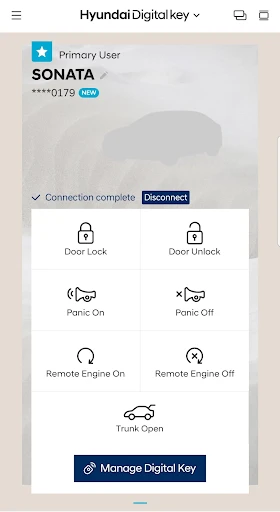
Description
About Hyundai Digital Key Feature – Seamless Access and Control
The Hyundai Digital Key is a innovative smartphone application that transforms compatible Android or iOS devices into a virtual car key. This technology allows users to lock, unlock, start, and operate their vehicle without the need for a physical key fob. By leveraging Near Field Communication (NFC) and Bluetooth Low Energy (BLE), the app provides a secure and convenient alternative for vehicle access and control. It is designed to integrate seamlessly with modern Hyundai vehicles, offering a glimpse into the future of connected and personalized mobility. The app represents a significant step in digital integration, enhancing the traditional ownership experience with smart, user-centric features.
Chapter 1: Function
The core function of the Hyundai Digital Key app is to replace the physical key fob. Users can perform essential vehicle operations directly from their authorized smartphone. The primary actions include locking and unlocking the doors by simply holding the phone near the driver's door handle. Furthermore, the app enables users to start and stop the engine remotely, provided the smartphone is inside the vehicle. It also allows for the sharing of digital key access with family members or friends for a limited period, eliminating the need to hand over a physical key. The app's interface typically displays the vehicle's status, such as door lock state, and may include controls for activating features like the panic alarm or locating the vehicle in a crowded parking lot. These functions are executed through secure, encrypted communication between the smartphone and the vehicle's onboard systems.
Chapter 2: Value
The value proposition of the Hyundai Digital Key lies in its unparalleled convenience, enhanced security, and personalization. Its foremost advantage is the elimination of key anxiety; users no longer need to worry about losing or forgetting their physical key fob, as their smartphone is an everyday essential. This convenience extends to key sharing, which can be done instantly and remotely, perfect for lending the car to family or valet services without physical exchange. From a security standpoint, the digital key utilizes robust encryption and authentication protocols, making it difficult to duplicate or hack compared to traditional radio-frequency keys. The app can also revoke access instantly if a shared digital key is compromised. Moreover, it personalizes the driving experience. When the digital key is used, the vehicle can automatically adjust settings like seat position, mirror angles, and infotainment preferences linked to the user's profile. This creates a tailored environment for each driver. For Hyundai, this technology strengthens brand perception as an innovator in connected car services, fostering greater customer loyalty and satisfaction by integrating the vehicle more deeply into the user's digital ecosystem.
Chapter 3: Scenarios
The primary target users for the Hyundai Digital Key are tech-savvy individuals, families with multiple drivers, and professionals who value efficiency and smart solutions. A common everyday scenario involves a parent who needs to share car access with a newly licensed teenager. Instead of duplicating a physical key, the parent can grant time-limited digital access via the app, ensuring control and peace of mind. For the frequent traveler or commuter, the scenario is one of streamlined routine: approaching the car with hands full of groceries, a simple tap of the phone against the door handle grants access, and pressing the engine start button inside gets them on their way without fumbling for keys. Professionals, such as real estate agents or delivery personnel who use the vehicle for work, benefit from easy and secure key sharing with colleagues. Additionally, in situations where a physical key is misplaced inside the vehicle or at home, the digital key on the user's person provides a reliable backup. The app is particularly valuable in car-sharing arrangements within families or small groups, simplifying logistics and enhancing the overall user experience with personalized settings for each driver.
Uninstall Instructions
For step-by-step guidance on how to safely remove this application from your device, please refer to our 《Uninstall Instructions》 document.
Pros
- turns compatible android phones into car keys
- remote parking via smartphone for tight spaces
- shares digital key access with multiple users
- works without cellular signal using nfc/uwb
- integrates vehicle controls into a single app
Cons
- limited to recent hyundai/genesis models only
- requires specific smartphone models and os
- setup process is complex for first-time users
- potential battery drain on the smartphone
- nfc key requires holding phone to door handle
Frequently Asked Questions
What is the Hyundai Digital Key app and what does it do?
The Hyundai Digital Key app turns your compatible smartphone into a digital key for your Hyundai vehicle. Its core function is to lock, unlock, and start your car without a physical key fob. It uses Near Field Communication (NFC) and Bluetooth Low Energy (BLE) technology to communicate with the vehicle, offering keyless convenience. The app also allows you to share digital keys with other users. It is designed for specific Hyundai models that support this feature.
Is the Hyundai Digital Key app free to use?
Yes, the Hyundai Digital Key app itself is free to download and use. However, it requires a compatible Hyundai vehicle equipped with the Digital Key feature, which may be a standard or optional inclusion depending on the model year and trim. No in-app purchases are required for basic key functions. Use of the app may be tied to your Hyundai account and require an active Bluelink subscription for certain remote features or initial setup in some regions.
Which phones and Hyundai models are compatible?
Compatibility is specific. The app primarily supports recent Samsung Galaxy and Google Pixel smartphones with NFC. For iPhone users, digital key functionality may be integrated into the Apple Wallet app instead. Vehicle compatibility is limited to newer Hyundai models (typically 2020 and later, like the Sonata, Palisade, Ioniq 5, etc.) that have factory-installed Digital Key hardware. Always check the official Hyundai website for the most current and detailed list of compatible phones and vehicle models.
How do I start my car using the Digital Key app?
To start the car, first ensure your phone's NFC and Bluetooth are on and the app is active. Place your phone on the vehicle's wireless charging pad (for NFC authentication). Then, with the phone still on the pad, press the engine start/stop button as you normally would. The app uses a combination of NFC for secure authentication and Bluetooth for continued connectivity once the vehicle is running. The exact steps might vary slightly by model, so refer to your vehicle's manual.
What should I do if the digital key stops working?
First, ensure your smartphone has sufficient battery, and that Bluetooth and NFC are enabled. Restarting the app and your phone can resolve temporary glitches. Verify that your Hyundai Bluelink subscription (if required in your region) is active. If problems persist, try removing and re-pairing the digital key within the app. For unresolved technical issues, contact Hyundai Customer Support or your local dealership, as the problem may relate to your specific vehicle's system or require a software update.
App Info
Technical Info
Recommended For You

Creati AI Photo Generator
Art & Design

Bible Daily, KJV Bible + Audio
Books & Reference

FlipaClip: Create 2D Animation
Art & Design

Fashion Design Sketches Book
Art & Design

Drawing Pad Pro - Sketchpad
Art & Design

Mirror Plus - HD Mirror app
Beauty

Paylocity
Business

My Verizon For Business
Business

ICS Mobile
Communication

Barber Chop
Beauty

VSD Viewer for Visio Drawings
Business

GettingOut Visits
Communication

Hangouts
Communication

Nail Art Design : Nails Polish
Beauty

Standup Wireless
Communication

5 Calls: Contact Your Congress
Books & Reference

Amazon Seller
Business

Boat AI Browser: Web & Tools
Business

Ai Vista
Art & Design

Toyota
Auto & Vehicles