
NuFACE
Screenshots


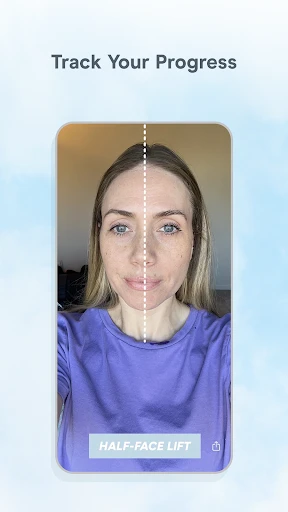

Description
About NuFACE App Feature
The NuFACE App serves as the intelligent companion to the NuFACE brand's suite of at-home microcurrent facial toning devices. It is designed to enhance the user's skincare routine by providing guided treatments, personalized settings, and progress tracking. By connecting via Bluetooth to compatible NuFACE devices, the app transforms a standalone beauty tool into a smart, customized skincare ecosystem, helping users achieve their aesthetic goals with consistency and expert guidance.
Chapter 1: Function
The core function of the NuFACE App is to pair with and control NuFACE microcurrent devices, such as the NuFACE Trinity or Mini. Upon connection, it delivers structured treatment protocols. Users can select from various guided routines tailored for different areas like the face, neck, or eyes, with the app providing real-time, step-by-step audio and visual instructions for proper device placement and movement. It allows for the customization of microcurrent intensity levels to suit individual comfort and sensitivity. Furthermore, the app features a treatment calendar, sending reminders to maintain regimen consistency, and logs each session to track usage frequency and progress over time, ensuring users follow the recommended treatment schedule for optimal results.
Chapter 2: Value
The primary value proposition of the NuFACE App lies in its ability to professionalize and personalize the at-home beauty treatment experience. Its key advantage is delivering expert-led guidance, which reduces the learning curve and ensures users employ their NuFACE device correctly and safely, maximizing the efficacy of microcurrent technology aimed at toning facial muscles and improving skin appearance. By offering customized routines and adjustable intensity, it accommodates diverse user needs and sensitivities, making advanced skincare accessible. The integrated tracking and reminder system addresses a common hurdle in beauty routines—consistency—turning sporadic use into a disciplined regimen. This data-driven approach allows users to visualize their commitment and correlate usage with visible results, fostering motivation. Ultimately, the app elevates the hardware from a simple tool to a connected wellness partner, enhancing user engagement, ensuring proper technique, and supporting long-term skincare goals with a foundation of education and structure, thereby protecting the user's investment in the device.
Chapter 3: Scenarios
The NuFACE App primarily targets individuals seeking professional-grade, non-invasive facial toning and skincare results from the comfort of their home. Key user groups include beauty enthusiasts aged 30 and above who are proactive about anti-aging routines and wish to address concerns like fine lines, loss of firmness, or facial contouring. It is also ideal for busy professionals who value efficient, structured routines that fit into their schedule, as the app's reminders and guided 5-minute treatments facilitate easy integration into morning or evening rituals. Furthermore, it suits users new to microcurrent technology who may feel intimidated by the device alone; the app's tutorials build confidence through clear instructions. Everyday use cases involve a user launching the app before a treatment to select a focused routine for the day, following on-screen prompts to glide the device across their skin, adjusting the intensity as needed, and then logging the session. Over weeks, they revisit the app's calendar to review their consistency and track progress toward their personal skincare objectives.
Uninstall Instructions
For step-by-step guidance on how to safely remove this application from your device, please refer to our 《Uninstall Instructions》 document.
Pros
- microcurrent toning requires no downtime post-treatment
- five adjustable intensity levels for personalized routines
- ergonomic head design contours precisely to facial curves
- FDA-cleared device for at-home facial muscle stimulation
- quick five-minute daily sessions maintain results
Cons
- requires consistent conductive gel application for operation
- initial learning curve for proper device angle and motion
- premium pricing compared to basic facial massage tools
- not suitable for areas with metal implants or fillers
- battery-powered unit needs regular recharging cycles
Frequently Asked Questions
What is NuFACE and what does it do?
NuFACE is a skincare and beauty app designed to work with the NuFACE brand of at-home microcurrent facial toning devices. Its core function is to guide users through personalized treatment routines, track usage, and provide educational content on device operation and skincare techniques. The app positions itself as a digital companion to enhance the effectiveness and consistency of your NuFACE device treatments.
Is the NuFACE app free to use?
The NuFACE app is free to download and includes essential functions like connecting to your device and accessing basic routines. However, it operates on a freemium model. Premium features, such as advanced personalized treatment plans, exclusive video tutorials, and in-depth progress tracking, require a subscription through in-app purchases. The app itself does not sell physical devices.
What devices and systems is the NuFACE app compatible with?
The NuFACE app requires a compatible NuFACE microcurrent device (like the Trinity or FIX) to use its core features. It is available for iOS and Android smartphones. For optimal performance, a stable Bluetooth connection is needed to pair with your device. Please check the official NuFACE website for the most current list of compatible device models and required operating system versions.
How do I connect my NuFACE device to the app?
Ensure Bluetooth is enabled on your smartphone. Open the NuFACE app and follow the on-screen pairing instructions, which typically involve turning on your device and holding it near your phone. If connection fails, try restarting both the app and your device, ensuring the device is charged, and checking for any app updates. The app provides troubleshooting guides for common pairing issues.
Where can I get support for app or device issues?
For technical support, warranty claims, or troubleshooting for both the app and your NuFACE device, you should contact NuFACE Customer Service directly. Support details are available within the app's 'Help' or 'Settings' section and on the official NuFACE website. The app does not handle hardware repairs or replacements directly but can guide you to the correct support channels.
App Info
Technical Info
Recommended For You

Driver Pulse by Tenstreet
Business
TeamSpeak 3 - Voice Chat
Communication

FOREO For You
Beauty

scan my tesla
Auto & Vehicles

PayByPhone
Auto & Vehicles

Magnificat Lenten 2025
Books & Reference

Planity
Beauty

DreamPic - AI Image Generator
Art & Design

Nomad Sculpt
Art & Design

Wikipedia
Books & Reference

Car Engine Sounds - Gas Pedal
Auto & Vehicles

JusTalk - Video Chat & Calls
Communication

NovelUP — Novel Downloader
Books & Reference

Whoscall - Caller ID & Block
Communication

starryai - AI Art Generator
Art & Design

GIMP
Art & Design

HHAeXchange
Business

Blessed - Bible verse & Prayer
Books & Reference

Webmotors: comprar carro
Auto & Vehicles

FillUp - Gas Mileage Log
Auto & Vehicles