
Alight Mobile
Screenshots

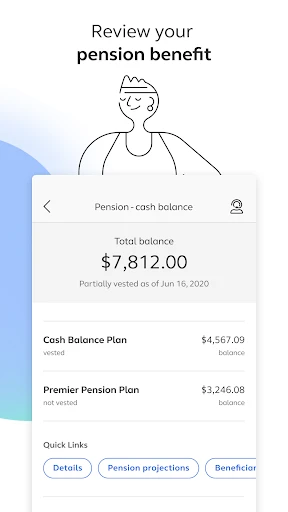


Description
About Alight Mobile Features – Your Comprehensive Work and Benefits Hub
Alight Mobile is an official application designed for employees to manage their work-related benefits, payroll, and HR services on the go. It serves as a personal digital gateway to an organization's human resources and financial information, streamlining access to critical employment data. The app consolidates complex administrative tasks into a user-friendly mobile interface, enabling users to view pay stubs, manage health benefits, plan for retirement, and access HR resources from anywhere. It is tailored for the modern workforce, offering convenience, security, and immediate access to essential tools that support both daily work life and long-term financial well-being.
Chapter 1: Function
Alight Mobile centralizes a suite of core HR and financial functions into a single, accessible platform. Its primary capability is providing detailed access to payroll information, allowing users to view current and historical pay stubs, track earnings, and understand deductions with clarity. The app facilitates comprehensive benefits management, enabling users to review and select health insurance plans, monitor healthcare spending accounts, and manage dental and vision coverage. For retirement planning, it offers tools to check 401(k) balances, adjust investment allocations, and model future savings. Additionally, it provides direct access to important tax documents like W-2s, company news, and HR contact information. The app also supports practical tasks such as submitting time-off requests and updating personal details, effectively digitizing the employee handbook and administrative office.
Chapter 2: Value
The value proposition of Alight Mobile lies in its empowerment of employees through convenience, transparency, and proactive financial management. It eliminates the traditional friction of HR processes by providing 24/7 access to vital information, freeing users from desktop dependency and lengthy inquiries to HR departments. A key advantage is the enhanced transparency into compensation and benefits; users gain immediate insight into their total rewards package, fostering better financial literacy and informed decision-making regarding health and retirement plans. The app promotes proactive wellness and financial health by offering integrated tools to track health savings account (HSA) contributions, simulate retirement outcomes, and manage spending. Security is paramount, employing robust encryption and authentication protocols to protect sensitive personal and financial data. Furthermore, its intuitive design and personalized dashboard present complex information in a digestible format, reducing confusion and saving valuable time. By consolidating disparate HR systems, Alight Mobile delivers a seamless user experience that not only simplifies administrative tasks but also actively contributes to an employee's sense of control and engagement with their overall compensation and well-being, ultimately adding tangible value to the employer's benefits offering.
Chapter 3: Scenarios
Alight Mobile primarily targets employees of mid-to-large-sized organizations that utilize Alight Solutions for HR and financial outsourcing. It is indispensable for busy professionals who need instant access to pay information while traveling or between meetings. New hires will find it crucial for onboarding, enabling them to electronically complete paperwork and select benefits. During open enrollment periods, the app becomes a vital tool for all employees to compare and elect benefit plans from their mobile device. Financial planners and individuals focused on future security use it regularly to monitor and adjust their 401(k) investments. Parents or individuals managing family healthcare utilize the app to check coverage details, view claim statuses, and manage dependent information before medical appointments. Employees preparing for tax season rely on it to quickly download and share their W-2 forms. In essence, any employee seeking a streamlined, self-service approach to managing the administrative aspects of their employment will find Alight Mobile tailored to their daily and long-term needs.
Uninstall Instructions
For step-by-step guidance on how to safely remove this application from your device, please refer to our 《Uninstall Instructions》 document.
Pros
- integrates payroll
- benefits
- and HR in one hub
- allows real-time paycheck access before payday
- offers personalized savings and budgeting tools
- streamlines W-2 and tax document retrieval digitally
- enables quick benefits enrollment and claim tracking
Cons
- requires employer enrollment for full feature access
- pay-on-demand feature depends on employer policy
- advanced financial tools limited to partnered services
- interface varies significantly by employer's setup
- notifications can be sparse for non-urgent updates
Frequently Asked Questions
What is Alight Mobile and what does it do?
Alight Mobile is a workforce and HR management application. Its core functions allow employees to access pay information, view work schedules, manage benefits, and handle other employment-related tasks directly from their mobile device. It is positioned as a convenient self-service portal for workforce management.
Is Alight Mobile free to use or are there any fees?
Alight Mobile is typically provided as a free service by your employer. There are no subscription fees for the app itself. However, its availability and specific features are contingent on your employer's partnership with Alight Solutions. You should confirm access details with your company's HR department.
What devices and systems are compatible with Alight Mobile?
Alight Mobile is available for both iOS and Android platforms. You can download it from the Apple App Store or Google Play Store. It is designed for smartphones and tablets. The app requires an active internet connection and is intended for use by employees of organizations that utilize Alight's HR and financial services.
How can I view my pay stubs and tax documents on Alight Mobile?
After logging in with your company-provided credentials, navigate to the 'Pay' or 'Compensation' section. Your pay stubs, tax forms (like W-2s), and earnings statements are stored there. You can view, download, or share these PDF documents. The exact menu labels may vary slightly based on your employer's configuration.
What should I do if I forget my login credentials?
Use the 'Forgot Password' or 'Need Help Signing In?' link on the app's login screen. This will guide you through identity verification, often involving your registered email or security questions. For username issues or if recovery fails, you must contact your employer's HR or IT support desk, as Alight manages access per company policy.
App Info
Technical Info
Recommended For You

Beauty Camera - Selfie Camera
Beauty

ReadEra – book reader pdf epub
Books & Reference

Ficbook: Read Fictions Anytime
Comics

Call Blocker - Block Numbers
Communication

Poster Maker - Flyer Maker
Art & Design

Google Voice
Communication

DailyBible Lite - KJV Version
Books & Reference

iFnovel - Books,Web Novel
Books & Reference

Holy Bible King James + Audio
Books & Reference

Vivaldi Browser - Fast & Safe
Communication

Proton Mail: Encrypted Email
Communication

Hairstyles step by step
Beauty

Zebra Comics: Webtoons & Manga
Comics

WoAD
Communication

PrinterShare Mobile Print
Business

Twenty-Four Hours a Day
Books & Reference

مانجا للصغار
Comics

ReadEra Premium – ebook reader
Books & Reference

Beauty Camera & Makeup Camera
Beauty

Magic Diamond Painting-Gem Art
Art & Design