
Video Background Changer
Screenshots




Description
About Video Background Changer Feature - Seamlessly Transform Your Video Scenes
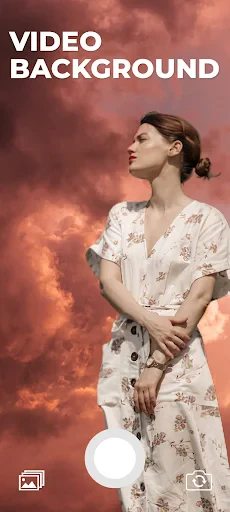
Video Background Changer is a specialized mobile application designed to empower users to effortlessly replace or modify the background of their video clips. Leveraging advanced AI segmentation technology, it accurately distinguishes subjects from their original surroundings, enabling a clean removal and substitution with a vast library of static images, dynamic videos, or even custom visuals. This tool democratizes a complex post-production effect, making it accessible directly on smartphones for content creators, social media enthusiasts, and professionals seeking quick yet impressive edits without the need for expensive desktop software or extensive technical expertise.
Chapter 1: Function
The core functionality of Video Background Changer revolves around its precise AI-powered subject segmentation and background replacement. Users begin by importing a video from their gallery or recording one directly within the app. The AI then automatically detects and isolates the primary subject—typically a person—creating a detailed mask that separates them from the original backdrop. Once isolated, users can choose a new background from a diverse built-in library featuring categories like office settings, natural landscapes, abstract designs, and animated scenes. Alternatively, they can upload their own photos or videos as the new background. The app provides essential editing tools to refine the cutout, adjust edges for a natural blend, and fine-tune parameters like color matching and shadow addition to ensure the subject integrates convincingly with the new environment. Finally, the processed video can be exported in various resolutions and shared directly to social platforms.
Chapter 2: Value
The primary value proposition of Video Background Changer lies in its ability to deliver professional-grade visual effects with unprecedented ease and speed on a mobile device. Its key advantage is the sophisticated AI segmentation engine, which achieves high accuracy in separating subjects, even with complex elements like hair or flowing clothing, saving users hours of manual rotoscoping. The app offers immense creative freedom through its extensive and regularly updated background library and the option for personalization, allowing users to craft unique narratives or correct unsuitable filming environments post-shoot. For businesses and educators, it presents a cost-effective solution for creating polished promotional videos, presentations, or online course content without a physical studio setup. It enhances productivity by streamlining a complex editing workflow into a few intuitive taps. Compared to desktop alternatives, its mobile-first design ensures convenience and accessibility, while maintaining a strong focus on output quality, making advanced video compositing an attainable skill for amateurs and a valuable tool for professionals on the go.
Chapter 3: Scenarios
Video Background Changer primarily serves social media content creators, such as vloggers and TikTok/Instagram Reels producers, who constantly seek engaging ways to stand out. They use it to transport themselves to exotic locations or thematic settings, adding production value to their clips. Online educators and corporate trainers form another key user group, utilizing the app to replace distracting home offices with clean, professional backdrops, thereby elevating the credibility of their instructional and presentation videos. Marketing professionals and small business owners employ it to create eye-catching product advertisements or promotional content with dynamic backgrounds. Everyday users also benefit for personal projects, such as enhancing travel videos, creating fun birthday greetings with animated themes, or simply improving video call backgrounds for a more polished appearance. In essence, the app caters to anyone needing to quickly alter a video's context for creative, professional, or communicative purposes.
Uninstall Instructions
For step-by-step guidance on how to safely remove this application from your device, please refer to our 《Uninstall Instructions》 document.
Pros
- one-tap background replacement for any video
- maintains high-resolution output after processing
- precise edge detection for complex subjects like hair
- offline processing ensures complete data privacy
- supports custom background uploads and green screen
Cons
- high-accuracy mode significantly slows processing speed
- requires powerful hardware for real-time preview
- limited to short video clips in the free version
- struggles with fine
- fast-moving details like smoke
- no cloud sync for projects across devices
Frequently Asked Questions
What is Video Background Changer and what does it do?
Video Background Changer is a mobile video editing app focused on AI-powered background replacement. Its core function is to automatically detect subjects in your videos and replace the original background with a new one, such as a different image, video, or color. It's designed for creating engaging content for social media, presentations, or personal projects by easily altering a video's setting.
Is Video Background Changer free to use?
The app typically operates on a freemium model. You can download and use basic features for free, which often includes a limited number of exports or standard background options. For full access to high-resolution exports, advanced AI tools, premium backgrounds, and removal of watermarks, a subscription or one-time in-app purchase is required. Specific pricing details are available within the app.
What devices and systems does this app support?
Video Background Changer is primarily available for iOS and Android smartphones. It is optimized for recent OS versions to ensure the AI features work efficiently. Performance may vary on older devices due to the processing power required for real-time background segmentation. There is generally no need for additional external hardware to use its core functions.
How accurate is the AI background removal?
The accuracy depends on video quality and subject contrast. The AI performs best with clear, well-lit footage where the subject distinctly contrasts with the original background. Fine details like hair or fast movement can sometimes pose challenges. The app usually includes manual editing tools like brushes to refine the auto-generated mask and improve the final result for complex scenes.
Can I use my own images as the new background?
Yes, a key feature of Video Background Changer is the ability to import custom backgrounds. You can use photos from your device's gallery or shoot new ones. The app also supports using dynamic video clips or solid colors as backgrounds. This allows for highly personalized creations, from placing yourself in exotic locations to using a branded image for professional clips.
App Info
Technical Info
Recommended For You

Infinite Painter
Art & Design

Sweet Editor Camera Lite
Beauty

Moonstories
Books & Reference

Vivaldi Color Analysis
Beauty
AR Drawing Sketch Paint
Art & Design

Obd Mary – Car Scanner for ELM
Auto & Vehicles

King James Bible Study KJV
Books & Reference

Rakuten Viber Messenger
Communication

Blend Photo Editor & Effect
Art & Design

OpenSea: NFT marketplace
Art & Design

CamCard-Digital business card
Business

Knots 3D
Books & Reference

NHRA.TV
Auto & Vehicles

Blink Charging Mobile App
Auto & Vehicles

Easy hairstyles step by step
Beauty

iSharing: GPS Location Tracker
Communication

FAX App: Send Faxes from Phone
Business

Bitcoin Miner Cloud
Business

Holy Bible - Verse+Audio
Books & Reference

My SafeLink
Communication