
Twenty-Four Hours a Day
Screenshots
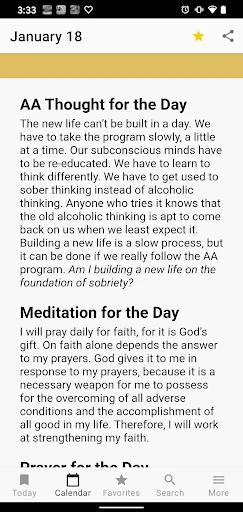

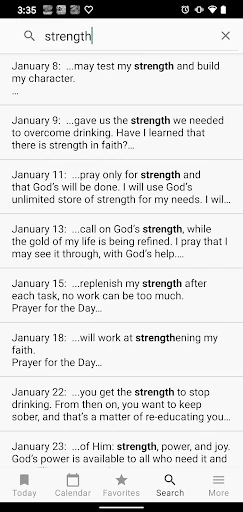
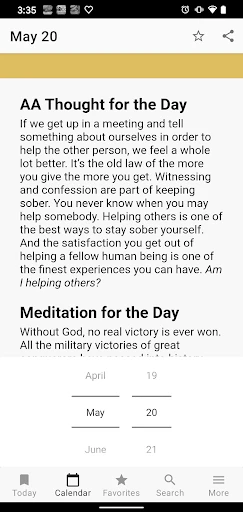

Description
About Twenty-Four Hours a Day App Features
Twenty-Four Hours a Day is a comprehensive personal time management and life recording application. It is designed to help users meticulously track their daily activities, manage time allocation, and cultivate positive habits through intuitive timeline recording and data analysis. The app serves as a digital diary and a personal efficiency coach, enabling users to gain a clearer understanding of how they spend their time and to reflect on and plan their lives.
Chapter 1: Function
The core function of the Twenty-Four Hours a Day app revolves around timeline-based activity recording and management. Users can easily add events or activities to a 24-hour timeline, categorizing them with custom labels such as work, study, leisure, fitness, or sleep. The app provides rich templates and quick recording options to minimize the effort required for input. Beyond basic recording, it generates detailed visual reports, including pie charts and bar graphs, to display daily and weekly time distribution. Additionally, the app features goal-setting and habit-tracking capabilities, allowing users to set specific time allocation goals for certain activities and receive reminders and completion statistics, thereby fostering disciplined time management.
Chapter 2: Value
The primary value proposition of the Twenty-Four Hours a Day app lies in its ability to enhance personal awareness and life efficiency through data-driven insights. In an era of fragmented time, many people feel their days slip away without tangible achievement. This app addresses this pain point by offering a simple yet powerful tool for quantifying life. Its key advantages include: first, intuitive visual feedback that transforms abstract time into concrete charts, helping users instantly identify time sinks and areas for improvement; second, fostering self-discipline through goal tracking and reminder features, which encourage users to adhere to their plans and gradually build positive routines; third, serving as a comprehensive life log, where the recorded timeline becomes a valuable personal archive for reviewing growth and reflecting on life patterns. Unlike complex project management tools, it focuses on the individual's daily life, lowering the barrier to time management. The long-term use of this app can cultivate a more mindful approach to time, leading to a more organized, purposeful, and fulfilling life, which is its most significant value.
Chapter 3: Scenarios
The Twenty-Four Hours a Day app primarily targets individuals seeking self-improvement and enhanced personal management. Key user groups include: students who need to balance study, revision, and extracurricular activities; young professionals aiming to optimize work efficiency, manage overtime, and allocate time for skill development and relaxation; freelancers and remote workers who require self-discipline to structure their flexible schedules; and individuals focused on habit formation, such as those consistently tracking reading, exercise, or meditation time. In everyday use, a student might use it to ensure eight hours of dedicated study and adequate rest; an office worker could track time spent on different projects to improve productivity and guarantee personal time; a fitness enthusiast might record workout durations and monitor consistency. It is also suitable for anyone wishing to conduct a personal time audit to understand their lifestyle patterns. The app seamlessly integrates into daily life, serving as a silent partner that aids in planning, recording, and reflecting, making every hour meaningful.
Uninstall Instructions
For step-by-step guidance on how to safely remove this application from your device, please refer to our 《Uninstall Instructions》 document.
Pros
- integrates time blocking with ambient soundscapes
- visual timeline for tracking daily activity categories
- one-tap log for frequent tasks reduces input friction
- generates weekly focus reports from time data
- minimalist interface avoids productivity app clutter
Cons
- steep learning curve for custom block configuration
- audio focus feature drains battery during long sessions
- no direct sync with major calendar platforms
- manual tagging required for retrospective analysis
- offline mode lacks report generation functionality
Frequently Asked Questions
What is the core function of Twenty-Four Hours a Day?
Twenty-Four Hours a Day is a mindfulness and meditation app designed to help users integrate short, guided mindfulness practices into their daily routine. Its core positioning is to provide accessible, bite-sized sessions that can be used at any moment to reduce stress, improve focus, and promote emotional balance throughout the day, without requiring long, uninterrupted periods of time.
Is Twenty-Four Hours a Day free to use, or does it have in-app purchases?
The app operates on a freemium model. It offers a selection of basic mindfulness sessions and daily check-ins for free. To access the full library of specialized courses, advanced features like progress tracking, and offline downloads, a subscription or one-time in-app purchase is required. Specific pricing details are available within the app's store listing.
What devices and operating systems does this app support?
Twenty-Four Hours a Day is primarily available for iOS and Android smartphones and tablets. It is optimized for recent versions of both operating systems. The app does not require any additional external hardware to function. For the most current information on specific version requirements, please check the official app store page.
How does the app's 'moment-based' mindfulness feature work?
The unique 'moment-based' feature delivers ultra-short, context-aware audio prompts (typically 1-5 minutes) triggered by time, location, or user activity. For example, it might suggest a brief breathing exercise before a scheduled meeting or a calming technique when you arrive home. This aims to seamlessly weave mindfulness into existing daily patterns.
Can I use the app's sessions offline without an internet connection?
Yes, but offline access is a premium feature. Users with an active subscription can download their favorite guided sessions, daily practices, and courses to their device for use without an internet connection. Free users typically need an active data or Wi-Fi connection to stream content. Management of downloads is done within the app's library section.
App Info
Technical Info
Recommended For You

My Total Wireless: Account App
Communication

Phoenix - Fast & Safe
Communication

Bible Daily, KJV Bible + Audio
Books & Reference

BeautifyX - AI Makeover Studio
Beauty

AGAMA Car Launcher
Auto & Vehicles

Blink Charging Mobile App
Auto & Vehicles

OBD2 Car Scanner - ELM Torque
Auto & Vehicles

UKG Dimensions
Business

CCW – Concealed Carry 50 State
Books & Reference

Stickman: draw animation maker
Art & Design

Car Gauge Pro (OBD2 + Enhance)
Communication

Invoice Simple: Invoice Maker
Business

IRMO AI Video Photo Generator
Art & Design

Enphase Enlighten
Business

Perfect Viewer
Comics

Duke Energy
Business

ExtraMile Rewards®
Auto & Vehicles

Realtime Charts for Torque Pro
Auto & Vehicles

Pixl - Face Retouch & Blemish
Beauty

Opera GX: Gaming Browser
Communication