Watch Sync App - BT Notifier
Screenshots



Description
About Watch Sync App - BT Notifier Features
Watch Sync App - BT Notifier is a dedicated utility application designed to establish seamless connectivity between a user's smartphone and their Bluetooth-enabled smartwatch or fitness band. It serves as a robust bridge, ensuring that users never miss important notifications from their phone while on the move. The app specializes in mirroring a wide array of smartphone alerts—including calls, messages, and app notifications—directly to the user's wrist-worn device. With a focus on reliability and user-centric design, it enhances the functionality of compatible wearables, transforming them into a convenient and discreet extension of the smartphone. It is particularly valuable for individuals seeking to maintain connectivity without constantly checking their phones, thereby promoting a more efficient and focused daily routine.
Chapter 1: Function
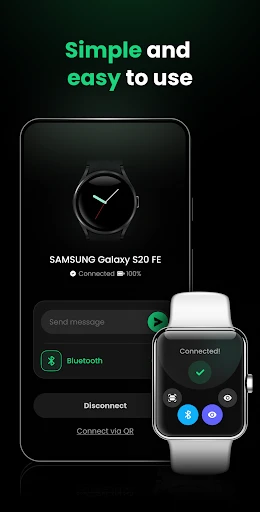
The core function of Watch Sync App - BT Notifier is to reliably synchronize smartphone notifications with a paired Bluetooth smartwatch. Upon installation and pairing, the app operates in the background, diligently forwarding alerts. It captures incoming calls, SMS messages, and notifications from third-party applications such as social media, email clients, and calendar apps. Users can typically customize which apps are allowed to push notifications to the watch, preventing alert overload. The app also often includes basic watch functionality controls, such as finding a connected phone by making it ring or controlling music playback remotely from the wrist. Its operation is centered on maintaining a stable Bluetooth connection, ensuring that notification delivery is both prompt and consistent, thereby keeping the user informed through discreet vibrations or alerts on their watch screen throughout the day.
Chapter 2: Value
The primary value proposition of Watch Sync App - BT Notifier lies in its ability to augment situational awareness and convenience, effectively reducing digital distraction. By funneling essential notifications to the wrist, it allows users to glance and quickly triage information without the need to physically handle their smartphone. This is a significant advantage in environments where using a phone is impractical, socially inappropriate, or unsafe, such as during meetings, while driving, or in crowded spaces. The app adds substantial value to compatible wearables that may lack deep native integration with certain phone models or notification systems, effectively upgrading their utility. Key advantages include enhanced productivity, as users can stay connected without interrupting their workflow, and improved discretion. Furthermore, for fitness enthusiasts, it ensures they remain reachable during workouts without carrying a phone. The app's focus on stable connectivity and customizable filters ensures that users receive only the alerts that matter to them, minimizing noise and promoting a more mindful interaction with technology. It transforms a simple smartwatch into a powerful, personalized notification hub.
Chapter 3: Scenarios
The primary target users for Watch Sync App - BT Notifier are individuals who own Bluetooth-capable smartwatches or fitness bands that benefit from enhanced notification syncing. This includes professionals and office workers who need to stay updated on emails and calendar appointments during busy days but wish to avoid constantly checking their phones. It is equally valuable for active users, such as runners and cyclists, who keep their phones stored away but want to see call or message alerts during their exercise sessions. Parents or caregivers who need to be reachable for urgent family matters while their hands are occupied with tasks also find great utility in this app. Everyday use cases are abundant: quickly dismissing a low-priority notification during a conversation, screening calls while in a meeting, reading a text message while cooking with messy hands, or controlling music playback during a commute. The app serves anyone seeking a more integrated, efficient, and less intrusive way to manage their digital communications through the convenience of their wrist.
Uninstall Instructions
For step-by-step guidance on how to safely remove this application from your device, please refer to our 《Uninstall Instructions》 document.
Pros
- mirrors phone notifications to basic Bluetooth watches
- operates without a dedicated smartwatch OS dependency
- minimal battery drain on both phone and watch
- simple pairing process for legacy Bluetooth devices
- custom vibration patterns for different app alerts
Cons
- limited to notification mirroring without reply options
- requires persistent Bluetooth connection draining phone battery
- no health tracking features common to fitness wearables
- compatibility restricted to older Bluetooth watch models
- basic interface lacks notification history or management
Frequently Asked Questions
What is Watch Sync App - BT Notifier?
Watch Sync App - BT Notifier is a utility application designed to sync notifications from your smartphone to a compatible smartwatch via Bluetooth. Its core function is to mirror alerts for calls, messages, emails, and other apps from your phone to your wrist, allowing you to stay informed without checking your phone. It typically supports custom vibration patterns and notification filtering.
Is this app free to use or does it have in-app purchases?
The app is generally free to download and use for basic notification syncing. However, it may offer optional in-app purchases to unlock advanced features such as extended customization options, additional notification filters, or the removal of advertisements. No additional physical equipment is required beyond a compatible smartwatch and smartphone.
What devices and systems are compatible with this app?
The app is primarily designed for Android smartphones and a wide range of Bluetooth-enabled smartwatches (not Apple Watch). It typically supports devices running Android 8.0 or later. Compatibility with specific watch models (e.g., Wear OS, Samsung Galaxy Watch, or other generic BT watches) varies, so checking the app's official description for a supported device list is recommended.
How do I troubleshoot if notifications stop syncing?
If notifications stop syncing, ensure Bluetooth is enabled and the devices are paired and in range. Check the app's permissions on your phone, specifically notification access and battery optimization exemptions. Restarting both the phone and watch often resolves temporary glitches. Also, verify the app's settings to ensure the specific app notifications are not disabled within the sync filter.
Can I customize which app notifications are forwarded?
Yes, a core feature of this app is granular notification control. You can typically select which applications on your phone are allowed to forward alerts to your watch. Most versions also offer basic customization for vibration patterns and the ability to dismiss notifications from the watch. Advanced filtering or reply functions may depend on watch model and OS support.
App Info
Technical Info
Recommended For You

Inky - Run Inkscape on Android
Art & Design

Truecaller: Caller ID Blocker
Communication

YotePya
Comics

Билеты ПДД 2025 и Экзамен ПДД
Auto & Vehicles

Holy Bible - Verse+Audio
Books & Reference

Cast Phone to TV, Chromecast
Business

DMV Practice Test Permit Genie
Auto & Vehicles

EPUB Reader for all books
Books & Reference

Meeting - Video Meeting
Communication

CL Theme C1
Auto & Vehicles

Spirit Fanfiction and Stories
Books & Reference

Mark - AI Logo Generator
Art & Design

Clipboard
Business

HCMToGo
Business

Obd Mary – Car Scanner for ELM
Auto & Vehicles

Rain Instant Pay
Business

PayPal Business
Business

Challenger Comics Viewer
Comics

HHAeXchange
Business

Toyota
Auto & Vehicles