AGAMA Car Launcher
Screenshots



Description
About AGAMA Car Launcher Features – A Customizable Driving Interface for Android Head Units
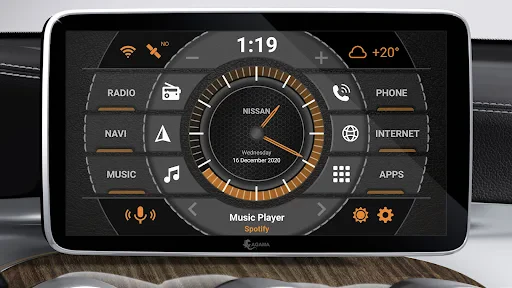
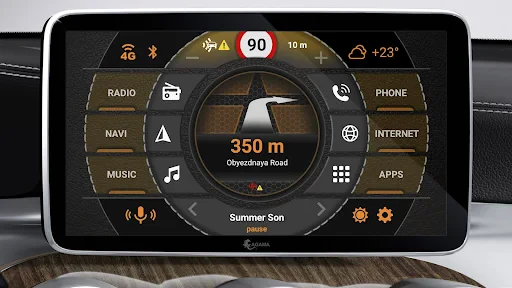
AGAMA Car Launcher is a specialized Android application designed to replace the standard interface of Android-based car head units and infotainment systems. It transforms the in-car screen into a sleek, driver-centric dashboard, prioritizing safety, accessibility, and personalization. By offering a simplified layout with large, touch-friendly widgets and controls, AGAMA enhances the user experience for drivers who rely on their vehicle's central display for navigation, media, and vehicle information, effectively turning a generic Android device into a dedicated car console.
Chapter 1: Function
AGAMA Car Launcher's core function is to serve as a customizable skin and organizer for your car's Android infotainment system. Upon launch, it replaces the default home screen with a driving-optimized interface. This interface typically features large, resizable widgets for essential functions like music playback, radio, navigation (integrating with apps like Google Maps or Waze), and phone calls. It provides quick access to installed apps through a customizable grid or list, and often includes system information displays such as speed, time, and network status. The launcher allows deep customization of the home screen's appearance, including themes, icon packs, and widget positioning. Furthermore, it manages app behavior, such as auto-starting specific apps when the car turns on, and can integrate with vehicle data via OBD-II adapters to show real-time diagnostics like coolant temperature and battery voltage on the dashboard.
Chapter 2: Value
The primary value of AGAMA Car Launcher lies in its ability to create a safer, more intuitive, and aesthetically cohesive in-car computing environment. Its key advantage is enhanced driver safety. By presenting large, glanceable controls and information on a simplified interface, it minimizes distraction compared to fumbling with small icons on a standard Android screen. The customization is its second major strength. Users are not locked into a manufacturer's static design; they can tailor the layout, colors, and information displayed to match their preferences and needs, making frequently used functions instantly accessible. This personalization extends to functionality, with support for various plugins and OBD-II integration, turning the head unit into a powerful vehicle monitoring tool. Thirdly, it improves usability. The interface is designed for use in a moving vehicle, with touch targets optimized for reduced-precision interaction. It also solves the problem of cluttered, poorly designed OEM interfaces by providing a uniform, user-friendly experience across different Android head unit models. Finally, it offers stability and continuous development, often receiving updates that add features and compatibility, ensuring the launcher evolves with user demands and new Android versions for head units.
Chapter 3: Scenarios
AGAMA Car Launcher is primarily targeted at car owners who have installed aftermarket Android head units or who own vehicles with native Android-based infotainment systems that allow launcher replacement. The first key user group is tech-savvy drivers and car enthusiasts who seek maximum control and personalization over their in-car tech experience, wishing to integrate navigation, high-quality audio players, and vehicle diagnostics into a single, clean dashboard. The second major group includes ride-share and delivery drivers who spend long hours in their vehicles. For them, the launcher's efficient layout allows rapid switching between navigation, trip tracking, and communication apps, directly impacting their workflow efficiency and safety. Everyday use cases involve starting the car and immediately being presented with a pre-set screen showing navigation to home or work, favorite music playlists, and current traffic conditions. During driving, large media controls allow easy skipping tracks without looking away from the road, while a large map widget provides constant navigation guidance. For car enthusiasts, connecting an OBD-II adapter transforms the screen into a real-time performance monitor, displaying gauges for vital engine parameters during a drive.
Uninstall Instructions
For step-by-step guidance on how to safely remove this application from your device, please refer to our 《Uninstall Instructions》 document.
Pros
- customizable widget-based interface for car infotainment
- integrates with vehicle OBD2 for real-time diagnostics display
- offline maps and navigation optimized for low-signal areas
- one-touch shortcuts for driving-specific apps and functions
- minimalist driving mode reduces on-screen clutter
Cons
- steep learning curve for initial widget setup and layout
- OBD2 features require specific compatible hardware dongles
- offline maps lack real-time traffic and route updates
- high battery drain when running without car charger
- occasional lag on older or low-spec Android head units
Frequently Asked Questions
What is AGAMA Car Launcher and its main purpose?
AGAMA Car Launcher is an Android app designed to replace your car's default infotainment interface. It provides a simplified, driver-optimized dashboard with large, touch-friendly widgets for navigation, media, and phone calls. Its core positioning is to enhance safety and convenience by minimizing distraction while driving. The launcher customizes your car's head unit screen with a clean layout and quick access to essential driving apps.
Is AGAMA Car Launcher free to use?
AGAMA Car Launcher is a freemium app. You can download and use its basic version for free, which includes core launcher functionality and standard widgets. The app offers in-app purchases to unlock premium features, such as additional widget packs, advanced customization themes, and more detailed layout options. There are no subscriptions, and no additional hardware is required beyond a compatible Android head unit.
What are the device and system requirements?
AGAMA Car Launcher is specifically designed for Android-based car stereos (head units), typically running Android 5.0 (Lollipop) or higher. It is not intended for standard smartphones or tablets. It adapts to various screen resolutions common in aftermarket and factory head units. The app is optimized for use while driving and supports steering wheel control integration if your hardware and system permit it.
How does it improve safety over a standard phone interface?
AGAMA improves safety by offering a persistent, simplified interface with oversized buttons and widgets, reducing the need for precise touch input while driving. It allows you to pin crucial apps like navigation and music player to the main screen for one-tap access. The design prioritizes glanceable information and minimizes on-screen clutter, which helps keep your focus on the road compared to navigating complex phone menus or a stock Android interface.
Can I use my favorite music and map apps with it?
Yes, AGAMA Car Launcher acts as a hub for your existing apps. Its media and navigation widgets can directly link to and control popular third-party applications like Spotify, Google Maps, Waze, and Poweramp. You configure the widgets to launch your preferred default app for each function. This means you retain full access to your accounts and features within those apps while benefiting from AGAMA's unified, driver-friendly interface.
App Info
Technical Info
Recommended For You

Glassdoor | Jobs & Community
Business

Drawing Apps: Draw, Sketch Pad
Art & Design

Standup Wireless
Communication

Bible Launcher-KJV & Prayer
Books & Reference

Magic Beauty Makeup Camera
Beauty

My Firestone
Auto & Vehicles

Square Point of Sale: Payment
Business

Google Meet
Communication

Moonstories
Books & Reference

Blue Letter Bible
Books & Reference

Jotform - Form, Sign & Survey
Business

Staples - Deals & Shopping
Business

WebNovel
Books & Reference

Everand: Ebooks and audiobooks
Books & Reference

MobiOffice: Word, Sheets, PDF
Business

Volvo Cars
Auto & Vehicles

Messages: Text SMS
Communication

Microsoft Authenticator
Business

EOBD Facile: OBD 2 Car Scanner
Auto & Vehicles

FoxFi Key (supports PdaNet)
Communication