
Blink Charging Mobile App
Screenshots
Description
About Blink Charging Mobile App Features
The Blink Charging Mobile App is an essential companion for electric vehicle (EV) owners, designed to streamline the process of locating, accessing, and managing EV charging sessions. It serves as a centralized platform connecting users to the extensive Blink Network of charging stations across North America. By integrating real-time data, remote control, and payment functionalities, the app transforms the EV charging experience from a logistical task into a convenient, user-driven activity. It empowers drivers to plan their journeys with confidence, optimize their vehicle's charging schedule, and monitor energy usage, all from the convenience of their smartphone.
Chapter 1: Function
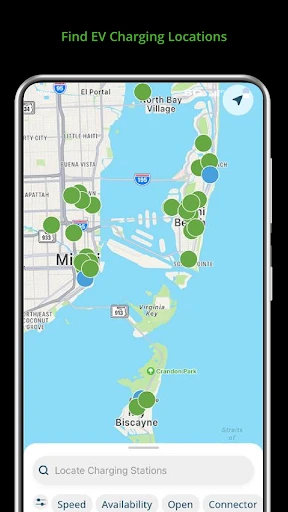
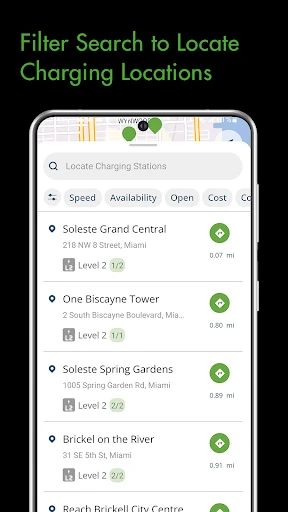
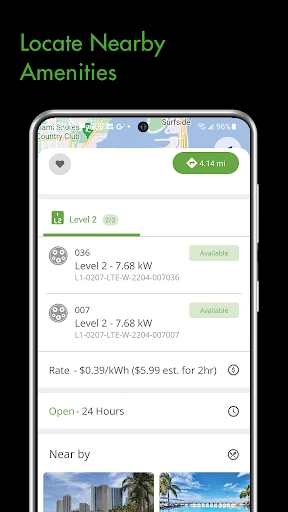
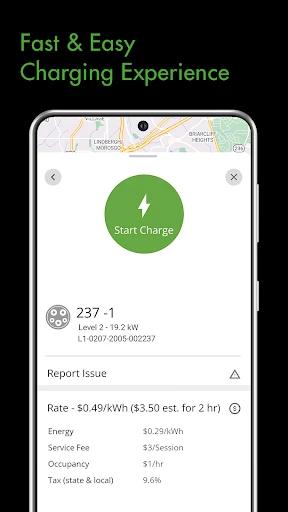
The Blink Charging Mobile App delivers a suite of core functionalities centered on accessibility and control. Primarily, it features an interactive map that displays the real-time status and location of all Blink charging stations, indicating availability, charging speed levels, and pricing. Users can seamlessly navigate to a selected station. A central function is the ability to initiate, monitor, and stop a charging session directly from the app, eliminating the need for physical RFID cards. The app integrates secure payment processing, allowing users to manage their payment methods and view detailed transaction histories. For owners of Blink home chargers, the app provides remote control to start or stop charging, set schedules to benefit from off-peak electricity rates, and track energy consumption. Additionally, users can receive notifications for session completion, station status changes, and special network promotions.
Chapter 2: Value
The Blink Charging Mobile App's primary value proposition lies in its ability to reduce range anxiety and enhance convenience for the EV lifestyle. It provides tangible advantages by offering reliable, real-time information that is critical for trip planning, saving users time and preventing frustration associated with finding an available, functional charger. The remote session management and cashless payment system create a frictionless, modern user experience, comparable to popular ride-sharing or food delivery apps. For home charger owners, the app unlocks significant economic value through scheduling features that can lead to substantial savings on electricity bills. Furthermore, the app adds a layer of transparency and control, as users can meticulously track their charging costs and energy usage patterns, aiding in personal budgeting and promoting efficient energy habits. By consolidating these services into a single, intuitive interface, Blink fosters user loyalty and positions itself not just as a hardware provider, but as a comprehensive service platform dedicated to supporting the entire EV ownership journey, from daily commutes to long-distance travel.
Chapter 3: Scenarios
The Blink app is indispensable for a broad spectrum of electric vehicle users. Daily commuters rely on it to locate reliable public charging near their workplace or along their regular routes, ensuring their vehicle is ready for the trip home. Urban dwellers without consistent access to home charging depend heavily on the app's map and status features to find and utilize public stations within city networks. Road-trippers and travelers use the app for long-distance journey planning, identifying fast-charging stations along highways to minimize stop times. Homeowners with a Blink charger represent a key user group, utilizing the app's scheduling and monitoring tools to manage home charging efficiently, often syncing with time-of-use utility rates. Fleet managers for companies adopting electric vehicles can also leverage the app to monitor and manage charging sessions for multiple vehicles, controlling operational costs. In essence, any EV driver seeking a smarter, more controlled, and less stressful charging experience is the primary target for this application.
Uninstall Instructions
For step-by-step guidance on how to safely remove this application from your device, please refer to our 《Uninstall Instructions》 document.
Pros
- real-time status of every charger in the network
- one-tap start for charging without physical cards
- filters for compatible plugs and charging speed
- in-app payment across all partnered stations
- route planning with charging stop integration
Cons
- requires account creation to view charger details
- network coverage limited to partner stations only
- real-time status depends on station connectivity
- no built-in community notes on charger reliability
- advanced filter lacks power output granularity
Frequently Asked Questions
What is the Blink Charging Mobile App used for?
The Blink Charging Mobile App is designed for electric vehicle (EV) owners to locate, activate, and pay for charging sessions at Blink Network charging stations. Its core functions include mapping available chargers, managing charging sessions remotely, and handling payments through the app. It also allows users to monitor charging status and view session history. The app serves as a central tool for accessing Blink's EV charging infrastructure.
Is the Blink Charging App free to download and use?
Yes, the Blink Charging Mobile App is free to download and install. However, using the charging stations typically incurs fees based on electricity consumption or session time, which are processed through the app. Some stations may have different pricing models. The app itself does not charge a subscription fee, but users must add a payment method to pay for actual charging services.
What devices and systems is the app compatible with?
The Blink Charging Mobile App is compatible with both iOS and Android devices. It requires iOS 12.0 or later for Apple devices and Android 8.0 or later for Android devices. The app is optimized for smartphones and tablets. It does not require additional specialized hardware, but it relies on the device's GPS and internet connection to locate and interact with charging stations.
How do I start a charging session with the app?
To start a session, open the app, locate a nearby Blink charger on the map, and select it. You can then initiate charging by scanning the QR code on the station or manually entering the station ID. The app will activate the charger and begin the session. You can monitor progress and stop charging remotely. Payment is automatically processed using your saved payment method after the session ends.
What should I do if a charging station is not working?
If a Blink charging station is malfunctioning, use the app to report the issue directly. Navigate to the station details in the app and select the option to report a problem. You can also contact Blink customer support through the app or their website for assistance. For refunds or billing issues related to a failed session, support can be reached via the contact information provided in the app's help section.
App Info
Technical Info
Recommended For You

ParkMobile: Park. Pay. Go.
Auto & Vehicles

MERO - Programări Online
Beauty

Batman Miniature Game
Comics

One Block for Minecraft Maps
Books & Reference

Storytel - Audiobooks & Books
Books & Reference

Plus Messenger
Communication

Zello PTT Walkie Talkie
Communication

Recraft
Art & Design

My Bible - Verse+Audio
Books & Reference

Marathon ARCO Rewards
Auto & Vehicles

Pocket Novel
Books & Reference

투믹스
Comics

Magic Beauty Makeup Camera
Beauty

PhiApp
Beauty

Weargram
Communication

Fonts - Logo Maker
Art & Design

Phoenix - Fast & Safe
Communication

Audible: Audio Entertainment
Books & Reference

Anime AI - Photo Maker
Art & Design

Messenger SMS & MMS
Communication