
Pixl - Face Retouch & Blemish
Screenshots


Description
About Pixl - Face Retouch & Blemish Feature
Pixl - Face Retouch & Blemish is a specialized mobile application designed for portrait photo enhancement, focusing on facial refinement and blemish removal. It provides users with a suite of intuitive, automated tools to retouch skin, remove imperfections, and enhance facial features with a few simple taps. The app prioritizes a natural-looking aesthetic, aiming to polish photos while preserving the subject's original character and texture. It caters to the growing demand for quick, professional-grade photo editing directly on smartphones, making advanced retouching techniques accessible to everyday users without the need for complex desktop software.
Chapter 1: Function
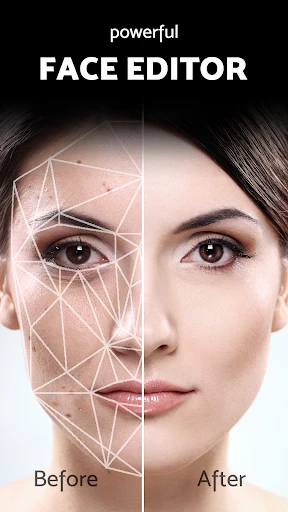
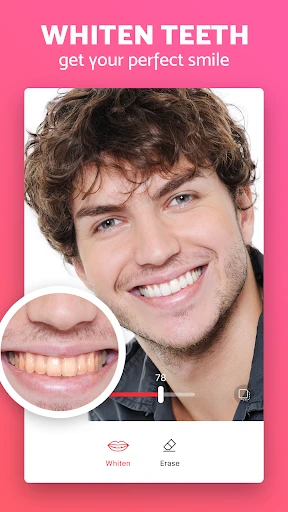
Pixl's core functionality revolves around automated and manual facial retouching. The app employs intelligent detection to map the user's face, enabling features like one-tap blemish and acne removal, which seamlessly erases spots and pimples. Its skin smoothing tool evens out texture and reduces the appearance of pores and fine lines without creating an artificial, plastic-like effect. Key functions also include tools for reshaping facial features, such as subtly adjusting eye size, slimming the face, or refining the nose and jawline. Additionally, it offers detail enhancement for eyes and teeth, brightening and clarifying these features. The app provides local adjustment brushes for precise editing on specific areas, alongside global filters and lighting adjustments to complement the retouching work. All edits are non-destructive, allowing users to revert or modify changes at any point.
Chapter 2: Value
The primary value proposition of Pixl lies in its ability to deliver professional-quality portrait retouching with remarkable simplicity and speed. Its key advantage is the sophisticated yet user-friendly automation; the AI-powered face detection and enhancement algorithms handle complex edits that traditionally required skilled manual work in software like Photoshop. This democratizes high-level photo editing, saving significant time and effort for both casual users and content creators. The app emphasizes natural results, a critical differentiator in a market saturated with heavy-handed beauty filters. By preserving skin texture and avoiding over-smoothing, it ensures subjects look refined yet authentic. Furthermore, Pixl operates entirely on the device, ensuring user privacy as photos are not uploaded to external servers for processing. The absence of watermarks on exported images and the provision of a one-time purchase option, as opposed to a subscription model in many competitors, offer clear economic and practical benefits. This combination of advanced technology, a natural aesthetic, privacy protection, and a straightforward pricing model creates a compelling package that addresses user frustrations with overly complex or unrealistic editing tools, establishing Pixl as a reliable and efficient solution for everyday portrait perfection.
Chapter 3: Scenarios
Pixl's primary target users are individuals who regularly share portraits on social media platforms, including Instagram, Facebook, and dating apps. This encompasses a broad demographic, from teenagers and young adults seeking to present their best selves online to professionals needing polished headshots for LinkedIn or company profiles. Social media influencers and content creators form a significant user group, as they require a consistent stream of flawless imagery to maintain their personal brand. The app is equally valuable for everyday scenarios such as enhancing a selfie before posting, improving a group photo where one's skin appears uneven, or touching up a portrait taken in unflattering lighting. It is also practical for preparing photos for personal use, like digital albums or gifts, where a polished look is desired without obvious signs of editing. For small business owners or freelancers without a budget for professional photography, Pixl serves as a cost-effective tool to elevate product photos that include models or to create appealing profile pictures. Its ease of use makes it suitable for users of all skill levels, from photography novices to enthusiasts looking for a quick mobile retouching workflow.
Uninstall Instructions
For step-by-step guidance on how to safely remove this application from your device, please refer to our 《Uninstall Instructions》 document.
Pros
- one-tap removal of specific blemishes like acne
- preserves natural skin texture while retouching
- localized healing tool for precise spot correction
- operates fully offline for immediate
- private editing
- minimalist interface avoids professional editing complexity
Cons
- limited to blemish removal without broader filters
- manual adjustment lacks batch processing for multiple photos
- high-resolution source files may slow processing on older devices
- no integrated social sharing or cloud backup features
- advanced texture control requires precise manual selection
Frequently Asked Questions
What is Pixl - Face Retouch & Blemish?
Pixl is a mobile photo editing application focused on portrait retouching. Its core function is to automatically detect and enhance facial features in photos, allowing users to smooth skin, remove blemishes, adjust lighting, and refine details with minimal effort. It is positioned as a user-friendly tool for quick, AI-powered portrait perfection, suitable for social media sharing.
Is Pixl free to use, or does it have in-app purchases?
Pixl's core retouching features are performed directly on your device using on-device AI processing, meaning your original photos do not need to be uploaded to external servers for basic edits. The app requires permission to access your device's photo library. For specific details on data collection and privacy practices, please review the app's official Privacy Policy.
Can Pixl edit photos of multiple people in one picture?
Pixl operates on a freemium model. The app can be downloaded and used for basic editing at no cost. However, access to its full suite of advanced retouch tools, high-resolution exports, and premium filters typically requires a subscription or one-time in-app purchase. Specific pricing details are available within the app's store listing.
What devices and operating systems is Pixl compatible with?
Pixl is primarily designed for iOS and Android mobile devices. It requires a relatively recent version of each operating system to support its AI processing features. For the most accurate and current information on supported iOS and Android versions, please refer to the official app listing on the Apple App Store or Google Play Store.
How does Pixl handle user photos and privacy?
Pixl's AI is optimized for detecting and retouching a single primary face in a portrait. While it may identify multiple faces, its automated tools like skin smoothing and blemish removal are typically applied to the most prominent face. For group photos, manual editing adjustments per person might be required for consistent results.
App Info
Technical Info
Recommended For You

Unicorn Stickers & Emoji Packs
Beauty

Bible Study - Verse & Audio
Books & Reference

Daily Bible - KJV Holy Bible
Books & Reference

Poster Maker - Flyer Maker
Art & Design

طاقچه؛ کتاب الکترونیکی و صوتی
Books & Reference
FunSwap - AI Face Swap
Beauty

Goods Unite Us
Books & Reference

Indeed Job Search
Business

Fresha for business
Beauty

Books - Read and Download
Books & Reference

Mirror App - Makeup Mirror
Beauty

Logo Maker : Logo Creator
Art & Design

Sideline: 2nd Phone Line App
Communication

네이버 웹툰 - Naver Webtoon
Comics

Mary Kay® Skin Analyzer
Beauty

Member Tools
Books & Reference

Video Call
Communication

AR Art Projector: Da Vinci Eye
Art & Design

Diamond Painting by Number
Art & Design

Carmin
Auto & Vehicles