
Opera GX: Gaming Browser
Screenshots



Description
About Opera GX Browser Features
Opera GX is a specialized web browser designed specifically for gamers and power users. It builds upon the robust foundation of the Opera browser by integrating a suite of features that enhance the gaming and multimedia experience directly within the browsing environment. With its distinctive dark aesthetic, customizable RGB lighting effects, and unique tools for system resource management, Opera GX transcends the traditional role of a browser. It positions itself as a control center for the digital lifestyle of modern users, seamlessly blending web navigation, social connectivity, entertainment access, and PC performance tuning into a single, cohesive application.
Chapter 1: Function
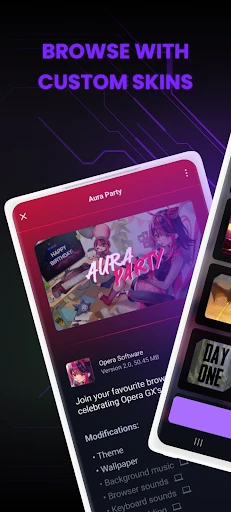
Opera GX delivers core browsing functionalities enhanced with gamer-centric tools. It features built-in resource limiters for CPU, RAM, and network bandwidth, allowing users to cap the browser's resource consumption to prevent interference with game performance. The browser includes direct integration with popular platforms like Twitch, Discord, and Spotify, enabling quick access without leaving the current tab. A unique GX Corner acts as a hub for gaming news, deals, and release calendars. Additional functionalities comprise a free, unlimited VPN for enhanced privacy, a native ad blocker for cleaner pages, and customizable visual and audio elements, including sound effects and background music via the GX Sound feature. Workspaces and tab management tools further aid in organizing numerous gaming guides, streams, and social tabs efficiently.
Chapter 2: Value
The primary value of Opera GX lies in its holistic approach to managing the digital ecosystem of a gamer or demanding user. Its key advantage is the direct control over system resources, a feature largely absent in mainstream browsers. By allowing precise limits on CPU and RAM usage, it ensures that background browser activities do not cause frame rate drops or stuttering during critical gaming sessions, providing tangible performance stability. The deep integrations with Twitch, Discord, and messaging apps centralize communication and entertainment, reducing the need for separate, resource-heavy applications and streamlining the workflow. The inclusion of a free, no-log VPN and ad blocker enhances security and browsing speed at no extra cost, offering significant value. Furthermore, its high degree of aesthetic customization through color themes, sound packs, and background imagery allows users to personalize their interface deeply, fostering a sense of ownership and immersion. Opera GX transforms the browser from a passive tool into an active, optimizing companion that respects and enhances the user's primary computing activities, whether for gaming, content creation, or multitasking with heavy media loads.
Chapter 3: Scenarios
Opera GX primarily targets PC gamers who require optimal system performance and seamless access to gaming communities. It is ideal for users who frequently have a game running while simultaneously browsing for walkthroughs, watching live streams on Twitch, or communicating with teammates on Discord. The browser is equally valuable for users with older or mid-range hardware, as the resource limiters can prevent the browser from monopolizing system power. Content creators and live streamers benefit from the organized workspace tabs for managing sources, chat, and analytics, and the easy social media access. Everyday use cases include limiting browser RAM usage during a competitive esports match, checking game release dates and discounts directly in the GX Corner, listening to music via the sidebar player without interrupting gameplay, and using the VPN for accessing region-locked game servers or content. It serves as the default browser for any user seeking a highly customizable, performance-aware, and all-in-one portal for their entertainment and social connectivity online.
Uninstall Instructions
For step-by-step guidance on how to safely remove this application from your device, please refer to our 《Uninstall Instructions》 document.
Pros
- cpu
- ram and network limiters for gaming resource management
- integrated discord
- twitch and gaming news in sidebar
- customizable rgb lighting and sound effects for ui
- gx corner aggregates free game deals and release calendars
- built-in ad blocker and vpn with minimal speed impact
Cons
- heavy ui customization can feel cluttered for productivity
- resource limiters require manual configuration per game
- native integrations favor specific platforms like discord
- dark aesthetic and sounds not suitable for professional use
- frequent gaming-themed updates may distract casual users
Frequently Asked Questions
What is Opera GX and what are its core functions?
Opera GX is a specialized web browser designed for gamers and high-performance users. Its core functions include built-in resource limiters (CPU, RAM, and network) to control browser impact on game performance, integrated gaming news feeds, and direct access to platforms like Discord and Twitch. It also offers standard browsing features like a free VPN, ad blocker, and tab management, all within a customizable gaming-themed interface.
Is Opera GX free to use, and does it have in-app purchases?
Yes, Opera GX is completely free to download and use. There are no mandatory in-app purchases or subscription fees to access its primary features like the resource limiters, integrated messengers, VPN, and ad blocker. The browser may promote optional partner services or cosmetic customization options, but its core functionality remains free without paywalls.
How does the GX Control feature work technically?
The GX Control feature includes hardware limiters that allow you to set maximum usage caps for the browser's CPU, RAM, and network bandwidth. This is managed through an in-browser panel. Technically, it works by actively monitoring and restricting the browser's own processes to ensure system resources are preserved for gaming or other applications, helping to prevent frame rate drops or lag caused by browser activity.
On which devices and operating systems is Opera GX available?
Opera GX is primarily available for Windows and macOS desktop systems. A mobile companion app for iOS and Android allows for synchronization of bookmarks and data via Flow. However, the full feature set, including the hardware resource limiters (GX Control), is only available on the desktop versions. There is no native version for Linux or gaming consoles.
Can I block all ads and use VPN simultaneously in Opera GX?
Yes, Opera GX includes a built-in, no-log ad blocker and a free, unlimited VPN that can be used simultaneously. You can enable both features independently in the browser settings. The ad blocker reduces clutter and tracking, while the VPN encrypts your traffic and can mask your IP location. Note, the VPN is an integrated feature of the browser and not a standalone VPN service.
App Info
Technical Info
Recommended For You

NovelFlow
Books & Reference

Droid Dashcam - Video Recorder
Auto & Vehicles

Online chat, calls - Gem Space
Communication

Google Ads
Business

Mark - AI Logo Generator
Art & Design

King James Bible - KJV Offline
Books & Reference

Webex Meetings
Business

Nail Art Design Ideas
Beauty

Realtime Charts for Torque Pro
Auto & Vehicles

Bimma EWD - Wiring Diagrams
Auto & Vehicles

Picky - Beauty Community
Beauty

Cortes de Pelo Hombre 2024
Beauty

GizmoHub
Communication

Fonto - story font for IG
Art & Design

Google Chat
Business

Tinker DIY
Auto & Vehicles

Uber - Driver: Drive & Deliver
Business

MangaRise - Manga Reader
Comics

AR Drawing - Sketchar App
Art & Design

Bible-Daily Bible Verse
Books & Reference