
Stickman: draw animation maker
Screenshots


Description
About Stickman: Draw Animation Maker Features
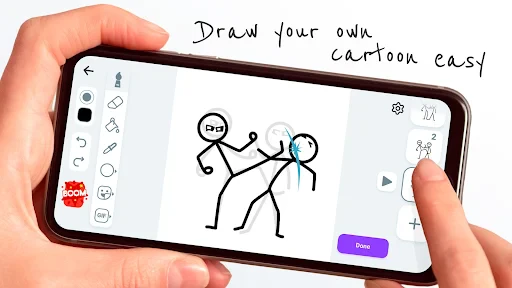
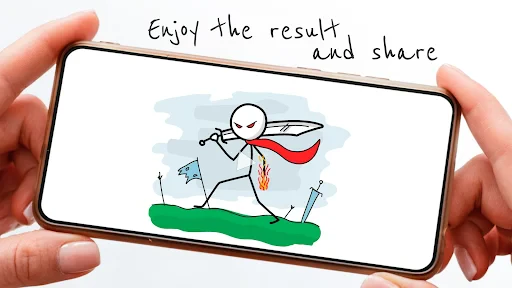
Stickman: Draw Animation Maker is a user-friendly mobile application designed for creating simple yet expressive frame-by-frame animations. It transforms the user's device into a portable animation studio, leveraging the classic stick figure as a versatile and accessible artistic medium. The app demystifies the animation process, making it possible for anyone, regardless of artistic skill level, to craft short animated stories, explainer videos, or humorous clips. By combining an intuitive drawing interface with essential animation tools, it serves as a gateway into the world of motion graphics and digital storytelling, fostering creativity and providing a platform for users to bring their ideas to life through motion.
Chapter 1: Function
The core functionality of Stickman: Draw Animation Maker centers on its straightforward, frame-by-frame animation workflow. Users start with a blank canvas or a background template, where they can draw their stickman characters and scenes using simple brush tools. The app operates on a timeline composed of sequential frames, similar to a flipbook. After creating a drawing on the first frame, the user duplicates it to create the next, making slight adjustments to the character's position or form to simulate movement. Key features include onion skinning, which allows viewing a faint trace of the previous frame for precise alignment, and layer management for organizing different elements. Users can control the playback speed (frames per second) to adjust the animation's fluidity. Once the sequence is complete, the app enables exporting the final product as a video file (like MP4) or an animated GIF, ready to be shared on social media platforms or messaging apps.
Chapter 2: Value
The primary value proposition of Stickman: Draw Animation Maker lies in its exceptional accessibility and empowerment of casual creators. It lowers the technical and skill barriers traditionally associated with animation, offering a cost-free and immediate creative outlet. Unlike complex professional software, this app distills the essence of animation into its most fundamental components, making the process educational and enjoyable. Its key advantages are multifold. First, it promotes learning by doing, teaching users the basic principles of timing, spacing, and motion through hands-on practice. Second, it serves as a powerful tool for visual communication; users can quickly sketch out ideas, create instructional videos, or visualize concepts without needing extensive dialogue or text. Third, it provides immense entertainment value, allowing for the creation of personalized, humorous, or narrative-driven content. The app's lightweight nature and mobile-first design mean creativity is not confined to a desk—it can happen anywhere, anytime. This combination of educational utility, communicative power, and spontaneous fun delivers significant value, turning every user into a potential animator and storyteller without the need for expensive equipment or formal training.
Chapter 3: Scenarios
Stickman: Draw Animation Maker caters to a diverse range of user groups driven by creativity, education, or simple entertainment. Its primary audience includes students and educators who utilize the app as a teaching and learning aid to explain scientific processes, historical events, or mathematical concepts through simple animated sequences. Hobbyists and casual artists form another core group, using the app to sketch short comic strips, express ideas, or experiment with motion for personal enjoyment. Content creators on social media platforms, especially those focusing on short-form video, find it valuable for producing engaging, do-it-yourself animated clips to enhance their posts. In everyday use, a teacher might animate the water cycle for a classroom lesson, a student might create a fun animated greeting for a friend, a marketer might draft a quick explainer for a product feature, or a parent and child might collaborate on a short cartoon story. The app thrives in scenarios requiring quick visualization, informal storytelling, and accessible digital creation, making it a versatile tool for both personal expression and practical communication across various age groups and professions.
Uninstall Instructions
For step-by-step guidance on how to safely remove this application from your device, please refer to our 《Uninstall Instructions》 document.
Pros
- intuitive stickman drawing simplifies frame-by-frame animation creation
- exports high-frame-rate videos suitable for social media sharing
- onion skinning feature is seamlessly integrated for smooth motion editing
- minimalist interface reduces learning curve for beginner animators
- supports layer-based editing for adding complex scene backgrounds
Cons
- limited to vector-style stickman art
- restricting artistic style
- audio syncing capabilities are basic compared to dedicated animation apps
- project files are not cross-compatible with professional software
- advanced rigging or bone tools absent for faster character movement
- free version watermark may affect video usability for commercial projects
Frequently Asked Questions
What is Stickman: draw animation maker?
Stickman: draw animation maker is a mobile app in the animation & video editing category. Its core function is to allow users to create simple, frame-by-frame stick-figure animations directly on their device. Users draw each frame manually, and the app stitches them together into a playable animation. It is positioned as an accessible tool for beginners and hobbyists to explore basic animation principles.
Is the app free to use or does it have in-app purchases?
The app typically allows you to export your animation as a video file (like MP4) or GIF. This is done through an export or share function within the app. Some features, like exporting in higher quality or without a watermark, may be part of the premium version. You can then save it to your device gallery or share it directly to social media platforms.
Can I add sound or voiceover to my animations?
The app is free to download and use with core animation features. It typically includes optional in-app purchases, such as removing ads or unlocking premium content like advanced drawing tools, more frames, or export options without watermarks. No additional physical equipment is required beyond a touchscreen device.
What devices and systems is this animation app compatible with?
The app is designed for mobile devices. It is primarily available for Android via the Google Play Store. Compatibility may vary with specific Android OS versions (e.g., Android 5.0 and up). It is generally not available for iOS or desktop operating systems. Always check the latest listing on your app store for current system requirements.
How do I save or share my finished stickman animation?
Basic versions of the app focus primarily on frame-by-frame visual animation and may not support audio editing. Advanced features like adding background music, sound effects, or voice recordings are sometimes available in premium tiers or through specific in-app purchases. For current audio capabilities, please refer to the official app description in your store.
App Info
Technical Info
Recommended For You

NotanIzer
Art & Design

Nomad Sculpt
Art & Design

StyleSeat: Book Hair & Beauty
Beauty

Bible Chat: Holy Bible Study
Books & Reference

Webex Meetings
Business

Perfect365 Makeup Photo Editor
Beauty

ScanBizCards Premium
Business

Car Launcher Pro
Auto & Vehicles

Power Apps
Business

Freepik: Design & edit with AI
Art & Design

Rain Instant Pay
Business

Drawing Apps: Draw, Sketch Pad
Art & Design

Hicut:Face Swap AI Video App
Art & Design

Vault - Hide Pics, App Lock
Business

Marvel Unlimited
Comics

@Voice Aloud Reader (TTS)
Books & Reference

Biblia Católica en español
Books & Reference

Figma: view. comment. mirror.
Art & Design

Tattoo AI - Tattoo Design
Art & Design
aesthetic background
Art & Design