
Find a Grave
Screenshots

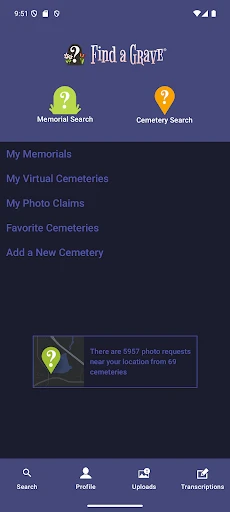


Description
About Find a Grave Feature – A Digital Memorial Platform
Find a Grave is a comprehensive online resource and mobile application dedicated to cataloging burial and memorial locations worldwide. It functions as a vast, crowdsourced database where users can search for, create, and maintain virtual memorials for the deceased. The app serves as a bridge connecting individuals with genealogical research, historical preservation, and personal remembrance, transforming the way people explore family history and honor ancestors. By digitizing cemetery records and facilitating community contributions, it preserves memories and makes historical data accessible from anywhere.
Chapter 1: Function
The core function of the Find a Grave app is to provide a searchable, user-contributed database of grave records. Users can search for individuals by name, location, birth or death dates, and browse cemeteries globally. A key feature allows contributors to photograph headstones and upload them, linking the images to corresponding memorial pages. Each memorial page can contain vital information, biographical sketches, family links, and virtual flowers or notes left by visitors. Users can also request photo captures of specific graves from volunteers in the community. Furthermore, the app enables management of memorials, allowing creators to edit information, transfer management, and suggest corrections, ensuring the database remains accurate and respectful.
Chapter 2: Value
Find a Grave's primary value lies in its unparalleled role as a free, centralized repository for genealogical and historical data. For family historians and genealogists, it is an indispensable tool that saves immense time and travel costs by providing remote access to headstone inscriptions and burial details, often including links to family members. Its community-driven model leverages the power of crowdsourcing, rapidly expanding its database to include millions of records that might otherwise remain obscure. The app fosters a profound sense of connection and remembrance, allowing users worldwide to honor individuals, from famous historical figures to personal ancestors, by contributing photos and leaving virtual tributes. This creates a collaborative space for preserving history and personal heritage. Compared to static archives, its interactive and continually updated nature ensures information is current and expansive. The value extends beyond research into emotional solace, offering a way for people to visit and care for gravesites they cannot physically reach, thus maintaining a lasting digital legacy for future generations.
Chapter 3: Scenarios
The primary user groups for Find a Grave are genealogists, family history researchers, and individuals tracing their ancestry. They use the app to locate burial sites, confirm vital records, and discover familial connections. History enthusiasts, students, and biographers also utilize it to research historical figures and local cemetery histories. Another significant user segment comprises individuals seeking to honor deceased family members or friends; they may create memorials, leave digital flowers, or share memories. Everyday use cases include a user searching for a great-grandparent's burial location while building a family tree, a volunteer photographer documenting a local cemetery's headstones for the database, or a person living abroad virtually visiting a loved one's grave by viewing a recently uploaded photo. The app is also used by those planning visits to cemeteries, using its mapping and listing features to locate specific plots efficiently.
Uninstall Instructions
For step-by-step guidance on how to safely remove this application from your device, please refer to our 《Uninstall Instructions》 document.
Pros
- integrates cemetery mapping with user-contributed memorials
- offers a virtual flowers feature for remote participation
- supports deep genealogical research via linked family trees
- community-driven updates keep grave records current
- global database includes many hard-to-locate burial sites
Cons
- record accuracy depends entirely on volunteer submissions
- interface feels outdated compared to modern genealogy apps
- limited offline functionality for cemetery visits
- photo quality varies greatly due to user uploads
- search filters lack precision for fragmented historical data
Frequently Asked Questions
What is Find a Grave and what does it do?
Find a Grave is a free online catalog and community resource focused on cemetery records. Its core function is to allow users to search for the final resting places of ancestors, celebrities, and historical figures. Users can browse millions of memorial pages containing photos, biographical details, and cemetery information. The platform relies on contributions from a global community to create and maintain these virtual memorials, serving as a tool for genealogy research and historical preservation.
Is Find a Grave completely free to use?
Yes, Find a Grave is free to access for searching and browsing memorials. Creating an account to contribute photos or create memorials is also free. The platform is supported by its parent company, Ancestry, and does not require a subscription for basic use. There are no in-app purchases. Some features, like requesting photo fulfillments from volunteers, are integrated into the free service model, ensuring no direct costs are associated with core research and contribution activities.
What devices and systems is Find a Grave available on?
Find a Grave is accessible via its main website on any modern web browser across desktop and mobile devices. It also offers official mobile applications for both iOS (via the App Store) and Android (via Google Play) operating systems. The apps provide core search and contribution functionalities optimized for smartphones and tablets. The service is designed for a broad audience, including genealogists, history enthusiasts, and individuals conducting personal family research.
How can I correct an error on a memorial page?
To correct information on a memorial, you can use the 'Suggest a correction' feature available on each memorial page. This sends an edit request directly to the member who manages that specific memorial. For more complex issues or if the manager is unresponsive, you can contact Find a Grave's support team through their help center. The platform operates on a community-managed model, so corrections rely on volunteer cooperation, but the support system facilitates resolution for factual inaccuracies.
Does Find a Grave have privacy controls for memorials?
Yes, Find a Grave provides privacy controls, particularly for memorials of non-famous individuals. The memorial creator or a designated manager can set a memorial to 'non-public' status, which restricts its visibility in public searches, typically limiting access to close family members. This helps protect the privacy of recently deceased individuals. For famous or historical figures, memorials remain public due to their genealogical or historical significance. All users must adhere to the site's terms of use regarding respectful content.
App Info
Technical Info
Recommended For You

Tattoo Design & Tattoo Maker
Beauty

WEBTOON: Manga, Comics, Manhwa
Comics

K MANGA
Comics

Funny Jokes And Riddles
Comics

Clay Box
Art & Design

AR Drawing : Trace Anything
Art & Design

Fongo World Edition
Communication

Caller ID - Block Spam Call
Communication

GoTo
Business

Adblock Browser: Fast & Secure
Communication

Marco Polo - Video Messenger
Communication

WhisperFM - Romance Novels
Books & Reference

Tracer (Donation Package)
Art & Design

ReadEra Premium – ebook reader
Books & Reference

Phone by Grice
Communication

Kiwi Browser - Fast & Quiet
Communication

BambooHR
Business

Dictionary - Merriam-Webster
Books & Reference

Paycor Mobile
Business

Dashtoon: Comics & Manga
Comics