
PocketBook reader - any books
Screenshots
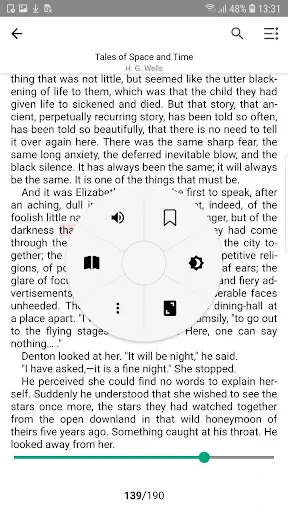
Description
About PocketBook Reader Feature - Your Personal Digital Library
PocketBook Reader is a versatile and powerful e-reading application designed for book enthusiasts who seek a comprehensive and personalized digital reading experience. Available on both iOS and Android platforms, it serves as a gateway to a vast world of literature, allowing users to access, organize, and enjoy their book collections in various formats. The app transcends being a mere file viewer by integrating robust library management, customizable reading settings, and seamless synchronization across devices. It positions itself as a one-stop solution for managing personal eBook libraries, supporting a wide array of formats without locking users into a specific ecosystem or store, thus empowering readers with freedom and control over their reading materials.
Chapter 1: Function
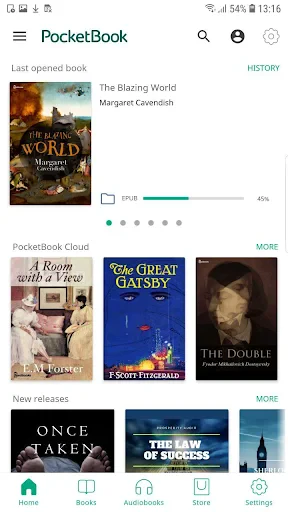
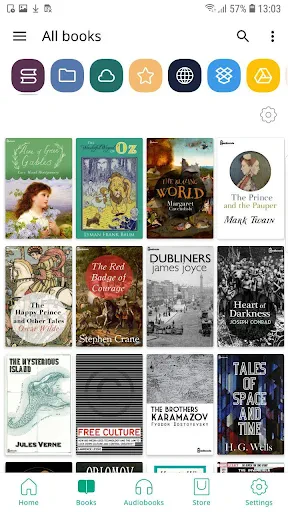
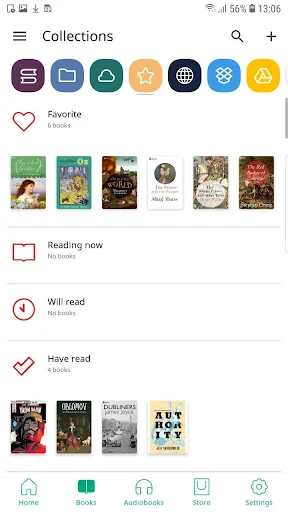
PocketBook Reader's core functionality revolves around three pillars: universal format support, deep reading customization, and intelligent library management. The app natively supports over 20 eBook formats, including popular ones like EPUB, PDF, MOBI, FB2, and DJVU, eliminating the need for external file conversion. Its reading engine provides a highly adaptable interface, allowing users to adjust fonts, sizes, margins, line spacing, and background colors to reduce eye strain. The app features advanced navigation through a detailed table of contents, bookmarks, and annotations. Text-to-speech functionality offers an auditory reading option. Furthermore, it includes a built-in file manager for organizing books into custom collections, a dictionary lookup for instant word definitions, and a progress tracker that displays time left in a chapter or book, enhancing focused reading sessions.
Chapter 2: Value
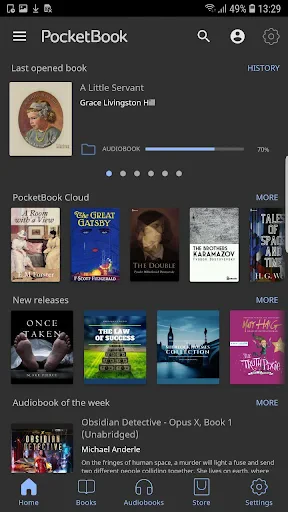
The primary value proposition of PocketBook Reader lies in its commitment to being an open, user-centric, and ad-free reading sanctuary. Unlike many platform-locked readers, its key advantage is format agnosticism; users can import books from any source—personal collections, online libraries, or project Gutenberg—ensuring true ownership and longevity of one's digital library without vendor lock-in. The app delivers exceptional reading comfort through its meticulous customization options, including a unique day-night mode switcher and configurable tap zones, which cater to prolonged reading without fatigue. Its cross-platform synchronization via cloud services like Dropbox and Google Drive ensures your library, bookmarks, and notes are always up-to-date across all devices. The absence of advertisements and in-app purchases for core reading functions creates an immersive, uninterrupted experience. Additionally, the integrated dictionary and translation tools facilitate learning and comprehension for readers of all levels. By combining the flexibility of a universal document viewer with the refined tools of a dedicated e-reader, PocketBook Reader offers substantial value for power readers, students, and professionals who demand control, privacy, and a superior, personalized reading interface.
Chapter 3: Scenarios
PocketBook Reader is ideally suited for several key user groups and daily situations. Avid readers and bibliophiles who maintain large personal eBook collections across different formats find it indispensable for consolidating their library into a single, organized application. Students and academics benefit greatly from its support for PDF and DJVU formats, along with annotation tools, making it perfect for studying textbooks, research papers, and technical manuals. Professionals who commute or travel frequently utilize the app's sync features to seamlessly switch between reading on a phone during transit and a tablet at home, with cloud storage ensuring their progress is never lost. Language learners leverage the instant dictionary and translation features to read foreign literature and improve vocabulary. Furthermore, its text-to-speech function serves users with visual impairments or those who prefer audiobooks during activities like driving or exercising. In essence, any scenario that involves focused reading, research, or leisure consumption of written content is enhanced by PocketBook Reader's adaptable and comprehensive toolset.
Uninstall Instructions
For step-by-step guidance on how to safely remove this application from your device, please refer to our 《Uninstall Instructions》 document.
Pros
- opens DRM-free formats like EPUB without conversion
- cloud sync works across diverse Android and iOS devices
- customizable reading engine with hyphenation and justification
- integrates with multiple cloud storage for direct book imports
- offers detailed statistics on reading speed and habits
Cons
- interface feels dated compared to modern e-reader apps
- no built-in bookstore or subscription content service
- advanced typography settings may overwhelm casual readers
- syncing can be slower with very large personal libraries
- lacks integrated social or community reading features
Frequently Asked Questions
What is PocketBook reader and what does it do?
PocketBook reader is an e-book reading application. Its core function is to serve as a digital library and reader, allowing users to purchase, organize, and read e-books and documents. It supports a wide range of formats including EPUB, PDF, FB2, and MOBI. The app provides a customizable reading interface with adjustable fonts, themes, and layouts.
Is PocketBook reader free to use with any hidden costs?
The PocketBook reader app itself is free to download and use. It provides basic reading and library management functions at no cost. However, it operates on a book purchase model where users buy e-books from its integrated store. There are no subscription fees for the core app, and it does not feature ads. Costs are solely for purchasing book content.
On which devices and platforms can I use this app?
PocketBook reader is available on Android and iOS mobile devices (smartphones and tablets). It is also accessible via web browsers for cloud library management. The app synchronizes your reading progress, bookmarks, and library across all logged-in devices using your account. It is designed for general readers and does not require specialized additional hardware.
How does the app handle different e-book formats and features?
The app supports a wide array of formats like EPUB, PDF, FB2, MOBI, and DJVU without conversion. Key technical features include a built-in dictionary for instant word lookup, text-to-speech functionality for audiobook-like experience, and advanced formatting options for PDFs (reflow, cropping). It also offers cloud storage backup for your personal documents and purchased books.
What happens to my purchased books if I change devices?
All your purchased books are permanently linked to your PocketBook account. You can access your entire library on any new device by simply logging into your account. The app syncs your collection from the cloud. For assistance with account recovery or library access issues, you can contact PocketBook's customer support through the official website or in-app help section.
App Info
Technical Info
Recommended For You

Messages: SMS Message Text App
Communication

Photo Editor - Retouch Photos
Art & Design

Merlin Bird ID by Cornell Lab
Books & Reference

Sound Amplifier
Communication

WebComics - Webtoon & Manga
Comics

Holy Bible Time-Verses&Audio
Books & Reference

Flashlight : SMS & Call Alert
Communication

BlueDriver OBD2 Scan Tool
Auto & Vehicles

delitoon
Comics

Keys simulator and cars sounds
Auto & Vehicles

Cars Mod for Minecraft PE 2025
Auto & Vehicles

Color by Number for Adults
Art & Design

Resume - Intelligent CV maker
Business

Paycor Mobile
Business

mobile.de - car market
Auto & Vehicles

Beauty Camera Selfie Makeup
Beauty

SALLY BEAUTY
Beauty

Message Plus - SMS Messager
Communication

Getcontact
Communication

ESV Bible
Books & Reference