
Outlined Watch Face
Screenshots

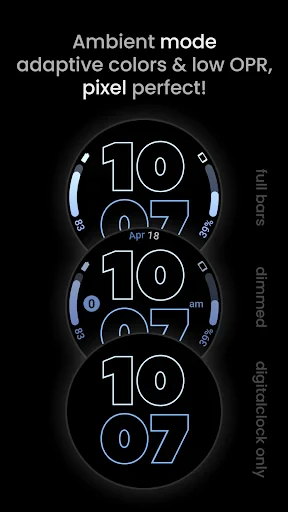
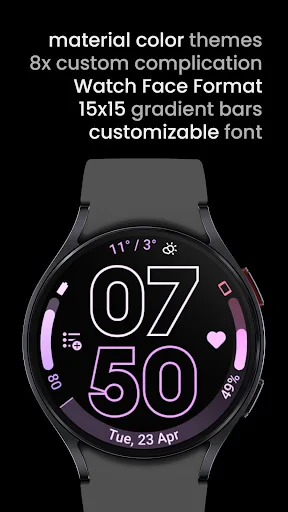
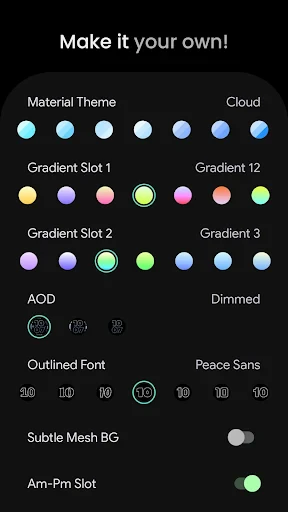
Description
About Outlined Watch Face Feature
Outlined Watch Face is a minimalist and highly customizable watch face application designed for modern smartwatches, primarily targeting Wear OS and Samsung Galaxy Watch platforms. It distinguishes itself through a clean, geometric design language that emphasizes legibility and personal style. The app allows users to tailor their watch interface with a focus on outlined elements, such as numerals, indices, and complications, against a choice of backgrounds. This approach reduces visual clutter while maintaining essential information at a glance. By prioritizing both aesthetic elegance and functional clarity, Outlined Watch Face serves as a digital accessory that enhances the user's daily interaction with their wearable device, blending utility with personalized design.
Chapter 1: Function
The core function of Outlined Watch Face is to provide a highly adaptable and visually distinct interface for compatible smartwatches. Users can select from a variety of outlined design templates, which typically feature thin, crisp lines forming watch hands, hour markers, and complication widgets. The application offers deep customization: users can adjust colors for the outlines and background independently, choose between different numeral styles (e.g., Arabic, Roman, or no numerals), and select which complications (like weather, heart rate, calendar events, or battery levels) are displayed and where they are positioned on the screen. Furthermore, it often includes functionality to customize the appearance for always-on display modes, ensuring consistency and battery efficiency. The interface is managed through a companion app on the user's smartphone, providing an intuitive setup process to tweak every visual element to personal preference.
Chapter 2: Value
The primary value proposition of Outlined Watch Face lies in its fusion of minimalist aesthetics with practical, at-a-glance functionality. In a market saturated with overly busy or generic watch faces, this app offers a refined, designer-led alternative that elevates the smartwatch from a mere tool to a statement of personal style. Its key advantage is the balance it strikes: the outlined design ensures maximum legibility in various lighting conditions while consuming less battery power compared to fully filled, colorful displays, thereby enhancing device endurance. The extensive customization empowers users to create a truly unique watch face that reflects their taste, something often lacking in manufacturer-provided options. This level of personalization increases the perceived value and attachment to the wearable device. Additionally, by focusing on clean design principles, the app reduces cognitive load, allowing users to access vital information quickly without distraction. For the tech-savvy individual who values both form and function, Outlined Watch Face delivers a superior user experience by making the smartwatch interface more intuitive, personal, and visually pleasing, thereby extending the utility and enjoyment derived from the wearable technology.
Chapter 3: Scenarios
Outlined Watch Face primarily targets style-conscious smartwatch users who prioritize a clean, uncluttered look and value personal expression through their tech accessories. Its everyday use cases are diverse. For the professional in a business setting, the watch face offers a sleek, sophisticated look that complements formal attire while discreetly showing calendar alerts and emails. Fitness enthusiasts benefit from its clarity during workouts, easily monitoring heart rate or workout duration without overly flashy graphics. In daily casual use, users appreciate the ability to match the watch face's color scheme to their outfit or mood, making the watch a seamless fashion accessory. The always-on customization is particularly valuable for scenarios requiring subtle information checks, like in meetings or cinemas, without causing screen glare. It is also ideal for users with older watch models seeking a fresh, modern interface without needing to upgrade hardware. Ultimately, the app serves anyone seeking to optimize their smartwatch's interface for readability, battery life, and personal style across all aspects of daily life.
Uninstall Instructions
For step-by-step guidance on how to safely remove this application from your device, please refer to our 《Uninstall Instructions》 document.
Pros
- live activity integration shows real-time data on phone
- dynamic complications update instantly without tapping
- custom layout engine allows precise element placement
- supports interactive complications for third-party apps
- always-on display optimization for minimal battery drain
Cons
- steep learning curve for custom layout editor
- live activities require specific supported ios apps
- advanced features need always-on display enabled
- real-time data complications may delay on older watches
- no pre-made templates for quick customization
Frequently Asked Questions
What is Outlined Watch Face and what does it do?
Outlined Watch Face is a custom watch face application for Wear OS smartwatches. Its core function is to provide a highly customizable, minimalist watch face centered on an outlined digital clock design. It allows users to personalize various elements like colors, complications (for weather, fitness data, etc.), and background styles to match their aesthetic and information needs, positioning itself as a clean and flexible alternative to stock watch faces.
Is Outlined Watch Face free to use?
The app typically follows a freemium model. A basic version may be free with a limited set of customization features or styles. To access the full library of outline designs, color palettes, complications, and advanced customization options, a one-time purchase or a subscription is usually required. The specific pricing structure is determined by the developer and can be found on the app's listing page on the Google Play Store.
What devices and systems are compatible with this app?
Outlined Watch Face is designed specifically for smartwatches running Wear OS 3.0 and above. It is not a standalone phone app. Compatibility depends on your watch model and its operating system version. It generally will not work on iOS/Apple Watch, other non-Wear OS smartwatch platforms, or as a direct phone application. Always check the latest compatibility information on the Play Store listing before installation.
How do I install or switch to this watch face?
Installation is done via the Google Play Store on your paired Wear OS watch or through the Play Store on your connected Android phone by selecting your watch as the installation target. After installation, long-press your current watch face on the watch to enter the selection menu, then swipe to find and select 'Outlined Watch Face'. Further customization is usually managed through a companion app on your phone or a settings menu on the watch itself.
Why is the watch face not updating complications or showing correctly?
This is often due to battery optimization settings or a sync issue. First, ensure the app has necessary permissions (like location for weather) on both watch and phone. Then, check your phone's and watch's battery saver settings to exclude Outlined Watch Face from restrictions. A restart of both devices can resolve sync glitches. If problems persist, reinstalling the app or contacting developer support through the Play Store listing is recommended for specific troubleshooting.
App Info
Technical Info
Recommended For You

OBDeleven VAG car diagnostics
Auto & Vehicles

Sling: Employee Scheduling App
Communication

The Language of Letting Go
Books & Reference

Photoleap: AI Photo Generator
Art & Design

Shonen Jump Manga & Comics
Comics
Flashlight : SMS & Call Alert
Communication

Comics Price Guide
Comics
Car play/Android Auto Sync
Auto & Vehicles

Reverso Translate and Learn
Books & Reference

Manga UP!
Comics

Autotrader: Shop Cars For Sale
Auto & Vehicles

Perfect Viewer Donation 2
Comics

Vaporwave PRO Wallpapers
Art & Design

ThinkDiag+
Auto & Vehicles

King James Bible - Verse+Audio
Books & Reference

Drivers Permit Practice
Auto & Vehicles

Tracer (Donation Package)
Art & Design

Meta Business Suite
Business

Skype for Business for Android
Business

Kik — Messaging & Chat App
Communication