
Android Auto
Screenshots


Description
About Android Auto Feature - Seamless Driving Companion
Android Auto is a smart driving companion developed by Google, designed to extend the Android experience to a vehicle's built-in display or the user's smartphone screen. It provides a simplified, driver-optimized interface that allows users to access key features of their phone safely while on the road. By connecting an Android smartphone to a compatible car or via the Android Auto app on the phone itself, it projects a clean, intuitive layout with large touch targets and voice-command functionality. The core philosophy is to minimize distraction by offering essential information and controls in an accessible format, integrating navigation, communication, media, and assistant services directly into the driving environment. It represents a bridge between personal mobile technology and the automotive cockpit, transforming how drivers interact with their digital world during journeys.
Chapter 1: Function
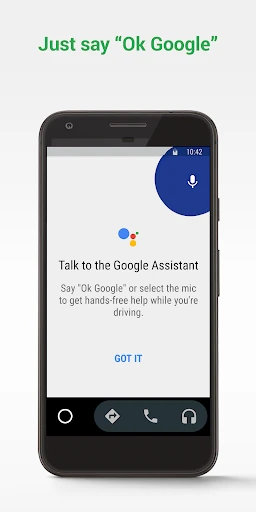
Android Auto's core function is to mirror and optimize a connected Android smartphone's key applications for safe use while driving. Upon connection via USB or wirelessly, it launches a streamlined interface on the car's infotainment screen or the phone's display. The primary functional pillars are navigation, communication, and media playback. It integrates Google Maps or Waze for real-time turn-by-turn navigation with traffic alerts. For communication, it enables hands-free calling, message reading, and voice-reply via SMS and popular messaging apps. Media functions provide access to music, podcasts, and audiobooks from services like Spotify, YouTube Music, and Google Podcasts through a unified player. Google Assistant is deeply embedded, allowing voice control for all these functions—setting destinations, making calls, or changing music—without taking hands off the wheel. The interface is designed with large, simple cards and buttons, and supports touch, steering wheel controls, or voice interaction to prioritize driver focus on the road.
Chapter 2: Value
The value proposition of Android Auto lies in its ability to enhance driving safety, convenience, and connectivity. Its foremost advantage is the significant reduction of driver distraction. By curating a driver-centric interface with large, glanceable information and robust voice control through Google Assistant, it minimizes the need to handle the phone physically. This promotes eyes-on-the-road and hands-on-the-wheel behavior, contributing to safer driving practices. Secondly, it offers profound convenience through deep integration with the user's Android ecosystem. It provides a familiar, consistent experience that syncs with the user's smartphone, offering personalized navigation predictions, contact-based suggestions, and media preferences seamlessly. The value extends to its broad compatibility, working with a vast range of Android phones and an increasing number of vehicle models, either through built-in systems or the standalone phone app. Furthermore, its proactive assistance is a key advantage; Google Assistant can provide timely alerts for calendar events, traffic conditions, and even suggest alternate routes. By consolidating essential services into a single, optimized interface, Android Auto transforms the car into an intelligent extension of the user's digital life, making journeys more efficient, informed, and enjoyable without compromising safety.
Chapter 3: Scenarios
Android Auto primarily targets daily commuters, frequent travelers, and any driver who relies heavily on their smartphone for navigation, communication, and entertainment while on the move. A key user group includes professionals who need to stay connected safely during business travel or while commuting, allowing them to join conference calls via voice, hear important messages, and navigate to meetings efficiently. Families and long-distance travelers benefit from reliable navigation to unfamiliar destinations, access to entertainment for passengers via media apps, and the ability to make quick stops guided by points-of-interest search. Ride-share drivers find immense value in having an integrated platform for turn-by-turn navigation and easy access to trip-related communication without fumbling with multiple devices. Even for routine errands, casual drivers use Android Auto for hands-free control of music playlists, receiving real-time traffic updates to avoid congestion, and sending quick voice-dictated status updates to family. Its utility spans from simplifying the daily school run to enhancing safety on complex road trips, making it an essential tool for any modern driver seeking a smarter, more integrated driving experience.
Uninstall Instructions
For step-by-step guidance on how to safely remove this application from your device, please refer to our 《Uninstall Instructions》 document.
Pros
- seamlessly mirrors phone navigation and media apps
- voice commands work reliably for messaging and calls
- simplified driving-optimized interface reduces distraction
- integrates real-time traffic and lane guidance
- automatic launch when connecting to compatible cars
Cons
- requires a specific phone connection cable type
- inconsistent performance across different car models
- limited app support beyond core Google services
- no standalone operation without a phone
- wireless connectivity only on select newer vehicles
Frequently Asked Questions
What is Android Auto and what does it do?
Android Auto is a smart driving companion app developed by Google. It projects a simplified interface from your Android phone to your car's compatible display, allowing safe access to navigation (Google Maps), communication (calls, messages), and media playback (music, podcasts) while driving. Its core function is to minimize distraction by providing voice-controlled commands and a driver-optimized layout.
Is Android Auto free to use, and what are the costs?
The Android Auto app itself is completely free to download and use. It requires a compatible Android smartphone (typically running Android 8.0 or later) and a vehicle with a compatible infotainment system. No subscription is needed for core features. Data usage charges from your mobile carrier may apply for streaming navigation and media.
What are the requirements to use Android Auto?
To use Android Auto, you need an Android phone with Android 8.0 (Oreo) or later, the Android Auto app installed, and a compatible car. Compatibility can be via a USB cable connection to the car's system or wirelessly if both your phone and car support it. Your vehicle must have an Android Auto-supported infotainment display. A stable phone connection and necessary permissions (like location for maps) are required.
How does Android Auto ensure safety while driving?
Android Auto promotes safety through a driver-focused interface with large, easy-to-touch targets and voice-first interaction via Google Assistant. It limits app functionality to driving-essential services, restricting typing and complex interactions. The screen design minimizes visual clutter. Notifications are read aloud, and replies are handled by voice, allowing drivers to keep their eyes on the road and hands on the wheel.
What should I do if Android Auto won't connect to my car?
If Android Auto fails to connect, first ensure you are using a high-quality, certified USB cable for a wired connection. Check that Android Auto is enabled in your phone's settings and that your car's infotainment system is compatible. Try restarting both your phone and your car's head unit. Ensure the Android Auto app and your phone's OS are updated to the latest versions. For persistent issues, consult your vehicle's manual or manufacturer.
App Info
Technical Info
Recommended For You

Marvel Unlimited
Comics

Literie-Endless Stories Await
Books & Reference

Yes Madam - Salon at Home
Beauty

pixivコミック - みんなのマンガアプリ
Comics

TeamViewer Remote Control
Business

Bitcoin Miner Cloud
Business

Asana: Where work connects
Business

Phoner 2nd Phone Number + Text
Communication

eBay Motors: Parts, Cars, more
Auto & Vehicles

Pashto short stories پښتو قیصی
Comics

Oxford Dictionary & Thesaurus
Books & Reference

Bible Homescreen - Read Now
Books & Reference

Jotform - Form, Sign & Survey
Business

Asiacell
Business

Garmin Drive™
Auto & Vehicles

Valvoline Instant Oil Change
Auto & Vehicles

GroupMe
Communication

Whistle Express Car Wash
Auto & Vehicles

DAT One
Business

Hairstyles step by step
Beauty