Draw Cartoon - AR Drawing App
Screenshots




Description
About Draw Cartoon - AR Drawing App Features
Draw Cartoon - AR Drawing App is an innovative mobile application that merges traditional sketching with cutting-edge augmented reality technology. Designed for both beginners and drawing enthusiasts, it transforms the user's physical environment into an interactive canvas. By utilizing the device's camera, the app projects virtual guides and cartoon templates onto real-world surfaces, allowing users to trace and learn drawing techniques in a highly immersive manner. This fusion of digital art tools and AR visualization simplifies the learning curve, making the process of creating cartoons and illustrations more accessible, engaging, and fun than ever before.
Chapter 1: Function
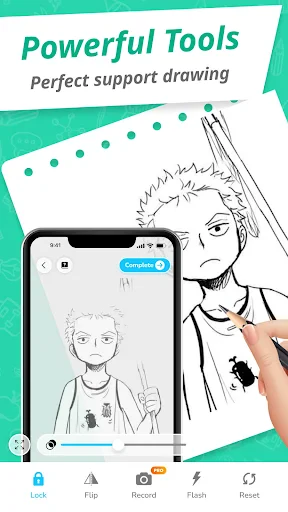
The core functionality of Draw Cartoon - AR Drawing App centers on its AR-assisted drawing system. Upon launching the app, users select from a vast library of cartoon characters, objects, or simple shapes. The app then accesses the device's camera to display a live view of the surrounding space. The chosen drawing template is superimposed onto this real-world view, appearing to float on a physical sheet of paper placed in front of the user. The primary function is to guide users to trace these projected lines with a physical pencil or stylus, effectively teaching proportion and form. Beyond tracing, the app includes basic digital art tools for freehand sketching on screen, layers for complex drawings, color palettes, and step-by-step tutorials for various difficulty levels. It also allows users to save their completed artworks, both as digital images and as time-lapse videos of the creative process, enabling easy sharing on social platforms.
Chapter 2: Value
The primary value proposition of Draw Cartoon - AR Drawing App lies in its revolutionary approach to demystifying the art of drawing. Its key advantage is drastically lowering the barrier to entry for aspiring artists. Traditional learning methods often involve intimidating blank pages and complex perspective techniques. This app solves that by providing real-time, three-dimensional visual guides that users can interact with in their own space, making abstract concepts tangible. This hands-on, learn-by-doing method accelerates skill development in spatial awareness, line confidence, and hand-eye coordination. Furthermore, the app offers exceptional convenience and portability, turning any well-lit table into a personal art studio without the need for printed references or lightboxes. For parents and educators, it presents immense educational value, fostering creativity, patience, and fine motor skills in children through a captivating, screen-based activity that still encourages interaction with physical materials. For seasoned doodlers, it provides a novel source of inspiration and a quick method to sketch ideas in correct perspective within real-world scenes. The app's value is thus multifaceted: it is an effective learning tutor, a boundless source of creative inspiration, and a unique bridge between the digital and physical realms of artistry, all packaged in an intuitive and user-friendly interface.
Chapter 3: Scenarios
Draw Cartoon - AR Drawing App primarily targets amateur artists, children, and hobbyists seeking a structured yet enjoyable entry into drawing. Its everyday use cases are diverse. For families, it serves as an engaging educational tool where parents and children can collaboratively trace and create cartoons, turning a weekend afternoon into a fun, shared creative session. In educational settings, teachers can utilize the app in art classes to help students grasp fundamental shapes and compositions interactively, making lessons more dynamic. Individual users, from teenagers to adults with a casual interest in art, employ the app during their leisure time to relax, de-stress, and develop a new hobby without the frustration of starting from scratch. It is also valuable for content creators, such as social media influencers or bloggers, who can use it to generate unique cartoon assets or record captivating time-lapse drawing videos for their audience. The app is ideally used in stable, well-lit indoor environments like living rooms, classrooms, or coffee shops, where a flat surface is available. It transforms these ordinary spaces into personalized art studios, making creative practice an accessible and integrated part of daily life.
Uninstall Instructions
For step-by-step guidance on how to safely remove this application from your device, please refer to our 《Uninstall Instructions》 document.
Pros
- ar guidance overlays directly onto physical paper
- simplifies complex cartoon proportions via real-time tracing
- offers step-by-step animated tutorials for each sketch
- requires only a smartphone and any paper for setup
- immediate visual feedback corrects drawing lines instantly
Cons
- requires consistent
- well-lit environment for ar tracking
- limited to pre-loaded cartoon styles and characters
- premium tutorials and assets require subscription
- ar projection may misalign on uneven paper surfaces
- lives as a guided tool rather than a freeform creative suite
Frequently Asked Questions
What is Draw Cartoon - AR Drawing App?
Draw Cartoon is a mobile application that uses Augmented Reality (AR) technology to assist users in drawing. It projects a virtual guide image onto a physical surface via your device's camera, allowing you to trace and learn cartoon-style drawings easily. Its core positioning is as a beginner-friendly tool to simplify sketching and improve drawing skills through guided AR overlays.
Is the app free to use, or does it have in-app purchases?
The app is typically free to download and use with basic features. However, it may offer in-app purchases to unlock additional cartoon libraries, advanced AR tools, or to remove advertisements. No additional physical equipment is required beyond a compatible smartphone or tablet with a camera.
What devices and systems are compatible with this AR drawing app?
Draw Cartoon requires an iOS or Android device with a rear-facing camera and support for ARCore (Android) or ARKit (iOS). Compatibility depends on your device's hardware and operating system version. Generally, newer mid-range and flagship models from the last 3-4 years are supported. Check your device's app store listing for specific requirements.
How does the AR tracing feature work for drawing cartoons?
The app uses your camera to display the real-world paper or canvas on your screen. You select a cartoon image from the library, and the app superimposes it as a semi-transparent outline onto the live camera feed. You then physically trace this projected outline onto your actual paper. This bridges the digital guide and your physical drawing, simplifying proportion and shape.
Can I save and share my drawings created with the app?
Yes, the app allows you to save your completed physical drawings by taking a photo of them within the app. You can then share these photos directly to social media platforms or your device's gallery. The app focuses on aiding the creation of physical art, so editing features for the photo may be basic, primarily for framing and lighting adjustment.
App Info
Technical Info
Recommended For You

randstad: jobs for workers
Business

Smart Watch app - BT Notifier
Communication
Stickman: draw animation maker
Art & Design

Universalis
Books & Reference

AI Face Swap Video App-Swapme
Art & Design

Everand: Ebooks and audiobooks
Books & Reference

GigSmart Get Gigs
Business

My Bible - Verse+Audio
Books & Reference

Cafe - Live video chat
Communication

Quranly
Books & Reference

How To Draw Comics
Comics

Staples - Deals & Shopping
Business

VistaCreate: Graphic Design
Art & Design

ScanBizCards Premium
Business

Microsoft Power BI
Business

Droid Dashcam - Video Recorder
Auto & Vehicles

Workforce Tools
Business

WhisperFM - Romance Novels
Books & Reference
The Book of Mormon
Books & Reference

AR Drawing - Trace Drawing App
Art & Design