inCarDoc Pro | OBD2
Screenshots



Description
About inCarDoc Pro | OBD2 Feature – Your Professional Vehicle Diagnostics Companion
inCarDoc Pro | OBD2 is a professional-grade mobile application designed to transform your smartphone into a powerful vehicle diagnostic tool. By connecting to a compatible OBD2 (On-Board Diagnostics) adapter plugged into your car's standard port, the app provides deep insights into your vehicle's health and performance. It caters to car enthusiasts, DIY mechanics, and everyday drivers who seek to understand their vehicle better, monitor its condition in real-time, and troubleshoot issues proactively. The app bridges the gap between complex automotive data and user-friendly interpretation, offering a comprehensive suite of features from reading and clearing fault codes to monitoring live sensor data and performing advanced functions.
Chapter 1: Function
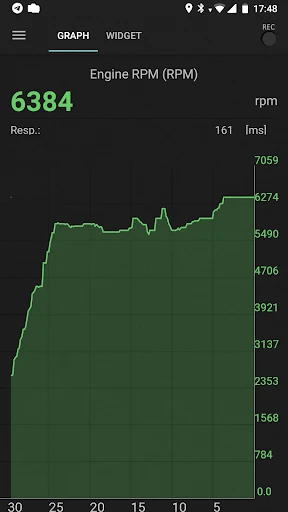
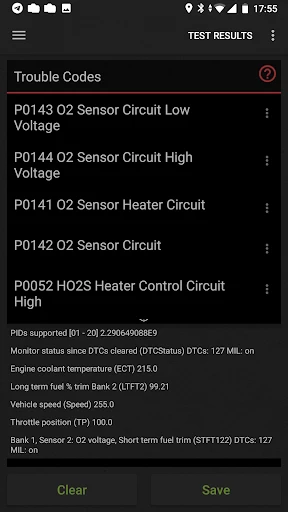
The core functionality of inCarDoc Pro centers on accessing and interpreting the data from your vehicle's ECU. Primarily, it reads Diagnostic Trouble Codes, providing code definitions and possible causes to pinpoint issues. It can also clear these codes after repairs. Beyond diagnostics, the app displays real-time live data from numerous sensors, such as engine RPM, coolant temperature, vehicle speed, and fuel system status, in customizable dashboards or graphical plots. It supports readiness monitor checks for emissions testing. For advanced users, it offers features like logging data for later review, performing actuator tests for certain components, and viewing freeze frame data captured when a fault occurs. These functions collectively provide a detailed, real-time overview of the vehicle's operational state.
Chapter 2: Value
The primary value of inCarDoc Pro lies in empowering vehicle owners with professional-level diagnostic information, promoting transparency, cost savings, and proactive maintenance. Its key advantage is demystifying complex car data, turning abstract codes and sensor readings into actionable insights. This can lead to significant savings by enabling users to identify minor issues before they escalate, understand repair estimates from mechanics, or even perform simple fixes themselves. The app's detailed live data monitoring is invaluable for performance tuning enthusiasts or for diagnosing intermittent problems that a mechanic might not easily replicate. Compared to basic OBD2 scanners, inCarDoc Pro offers deeper data visualization, logging capabilities, and a more comprehensive database of trouble code explanations. Its user interface is designed to balance depth of information with accessibility, making advanced diagnostics approachable. By fostering a deeper understanding of one's vehicle, the app enhances safety, reliability, and the overall ownership experience, transforming a smartphone into an essential tool for modern vehicle care.
Chapter 3: Scenarios
inCarDoc Pro is ideally suited for several key user groups and daily situations. The primary audience includes DIY car owners and hobbyist mechanics who prefer to maintain and troubleshoot their vehicles, using the app to diagnose check engine lights, monitor sensor values during repairs, or verify repair success. Second, it serves performance enthusiasts who want to monitor engine parameters in real-time while driving to optimize performance or during modifications. Everyday drivers concerned with vehicle health form another group; they can use the app for periodic system scans, pre-purchase inspections of used cars, or preparing for mandatory emissions tests by checking monitor readiness. Common scenarios involve a sudden illumination of the dashboard warning light, where the user quickly retrieves and researches the fault code. Another is before a long road trip, performing a quick health check of critical systems. It is also routinely used to reset maintenance reminders or monitor fuel efficiency metrics over time to adopt more economical driving habits.
Uninstall Instructions
For step-by-step guidance on how to safely remove this application from your device, please refer to our 《Uninstall Instructions》 document.
Pros
- real-time OBD2 data overlays on car's windshield via HUD
- customizable alerts for specific fault codes and engine parameters
- generates detailed
- shareable PDF health reports for mechanics
- supports head-up display projection without extra hardware
- logs trip data with fuel consumption and fault history
Cons
- requires a compatible OBD2 Bluetooth adapter separately
- HUD mode is only effective during nighttime driving
- advanced diagnostics need vehicle-specific knowledge to interpret
- constant Bluetooth connection drains smartphone battery quickly
- PDF report feature is locked behind a premium subscription
Frequently Asked Questions
What is inCarDoc Pro and what does it do?
inCarDoc Pro is a professional-grade OBD2 diagnostic app. It connects to your vehicle's OBD2 port via a compatible Bluetooth adapter. Its core function is to read and clear diagnostic trouble codes, display real-time sensor data (like RPM, coolant temp), and show vehicle status information. It's positioned as a tool for car enthusiasts and DIY mechanics to monitor health and troubleshoot issues.
Is inCarDoc Pro free to use or does it require purchases?
inCarDoc Pro typically follows a freemium model. The app itself can be downloaded for free, offering basic functions like reading generic trouble codes. However, advanced features—such as accessing manufacturer-specific codes, enhanced diagnostics, data logging, or full system scans—require a one-time purchase or a subscription within the app. A compatible OBD2 Bluetooth adapter is also required, sold separately.
What vehicles and devices are compatible with this app?
inCarDoc Pro is designed for vehicles compliant with the OBD2 standard, generally cars sold in the US from 1996 onward and in Europe from 2001 onward. Compatibility with specific brands or advanced functions may vary. The app is available for Android and iOS smartphones/tablets. It requires a Bluetooth Low Energy (BLE) OBD2 adapter to establish a connection with the vehicle.
How accurate is the real-time data from the app?
The data accuracy primarily depends on your vehicle's ECU and the quality of the OBD2 adapter used. inCarDoc Pro displays the sensor data as reported by your car's onboard computer through standard OBD2 protocols. While it provides reliable real-time readings for parameters like speed and engine load, it is intended for informational and diagnostic purposes and should not be considered as precise as professional garage equipment.
Can the app clear an engine check light permanently?
The app can clear trouble codes and turn off the associated check engine light. However, this is only a reset. If the underlying mechanical or electrical issue is not repaired, the light and codes will likely reappear after the vehicle's diagnostic cycle completes. inCarDoc Pro is a diagnostic tool; it does not fix physical car problems. For persistent warnings, consulting a professional mechanic is recommended.
App Info
Technical Info
Recommended For You

850 OBD-II
Auto & Vehicles

MySpot Driver
Auto & Vehicles

ReadAnywhere
Books & Reference

Grubhub for Drivers
Business

Google Chat
Business

Card Maker for PKM (Poke Fan)
Comics

Mirror App - Beauty Mirror
Beauty

Literie-Endless Stories Await
Books & Reference

Our Daily Bread
Books & Reference

DailyBible Lite - KJV Version
Books & Reference

Pratilipi Novel
Books & Reference

Caller ID Name, Location & SMS
Communication

clickworker
Business

imo video calls and chat HD
Communication

GIF Sticker & WAsticker
Communication

iDraw
Art & Design

Cortes de Pelo Hombre 2024
Beauty

AR Drawing: Art, Trace, Sketch
Art & Design

Yaelokre OC Maker
Art & Design

Quranly
Books & Reference